How to update old blog posts: find the declining ones, then refresh
How to update old blog posts, in short: compare two equal periods in Search Console, pick the posts losing clicks, then refresh their facts, headline and links at the same URL. An AI tool can do the spotting. We tested SemChat's content refresh skill on October 29, 2026: honest about its limits, but its estimated positions and volumes needed checking.
 By Jérémy Santos Updated on October 30, 2026 Tested on his own SemChat account: first audit on October 29, 2026.
 This page is part of the guide: SEO content tool

Update a post that is slipping, without changing its address. Illustration by Zéro Corvée.
Your old posts age quietly. A number goes stale, a competitor publishes something better, and clicks slip away before you notice. Here’s how to update old blog posts without guessing, and how an SEO content tool can do the spotting for you.
The short version:
- In Search Console, compare the last 28 days with the 28 days before, page by page.
- Pick the posts that lost the most clicks.
- Check what still works on them: URL, links, topic. Leave those alone.
- Refresh the facts, the numbers, the headline and the links.
- Republish, then measure again a few weeks later.
Below, each step in detail, with a real test of SemChat’s content refresh skill on plugkit-avis.com, my other site (October 29, 2026). The SemChat buttons on this page are affiliate links.
Why update old blog posts instead of writing new ones
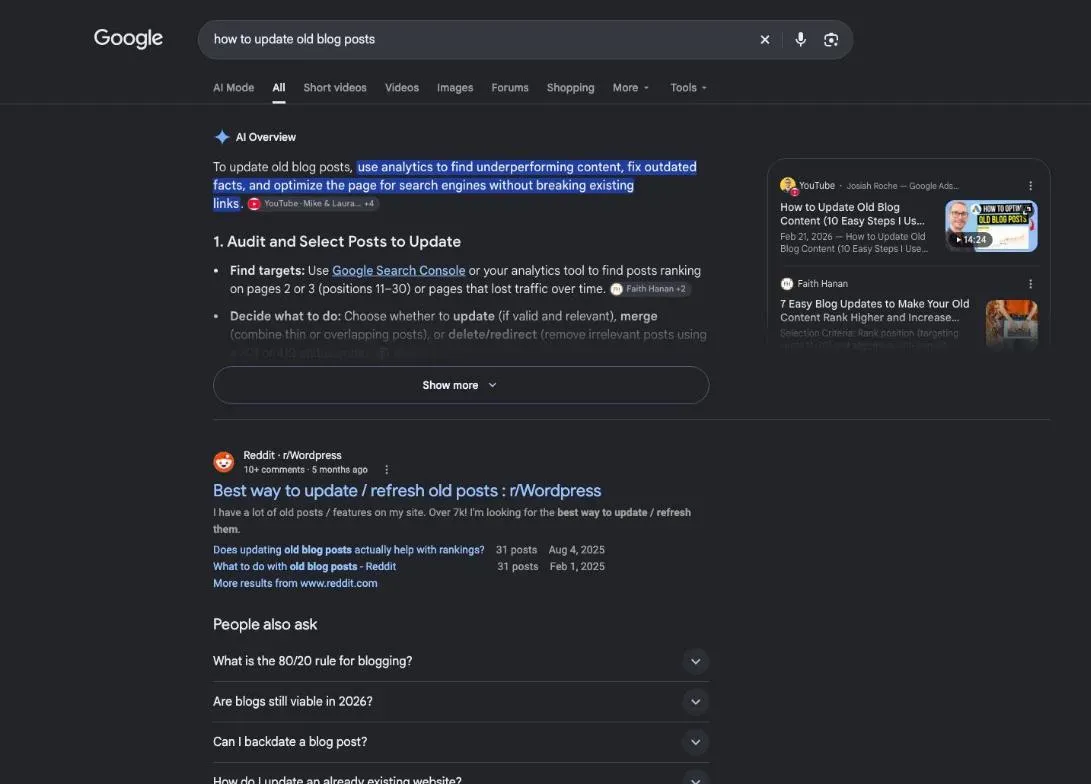
A published post already has things a new one doesn’t: a URL, links pointing to it, sometimes a spot in Google. A new post on the same topic starts from zero and competes with the old one. Updating keeps what the post has earned and fixes what has aged.
Keep facts accurate and links current
Most of an update is maintenance. Prices change, tools get renamed, a study gets replaced, a page you linked to disappears. Each outdated fact makes the whole post less trustworthy to the reader who spots it. Start every refresh by checking dates, numbers and links.
When to update a post: spot the ones in decline
Search Console, Google’s free tool for site owners, counts the real clicks your pages get from Google. It’s the one source that measures instead of estimating.
Compare two periods in Search Console, page by page
Google’s help says you can compare performance “Over different time periods, such as this week versus last week” (Search Console Help, read October 30, 2026). The path: Performance report, Date filter, Compare.
- 1 Performance report Search results, in Search Console.
- 2 Date filter, Compare Two periods of the same length, recent and previous.
- 3 Pages tab One row per page, with a Difference column.
- 4 Sort by lost clicks The posts losing the most come first.
Google adds that the results table then shows a Difference column for each row. Sort by it and the posts losing the most rise to the top. Use periods of equal length, such as 28 days against the 28 days before, so you compare like with like.
Clicks, impressions, position: the three numbers to read
Google defines them this way (Search Console Help, read October 30, 2026):
- Clicks: “The number of times a user clicked your site from Google Search results.”
- Impressions: “How many times your site appeared in Search results.”
- Average position: “The average position of the topmost result from your site.”
Read them together. Fewer impressions: Google shows the post less. Same impressions, fewer clicks: your headline pulls less. A dropping position: other pages moved ahead.
Don’t mix up three kinds of position: what you see when you search yourself (personalized), the average position in Search Console (measured), and a third-party tool’s position (estimated, on a given date). For more on measured versus estimated numbers, see our website traffic checker guide.
Step 1: connect Search Console and pick the right conversation
In SemChat, Search Console connects under Settings, Connectors, at the workspace level. On my account it was connected, along with Google Analytics.
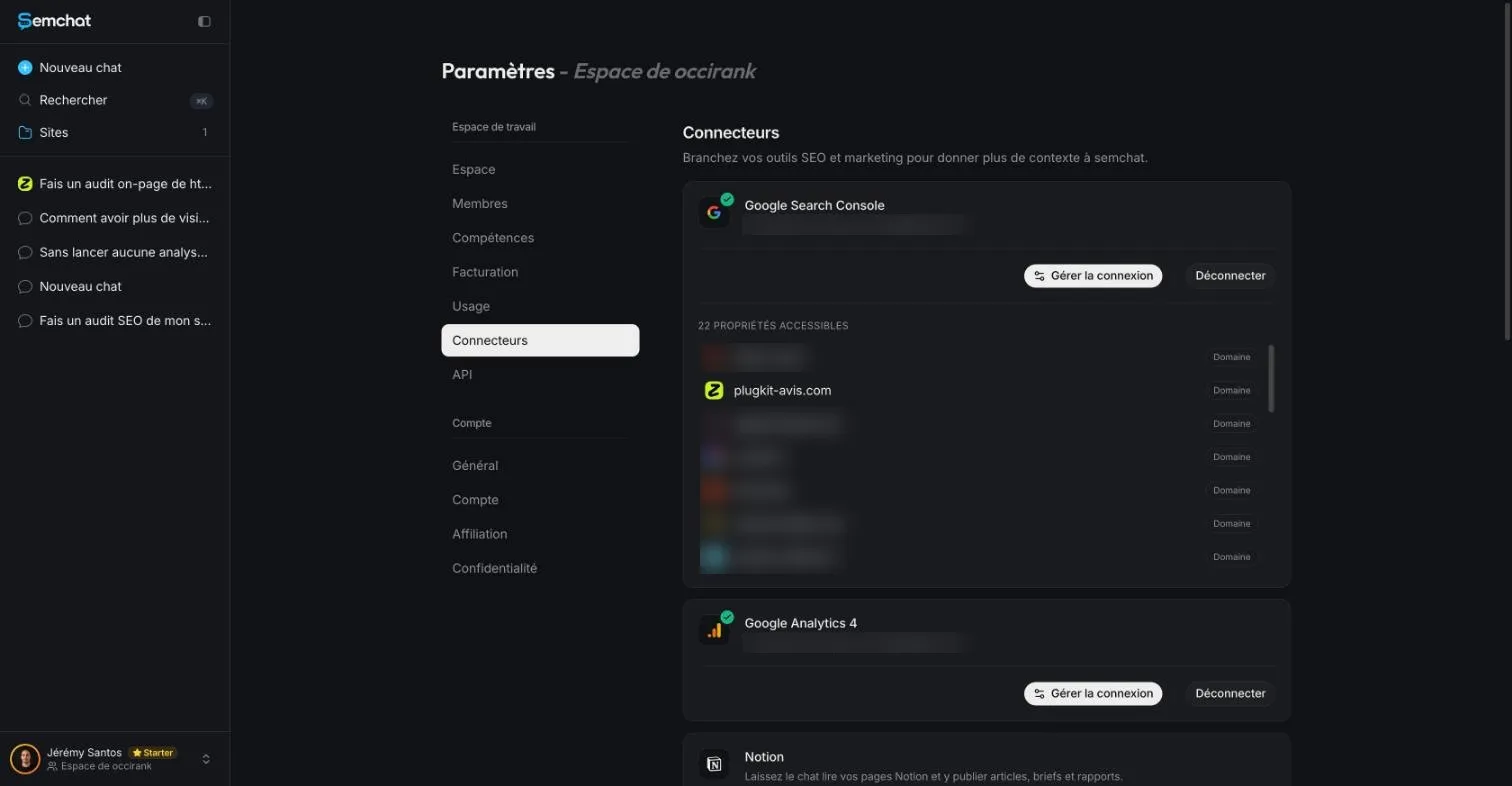
Connected doesn’t mean read. That’s the trap with this skill.
A conversation linked to your site, or started on its own: the difference that matters
When your sentence names your site, SemChat offers to link the conversation to it, or to start it on its own. For this test, I linked it. The result: the conversation didn’t see the Search Console connected to the workspace.
It wasn’t a one-off. Earlier the same day, in another test, a conversation linked to the site said the same thing, while a new workspace chat started on its own did read Search Console: 8 clicks and 533 impressions in total after a follow-up, numbers confirmed by reading Search Console directly.
My advice: for this skill, start from a new workspace chat, not linked to the site. Then check that the answer quotes actual Search Console numbers.
Step 2: type the template sentence and ask for exact numbers
The skill’s template sentence is « Identifie les pages en déclin de mon site et planifie leur mise à jour » (identify the pages in decline on my site and plan their update). I added what I wanted measured.
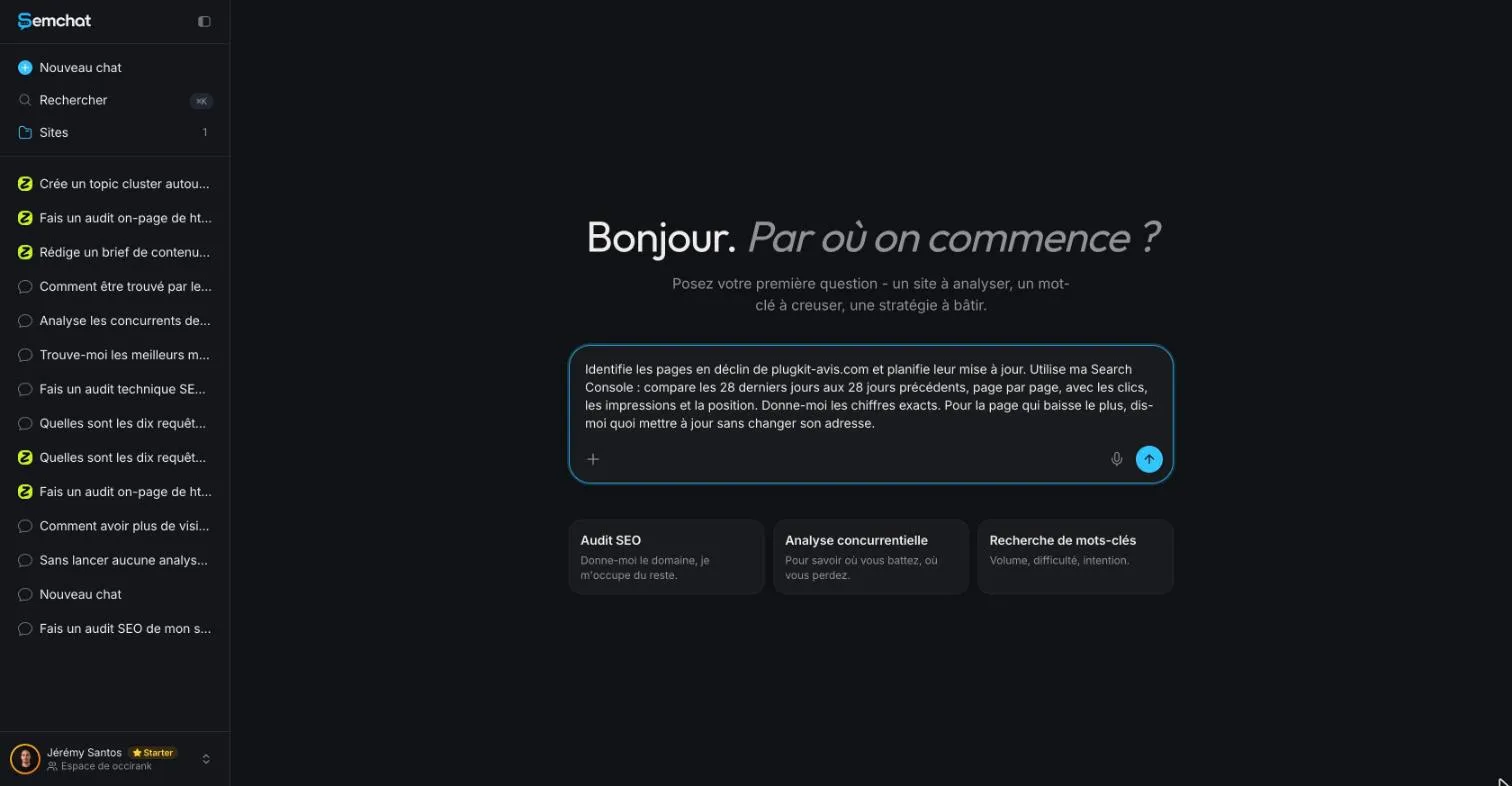
The request we tested, written in French
Our test was typed in French, on a French site, with the interface in French. Here’s the exact request:
« Identifie les pages en déclin de plugkit-avis.com et planifie leur mise à jour. Utilise ma Search Console : compare les 28 derniers jours aux 28 jours précédents, page par page, avec les clics, les impressions et la position. Donne-moi les chiffres exacts. Pour la page qui baisse le plus, dis-moi quoi mettre à jour sans changer son adresse. »
(Identify the pages in decline on plugkit-avis.com and plan their update. Use my Search Console: compare the last 28 days with the previous 28 days, page by page, with clicks, impressions and position. Give me the exact numbers. For the page that drops the most, tell me what to update without changing its URL.)
Three details matter: the source (“my Search Console”), the method (two 28-day periods, page by page) and the constraint (“without changing its URL”). The same request in English is missing data (planned source: an English test). SemChat then ran its tools: site analysis, position history, domain positions, top pages, a reading of five pages and search results.
Step 3: read the diagnosis, separating measured from estimated
Before you act on any advice, ask where each number comes from. Here, the answer said so itself.
A useful admission: no access to Search Console
Right away, SemChat warned: « je n’ai pas accès à ta Search Console » (I don’t have access to your Search Console). It added that it was working from estimated positions and traffic, not real Search Console numbers, and ended with « Je te le dis franchement. » (I’m telling you straight.)
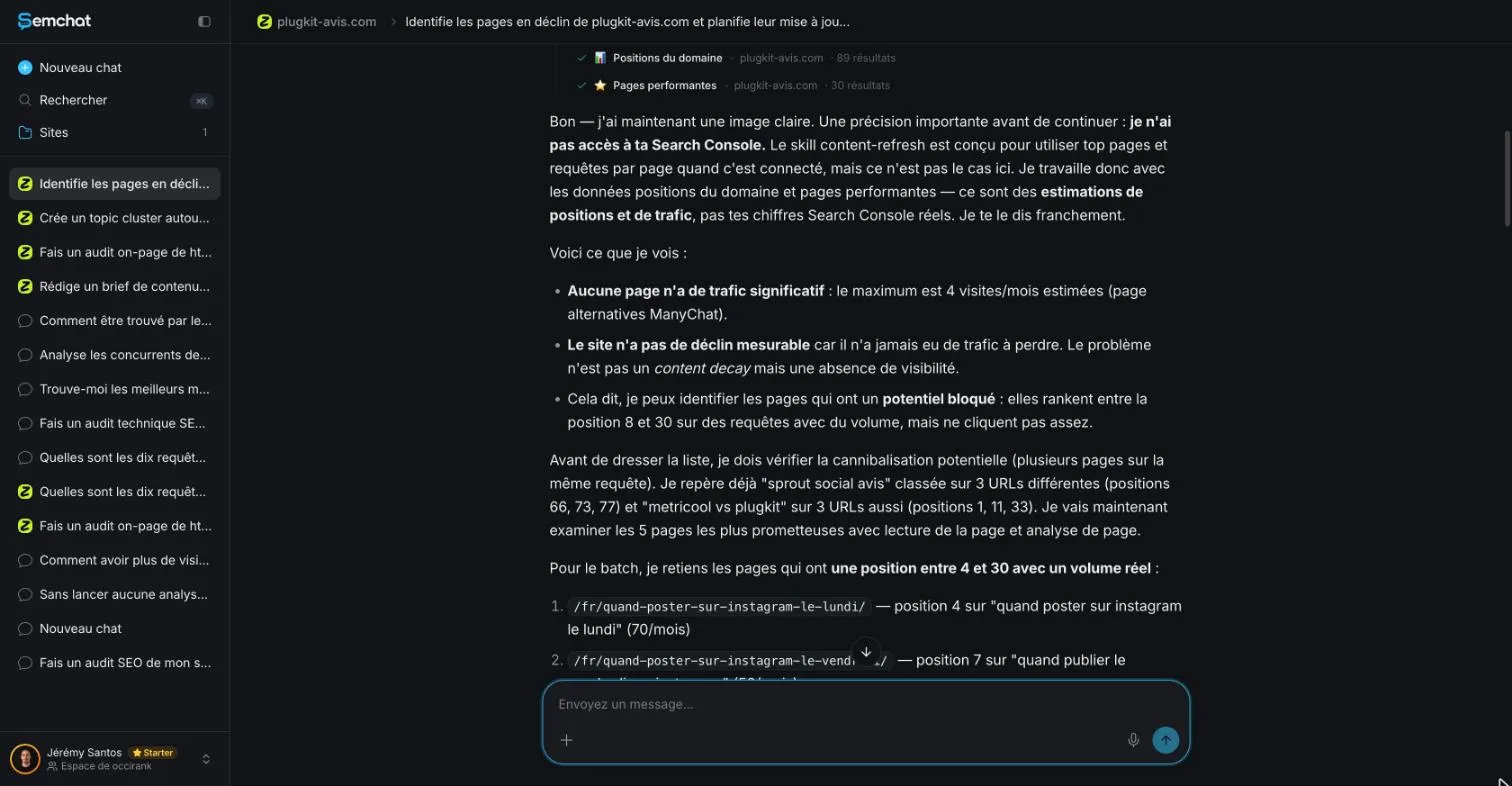
That’s good behavior: a tool that states its limits beats one that invents exact numbers. But it also shows the flaw from step 1: Search Console was connected to the workspace.
No measurable decline: the right call for a new site
Its conclusion, translated: the site has no measurable decline because it never had traffic to lose. I checked Search Console: no data from September 2 to 29, 2026, and the first impressions on October 24, 2026. Correct.
A new site can’t decline. Its question isn’t “what should I refresh?” but “how do I get seen?”
Step 4: cross-check positions and volumes before you act
With no decline to report, SemChat switched to five pages with “blocked potential”: well placed, it said, on searches with volume. Those positions were estimates. I checked them against Search Console.
Estimated positions that Search Console partly contradicts
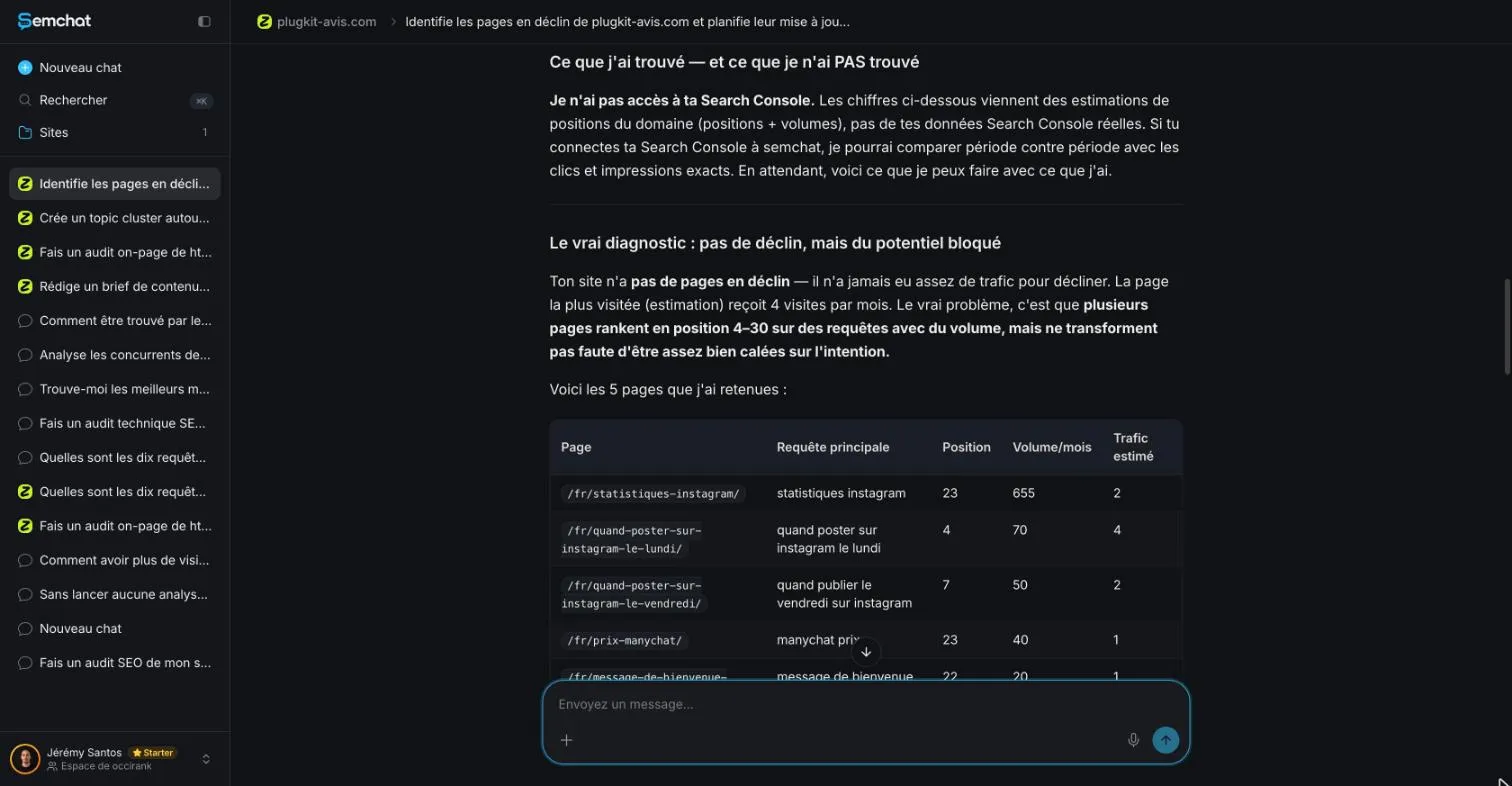
| French search | SemChat’s position | Search Console average position (Sept. 30 to Oct. 27, 2026) | Verdict |
|---|---|---|---|
| statistiques instagram (Instagram statistics) | 23 | 26.1 | false, but close |
| quand poster sur instagram le lundi (when to post on Instagram on Monday) | 4 | 9 | false |
| manychat prix (ManyChat price) | 23 | 26 | false, but close |
| message de bienvenue instagram (Instagram welcome message) | 22 | no impressions | false |
Two estimates were in the right range. The other two would have sent you to work on a page that didn’t show up, or ranked lower than claimed. On a young site, Search Console still counts few impressions: only 12 for “statistiques instagram” over the period. One more reason not to decide on an estimate.
A search volume inflated well above other sources
For “statistiques instagram”, SemChat gave 655 searches a month. DataForSEO (Google Ads, France) gave 210, and 140 in September 2026.
Not everything was inflated: for “manychat prix” (40) and the Monday query (70), its volumes matched DataForSEO. Hence the rule: cross-check a volume before it drives an update.
Step 5: how to update old blog posts without breaking what works
The most useful part of the answer may be the shortest: what not to touch.
Don’t change the URL, the links or the topic
SemChat listed three things to leave alone: no URL changes, existing internal links stay, each page keeps its topic. That’s the right checklist. WordPress’s own documentation explains why the URL matters: “A permalink is a permanent URL of your post or page. They are used to link to the page/post from another blog, email, or from social media profile” (WordPress documentation, read October 30, 2026). Change it, and those links point to nothing.
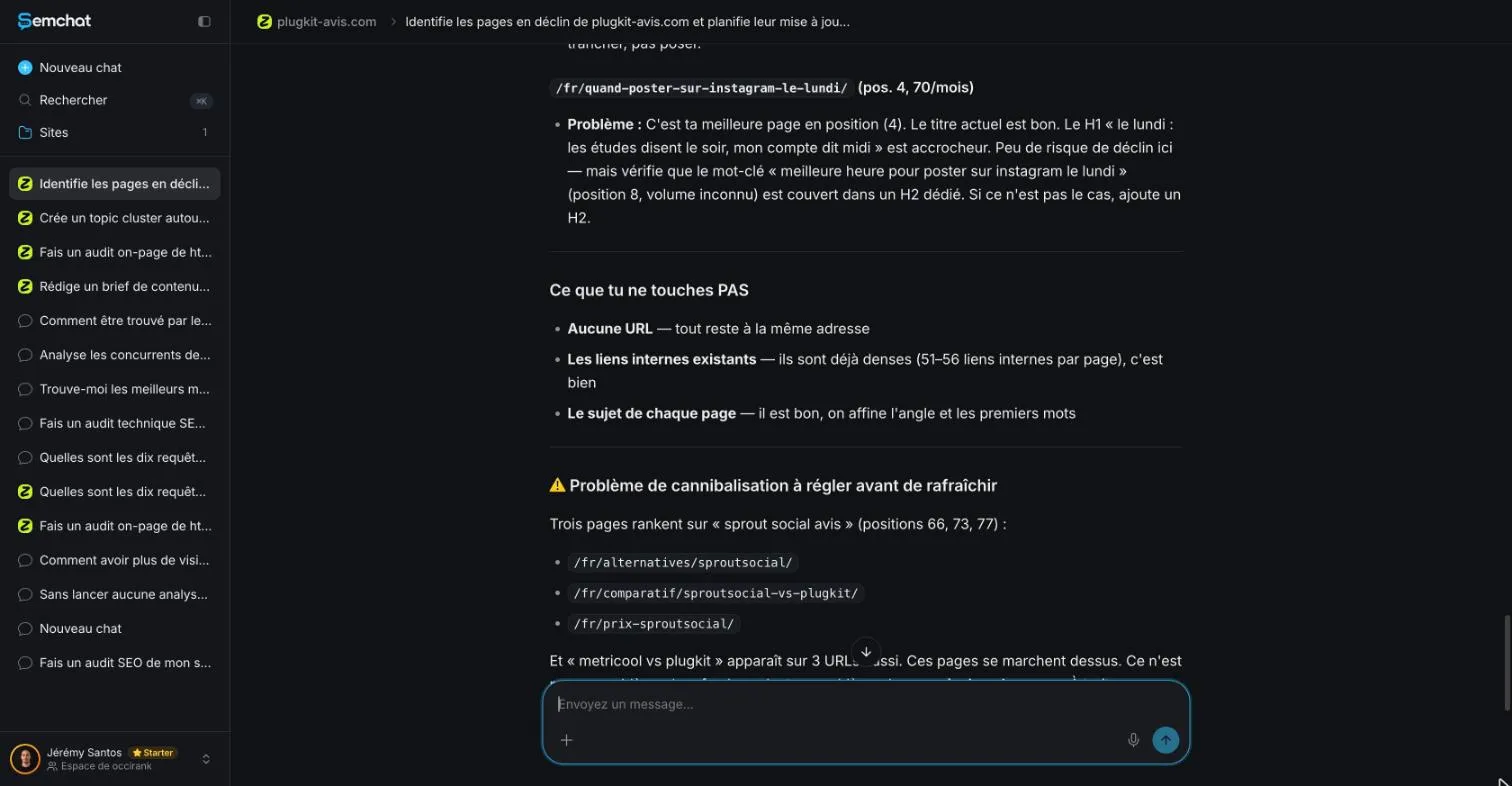
In the same answer, SemChat flagged three pages ranking for the same review query. We didn’t verify that flag in our test: look at it before any update.
Refresh keywords, facts and the headline
For the Instagram statistics page, SemChat suggested five changes: headline, meta description, introduction, a section on tools, and dates.
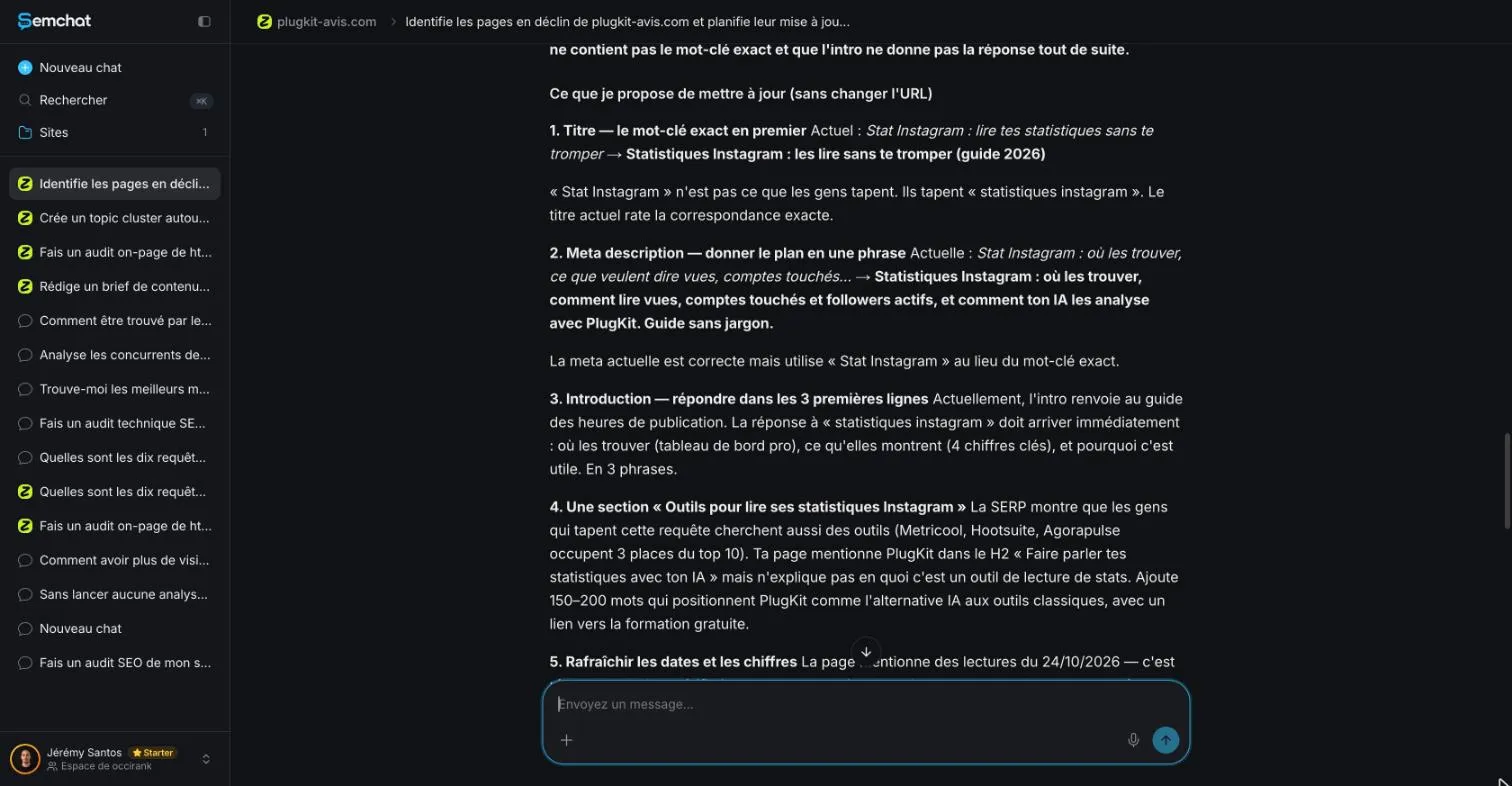
I compared each one with the page as it stood on October 29, 2026 (last updated October 24, 2026):
- The headline: it advised the longer French form because, it said, the short form “stat instagram” isn’t what people type. False: “stat instagram” and “stats instagram” have 260 searches a month each, against 210 (DataForSEO), and the page’s best average position among these forms, 10.1, is on “stats instagram” (Search Console).
- The introduction: it wanted an immediate answer. The page already gives one: its first sentence says where the stats are and which ones to read.
- The tools section: it already exists, under another heading.
So three of its five suggestions were contradicted by the page or the numbers. The meta description and the dates are yours to judge. Your rule: open your post next to the answer, and keep only what’s really missing.
Add links to newer pages on your site
An old post was written before your newer pages existed. Linking to them is the easiest win of a refresh, and our internal linking tools guide shows how to place them. If several posts compete for the same searches, group them by topic first with a topic cluster tool, and sort the searches with keyword clustering tools.
Step 6: republish, then keep an eye on the updated post
SemChat ended with a plan: this week’s fixes, then a new measurement of the five pages three weeks later. The idea is sound; the measurement should come from Search Console.
Change the post date in WordPress, or leave it
In WordPress, the Publish setting of the post sidebar controls the date: “To backdate the post or change it to a date and time in the future, use the calendar” (WordPress documentation, read October 30, 2026). Don’t touch the Slug field next to it: that’s your URL.
Google estimates a “byline date” for each page, the date it thinks the page “was updated or published”. Its advice: “Add a user-visible date to the page and feature it prominently”, and “Label your dates appropriately with text like ‘Publish’ or ‘Last updated’” (Google Search Central, read October 30, 2026). So rather than faking a new publish date, show a clear “Last updated” date when you’ve made a real update.
Write what’s missing with a content brief generator
Sometimes a refresh reveals a gap one section can’t fill: a question none of your posts answers. That calls for a new post, planned with a content brief generator, then linked from the refreshed one.
What this test cost in the quota: missing data for this skill alone. The reading covers 7.1 points of the Starter plan for three answers in a row (on-page audit, topic cluster and refresh), with no breakdown per answer. Plans are on our SemChat pricing page.
My verdict: a skill that’s honest about its limits, with a good checklist of what not to touch. But without Search Console, it works from estimates, and most of its advice for the chosen page didn’t hold up. The full test of the tool is in our SemChat review.
That’s how to update old blog posts with less guesswork: spot the posts losing clicks in Search Console, check every suggestion against your post and a second source, then refresh at the same URL. The tool saves you the spotting; the decisions stay with you.
Frequently asked questions
How do you update old blog posts for SEO?
Find the posts that lose clicks by comparing two equal periods in Search Console, page by page. For each one, check the searches that bring it visitors and what Google's top results now cover. Then update facts, numbers, headline and links at the same URL, and link the post to your newer pages.
How often should you update old blog posts?
There's no official schedule. A simple routine for a small site: once a month, compare the last 28 days with the 28 days before in Search Console, and update the two posts that lost the most clicks. A post that keeps its clicks can wait.
Should you focus on the few posts that bring most of your visits?
Start with the clicks, not a rule of thumb. Sort your pages by clicks in Search Console: the posts at the top are worth protecting, and the ones losing the most clicks are worth fixing first. On a new site with almost no clicks, there's nothing to protect yet.
Does SemChat read Search Console to find posts in decline?
Not in our test. Search Console was connected to the workspace, but the conversation linked to the site said it had no access and worked from estimates (October 29, 2026). A new workspace chat started on its own had read Search Console in another test the same day. So start your request from a new workspace chat.
Let your AI do the chores of getting found online.
10% off your subscription, for life with my link, if you subscribe within 2 weeks of signing up. No code. All about the SemChat promo code
Affiliate link: it costs you nothing extra.
Verified sources
- Search Console Help: Performance report (clicks, impressions, average position) (30/10/2026)
- Search Console Help: Advanced filtering and comparison (compare time periods) (30/10/2026)
- WordPress documentation: Page / Post Settings Sidebar (Publish date, Slug) (30/10/2026)
- Google Search Central: Influence your byline dates in Google Search (30/10/2026)
- SemChat pricing: “Every feature, in every plan.” (Free €0) (30/10/2026)