Content brief generator: the brief SemChat wrote, checked line by line
A content brief generator turns one sentence into a page plan: search intent, title, outline, FAQ, internal links. On October 29, 2026, SemChat's brief skill returned an 11-part document and filed it in the site's library. It's a solid first draft, but not one to hand over as is: we found inflated search volumes, a duplicate section and an unsourced FAQ answer.
 By Jérémy Santos Updated on October 30, 2026 Tested on his own SemChat account: first audit on October 29, 2026.
 This page is part of the guide: SEO content tool
A brief ready before writing: the outline, the questions, the links to add. Illustration by Zéro Corvée.
You know what you want to write about, just not how to build the page. A content brief generator hands you that plan in minutes: you type one sentence, the tool reads Google and your site, then writes the brief. It’s the most direct use of an SEO content tool: planning a page before anyone writes it.
I tested one for real on October 29, 2026: the brief skill of SemChat, an SEO assistant you talk to in plain language, on plugkit-avis.com, my other site. Here’s every step, what it got right, and the four things I had to fix before I could use it. The SemChat buttons on this page are affiliate links.
What a content brief generator does before anyone writes
A brief is the order you give to whoever writes the page, even when that’s you. A generator fills it in for you: it reads the pages that rank, pulls out their headings and questions, adds search volumes and suggests links.
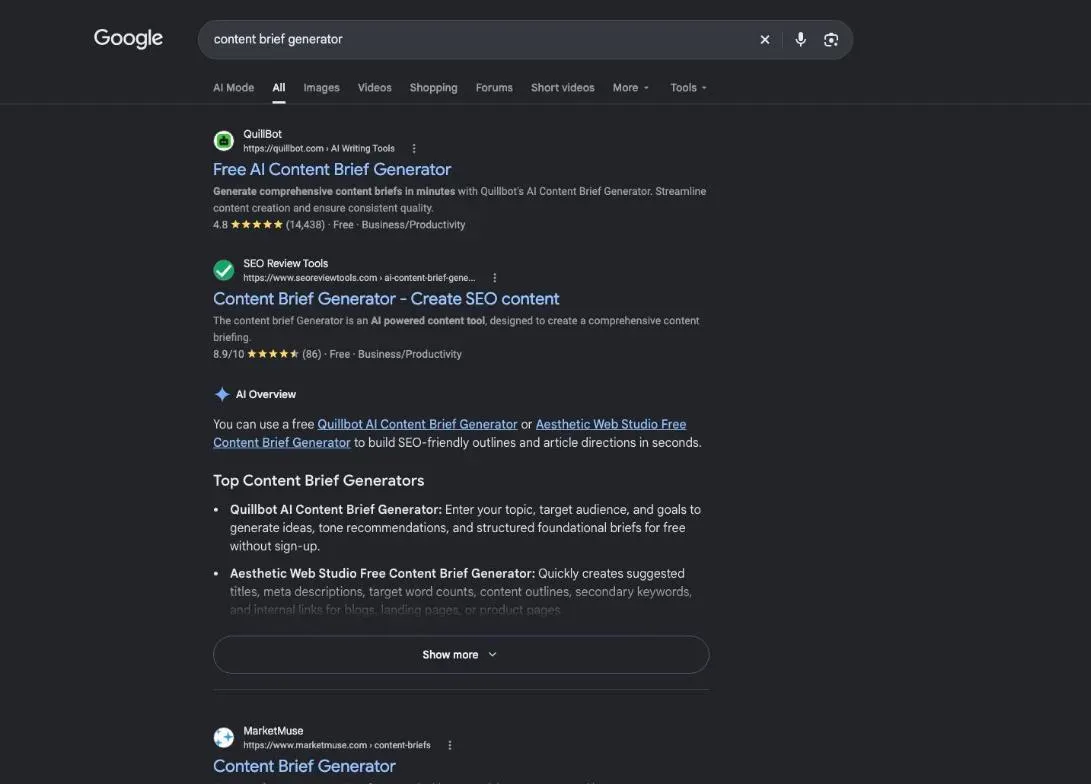
Google’s top results for “content brief generator” in the United States are mostly free online generators: you type a keyword, you get an outline (DataForSEO, October 29, 2026). They all promise the same thing: skip the hours of reading competitor pages. The question is what the brief is worth once you check it. That’s what this page answers.
What every brief should include
Whatever the tool, a usable brief covers:
- the keyword and what the searcher really wants (the search intent);
- the title and the meta description;
- the outline: the main heading, then the H2 and H3 subheadings;
- the questions to answer, often as an FAQ;
- the internal links, to and from your existing pages;
- the target length and the sources to cite.
Writing a content brief by hand: the method
You can do all of it yourself: read the top five results, note their headings, pick an angle, check your site for a page on the same topic. Our full method and template are on our content brief page. Here, we look at what a generator does for you, and what’s still your job.
Step 1: set up your site in SemChat
Two settings change the result before you type anything: whether the conversation is linked to your site, and the writing style.
Link the conversation to your site
When your sentence names a site you already track, SemChat asks whether to link the conversation to it, or to start it on its own. For a brief, link it. A document produced in a linked conversation is filed in that site’s Library; a conversation that isn’t linked doesn’t show up there (product notes from our test, October 29, 2026).
Pick a writing style
In the site’s settings, SemChat offers 11 writing styles, from professional to conversational to SEO-optimized. I switched from no preference to « Pédagogique » (teaching), which the app describes as « Explique, définit les termes, pas à pas » (explains, defines terms, step by step).
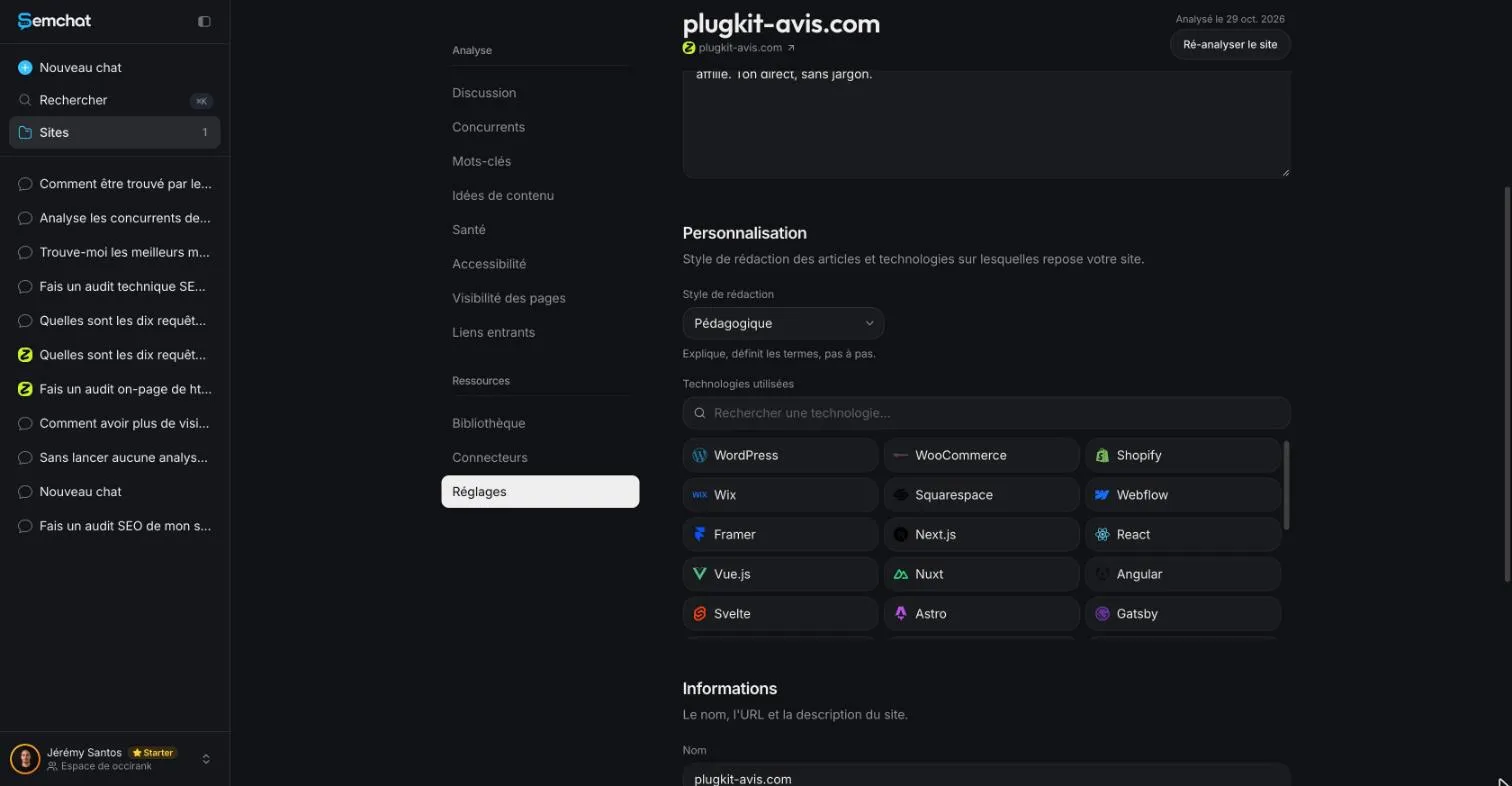
Pick your readers’ tone, not yours. If you sell to beginners, a teaching style fits. Click Save, then reload the page to check the style stuck: that’s what I did.
Step 2: type the template sentence (our test was in French)
In a new chat, the “+” menu opens the skills. Pick the brief skill, called Brief rédactionnel (writing brief) in the French interface. The message bar fills with a template sentence: « Rédige un brief de contenu pour le mot-clé » (write a content brief for the keyword).
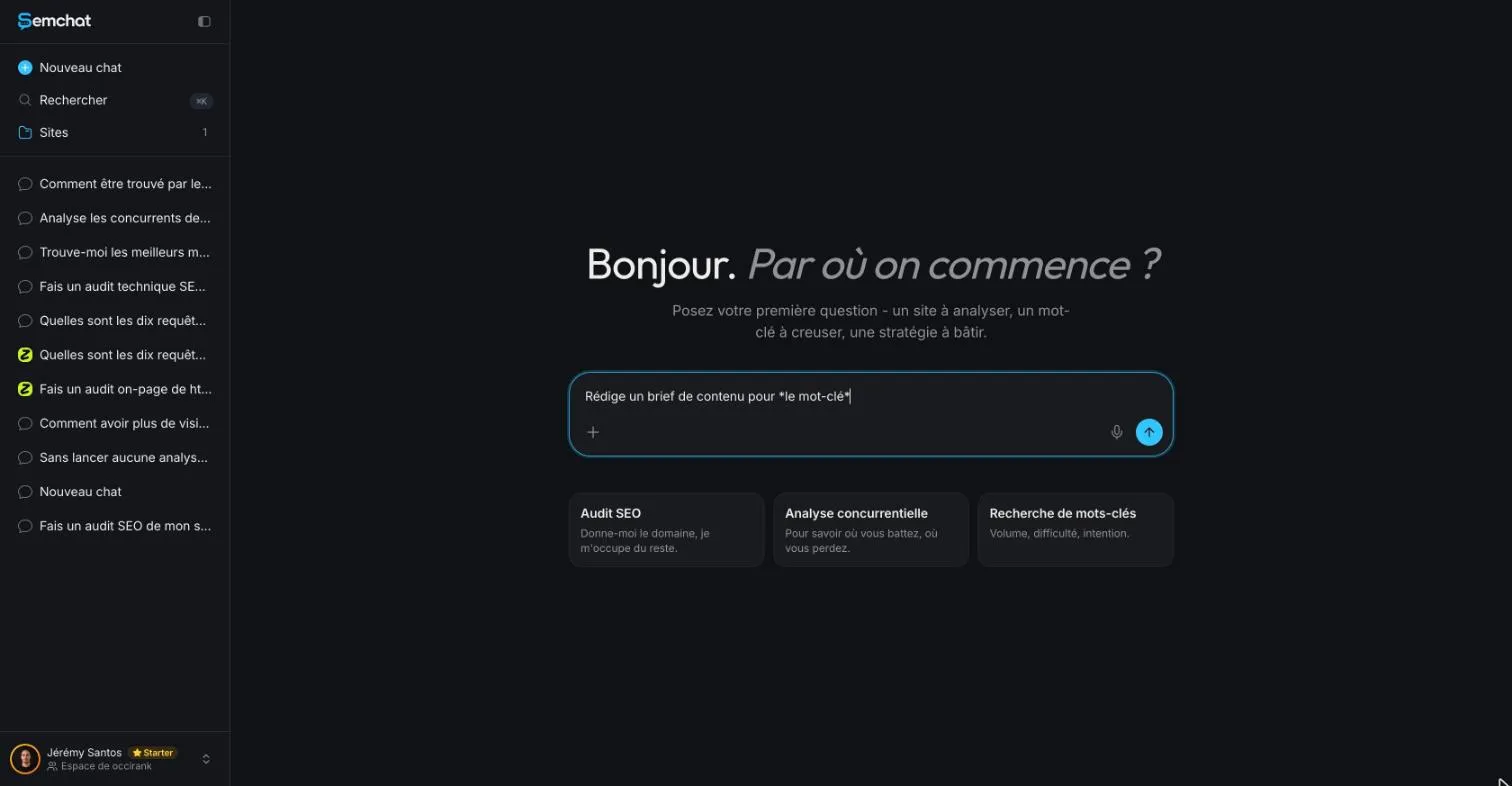
Our test was typed in French, on a French site, with the interface in French. How the skill handles the same request in English is missing data (planned source: an English test).
What to ask for: intent, outline, FAQ, internal links
Don’t send the template alone: a vague sentence gets a vague brief. Here’s the exact request I typed:
« Rédige un brief de contenu pour le mot-clé « programmer publication instagram », pour le site plugkit-avis.com. Mon lecteur est un entrepreneur non technique. Donne-moi l’intention de recherche, le titre de la page, le plan en H2 et H3, une FAQ de cinq questions, la longueur visée, et trois liens internes vers des pages qui existent déjà sur mon site, avec leur adresse. Vérifie dans mon sitemap qu’aucune page ne traite déjà ce sujet. »
(Write a content brief for the keyword “programmer publication instagram”, schedule an Instagram post, for the site plugkit-avis.com. My reader is a non-technical business owner. Give me the search intent, the page title, an H2 and H3 outline, a five-question FAQ, the target length, and three internal links to pages that already exist on my site, with their URL. Check my sitemap that no page already covers this topic.)
Each part has a job:
- the reader sets the level of language;
- intent, title and outline are the core of the brief;
- the number of questions prevents a two-line FAQ;
- “pages that already exist” blocks links to imaginary pages;
- the sitemap check stops you from writing a page you already have.
SemChat then ran its tools, each one shown on screen: site analysis, keyword research, search results, keyword ideas, a reading of five ranking pages, keyword volumes and the site’s best-performing pages.
- 1 Your sentence Keyword, reader and what you expect.
- 2 Its tools Google results, volumes, pages on your site.
- 3 The document Filed in the site's Library.
- 4 Your check Numbers, sections and links verified before use.
Step 3: read the brief it returns, section by section
The document has 11 parts: a snapshot (the summary with numbers), the angle, the search results context, entities and gaps (missing subtopics), the outline, secondary keywords, the FAQ, internal links, a fact gate, an “anti-filler” checklist and measurement. Read them in that order.
Search intent and outline
Good start: the intent is right. SemChat classed the search as informational and suggested a step-by-step guide. The results page pulled by DataForSEO the same day showed the same intent, with different sites from the ones SemChat saw.
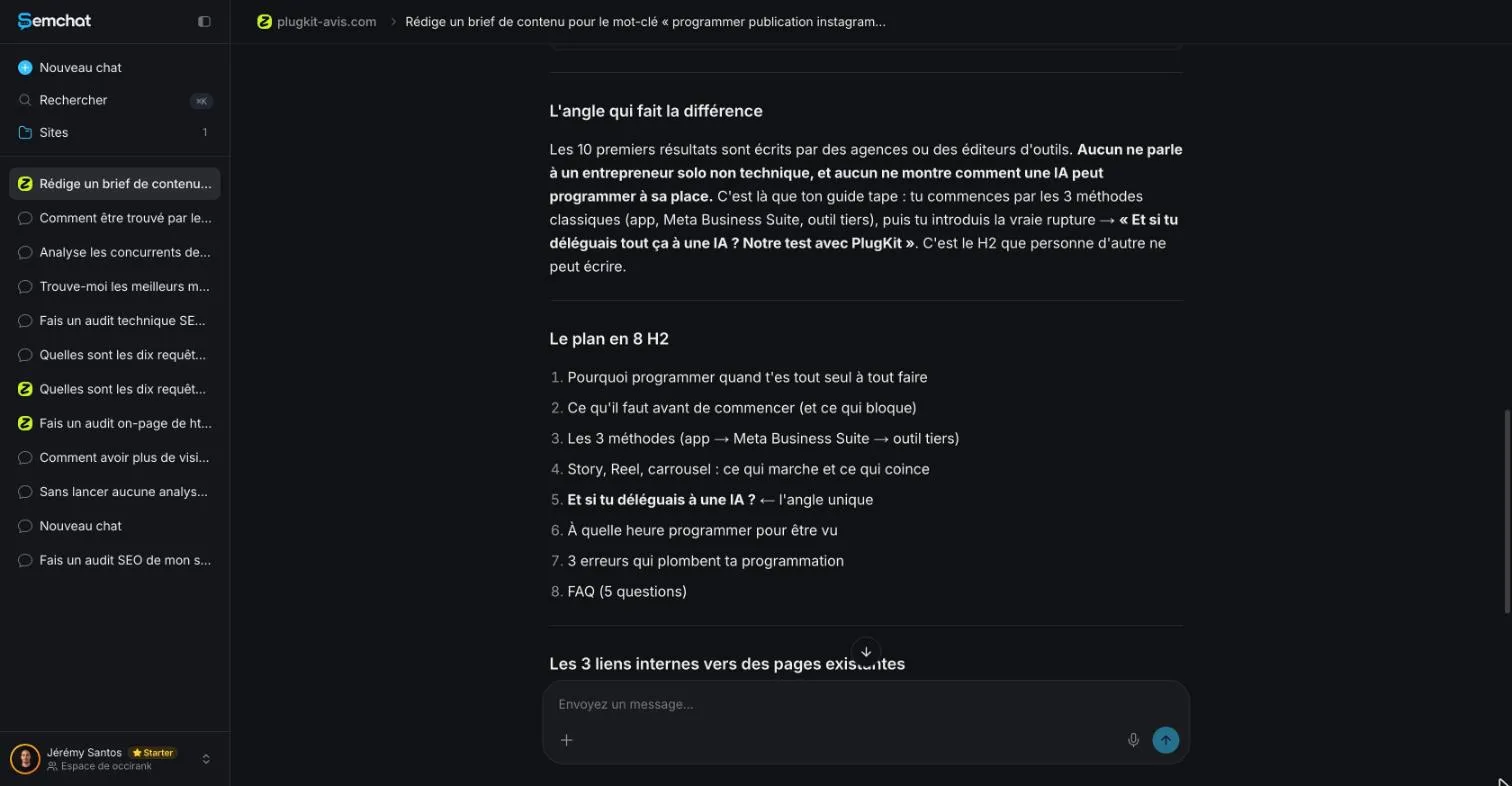
The outline has eight H2 headings and a clear angle: speak to the solo business owner the top pages ignore. It also checked the sitemap: no page on the site covered scheduling Instagram posts. True, according to the French sitemap of 51 URLs.
The fact gate: a guard against unsourced numbers
Part 9 is the best idea in the document. Its rule, translated: every claim with a number or a date must be checked at the time of writing. A table then says what to do for each kind of claim, such as checking tool prices on the day you write.
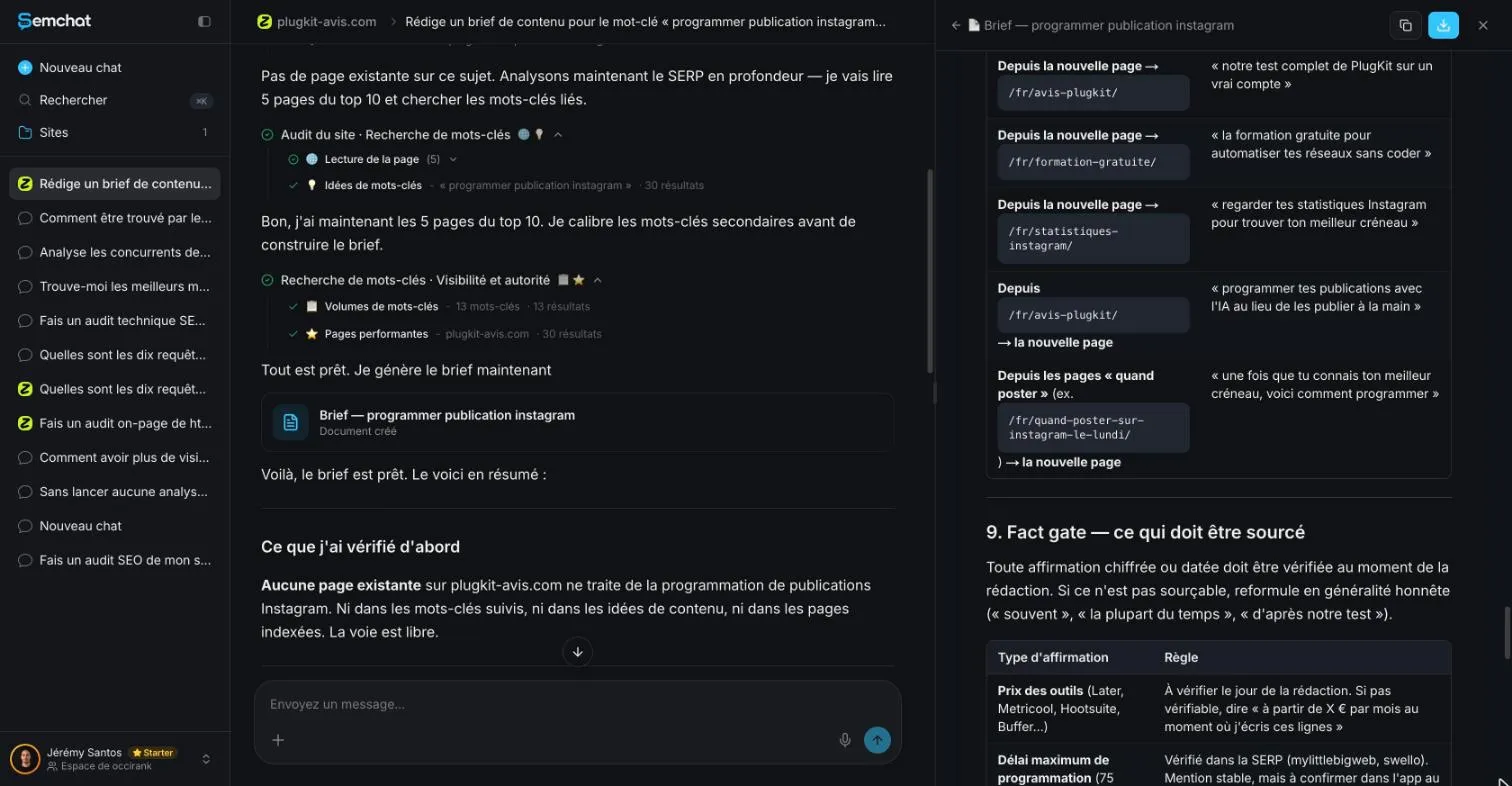
Keep that table when you hand the page to a writer: it’s a ready-made writing rule. As step 4 shows, the brief itself didn’t follow it. For the writing itself, our guide to SEO content writing shows how to write for a person and prove what you say.
Internal links to pages that exist
The three suggested links go to the site’s review page, its free course page and its Instagram statistics page. I checked: all three answered normally (HTTP 200) on the day of the test. SemChat even suggested links back to the new page from the review page and the “when to post” pages.
That’s the right reflex. The link text is another story (step 4).
Step 4: fix what’s off before handing it to a writer
Four problems, all checked the same day. Two smaller ones too: the suggested title promised a guide “without a paid tool” for a page meant to lead to a paid tool, and one heading announced “our test with PlugKit”, a test nobody had run.
A section that duplicates an existing page
The outline includes a heading on what time to schedule posts to be seen. The site already has a page on the best time to post on Instagram, plus seven “when to post on Instagram” pages, one for each day of the week. SemChat had correctly found no page about scheduling, but missed that one of its sections overlapped a neighboring page.
Replace the section with two sentences and a link to the existing page. If your pages keep stepping on each other, group them by topic first, which is what a topic cluster tool does.
Search volumes to cross-check
The snapshot gave 500 searches a month, labeled as an estimate, and a difficulty of 76. DataForSEO (Google Ads, France) gave 590, with demand falling: 1,000 in October 2025, 390 in September 2026. DataForSEO Labs gave a difficulty of 0.
Secondary keywords were more inflated: one at 90 against 20, two at 70 against 10 each. In France, SemChat’s data comes from Haloscan; outside France, from a mix of providers it doesn’t name (email from Haloscan, October 29, 2026). So for a US site, cross-check every volume against a second source. To group secondary keywords before building the outline, see our keyword clustering tools page.
A FAQ answer stated with no source, despite its own guard
This is the most telling flaw. FAQ question 3 answers: « Instagram l’a confirmé : un post programmé a exactement la même portée » (Instagram confirmed it: a scheduled post gets exactly the same reach), with no source at all. Part 9 of the same document forbids that kind of sentence.
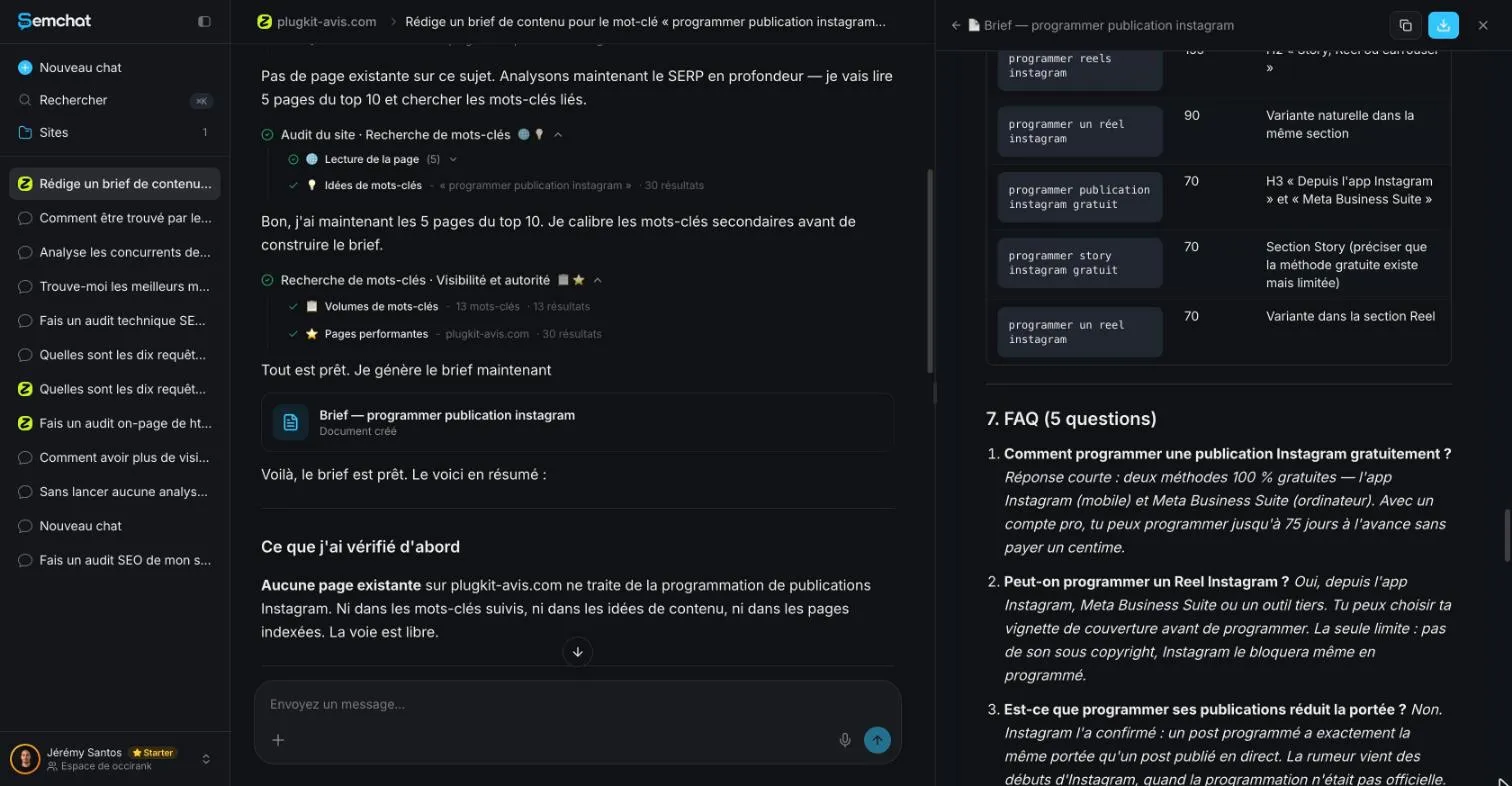
We’re not saying it’s false. We’re saying nothing in the brief proves it. If a writer copies that answer, your page states a fact it can’t back up. Find the source or cut the sentence before you hand it over.
Link text too long: use the target page’s keyword
The suggested link texts are whole sentences, such as « regarder tes statistiques pour trouver ton meilleur créneau » (check your stats to find your best time slot). Neither a busy reader nor Google can tell at a glance what the target page covers.
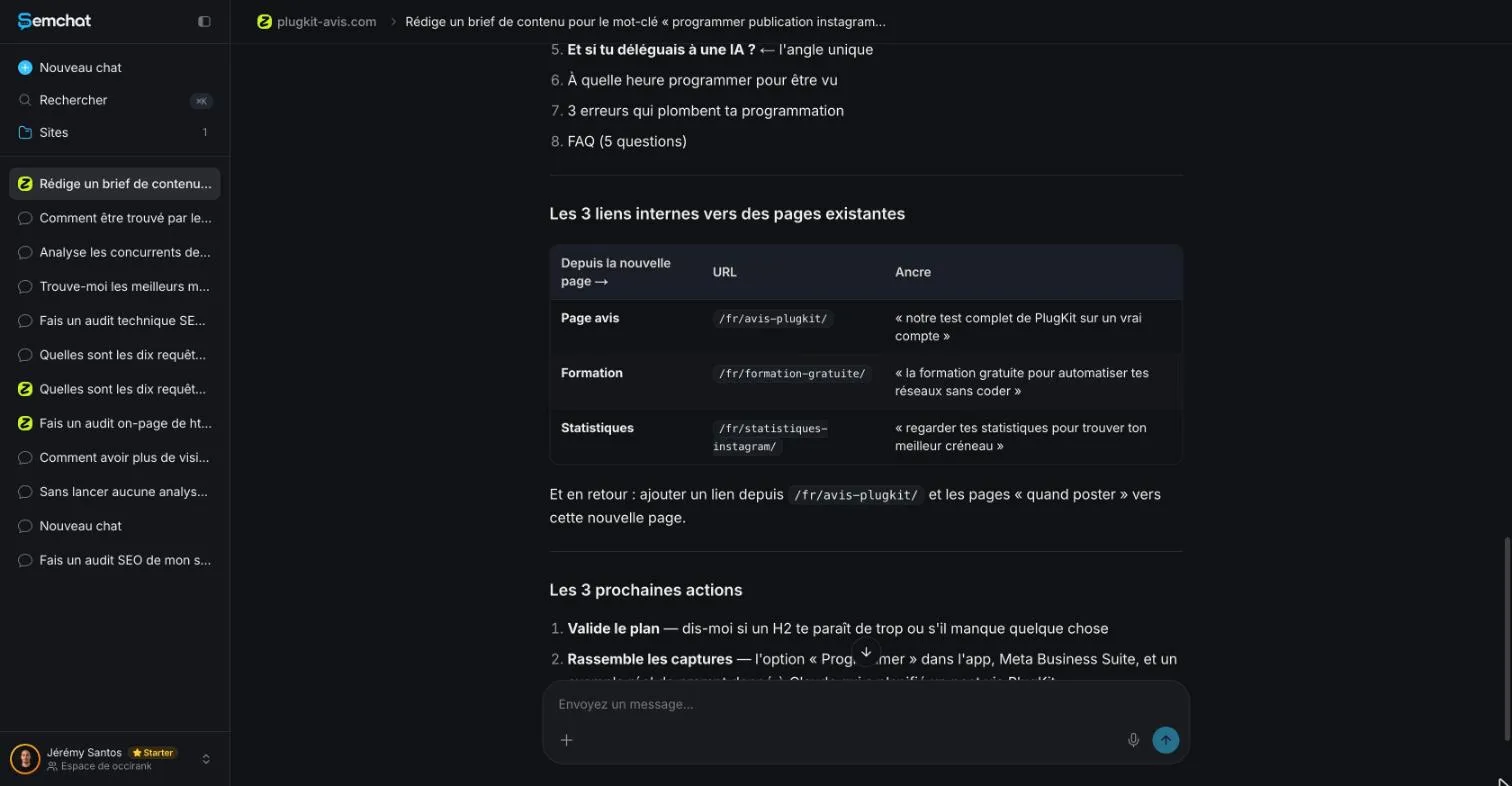
Google writes that “Good anchor text is descriptive, reasonably concise, and relevant to the page that it’s on and to the page it links to” (Google Search Central, read October 30, 2026). On this site, the rule is simple: the link text is the keyword of the target page. To set up every link on a site that way, see our internal linking tools page.
Step 5: find the brief again in the Library
The brief first opens in a panel on the right of the chat, with a copy button and a download button. It’s also filed: site page, Resources, Library, Documents.
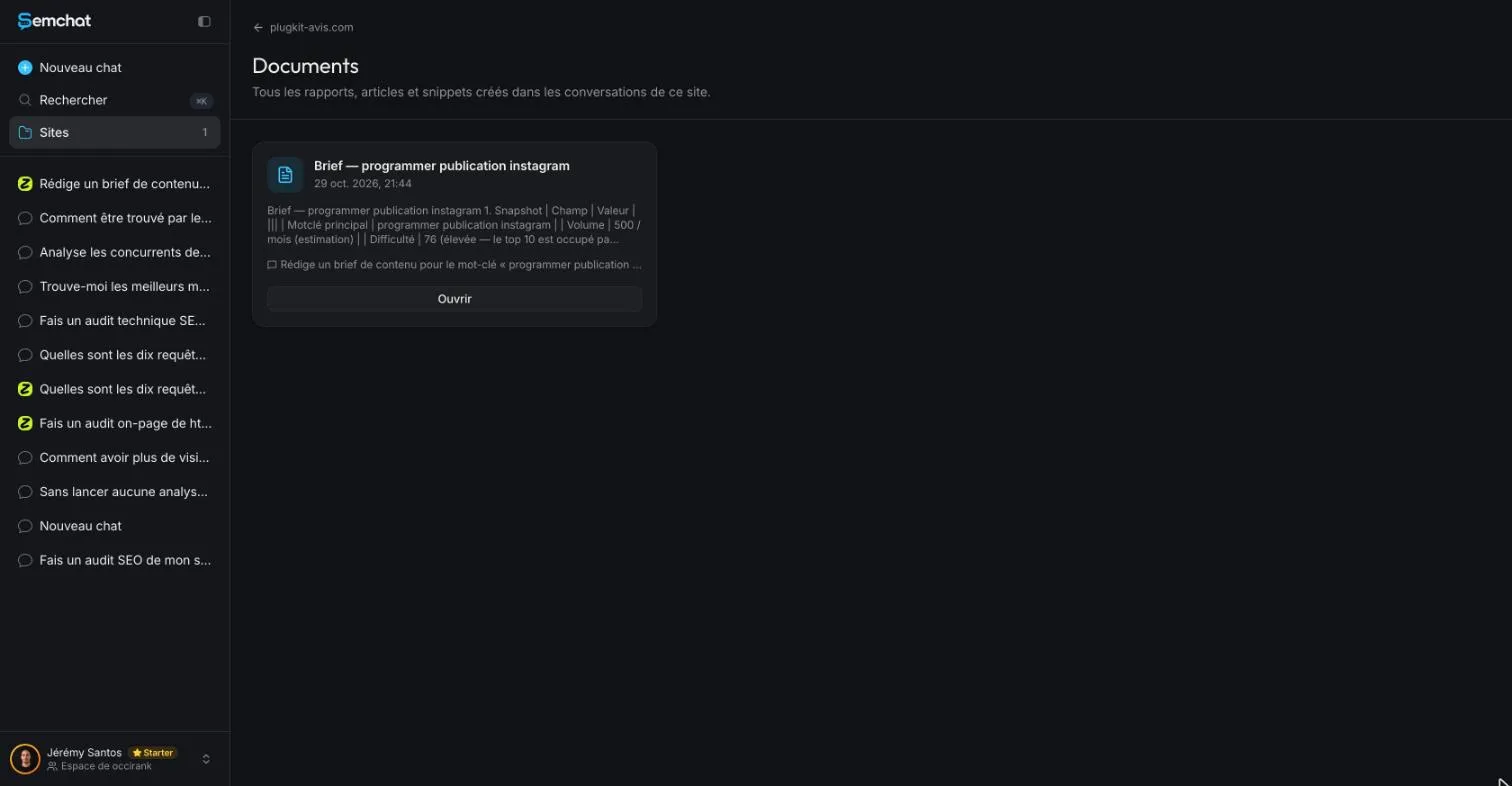
Handy when you come back to it three weeks later, as long as you linked the conversation to the site in step 1.
What one brief costs from the Starter quota
This brief used 2.5 points of the Starter plan’s monthly quota: usage went from 38.5% to 41%. Starter costs “€20 /mo” (semchat.io/en/pricing, read October 30, 2026). Do the math: at that rate, a month of Starter would cover about forty briefs if that’s all you did. That’s an estimate from a single test, not a promise.
We didn’t measure it on the Free plan at €0: missing data (planned source: one brief on a Free account). That plan has every feature, with lighter usage. Plan details are on our SemChat pricing page.
Brief generator or brief by hand: how to choose
You don’t have to pick one. The generator handles the long part, reading Google; you handle the check, where it gets things wrong.
| SemChat's brief | Your part | |
|---|---|---|
| Reading Google | top pages read for you | check the intent fits |
| Outline and FAQ | outline and questions drafted | cut what duplicates a page |
| Numbers | volumes and difficulty estimated | cross-check with a second source |
| Internal links | existing pages found | link text set to the keyword |
Use a generator if you plan several pages a month and know how to check. Do it by hand for your most important page, or if you’ve never written a brief: you’ll understand what the tool does.
A content brief tool inside a bigger suite: Surfer, Frase
SemChat isn’t the only option. Two well-known suites include a content brief tool. We haven’t tested either; what follows comes only from their competitor sheets, dated October 29, 2026:
- Surfer builds a generated outline and writing guidelines in its Content Editor, and its MCP connector lists a brief among six built-in skills. It has no free plan on its pricing page; the cheapest, Discovery, shows €49 a month billed yearly from France (Surfer says prices are identical in USD and EUR). The trial lasts 7 days and asks for a card.
- Frase builds briefs from the pages that rank, and each brief has a target country that drives its keyword volumes. No free plan: paid plans start at $49 a month (Starter). Its 7-day trial needs no card and includes 10 briefs.
Should you fully automate briefs and publishing?
No. Google’s guidance is clear: “using generative AI tools or other similar tools to generate many pages without adding value for users may violate Google’s spam policy on scaled content abuse” (Google Search Central, read October 30, 2026).
A brief is where you add that value: your test, your numbers, your angle. Once a page is live, keep it current: that’s the job of our guide on how to update old blog posts. The full test of the tool is in our SemChat review.
A content brief generator saves you the long part: reading Google, drafting an outline, finding links. Link the conversation to your site, make your request specific, then check four things: sections that duplicate a page, volumes, unsourced claims and link text. Your next page starts there.
Frequently asked questions
Is an AI content brief generator free to use?
Some are. SemChat has a Free plan at €0 with every feature and light monthly usage (semchat.io/en/pricing, read October 30, 2026); we didn't measure what one brief costs on it. On the Starter plan (€20 a month), our brief used 2.5 points of the monthly quota. Surfer and Frase have no free plan according to their dated competitor sheets (October 29, 2026), only trials.
Do content brief generators work in any language?
It depends on the tool. Our SemChat test was run in French, on a French site, with the interface in French. SemChat's website comes in six languages, but the languages its assistant answers in are missing data (planned source: an English test). Outside France, its keyword data comes from a mix of providers it doesn't name (email from Haloscan, October 29, 2026).
How often should a content brief be updated?
A brief is a plan for one page, so check it again whenever you wait long before writing: Google's top results and search volumes move. In our test, the main keyword's monthly volume went from 1,000 in October 2025 to 390 in September 2026 (DataForSEO). Once the page is live, you update the page itself, not the brief.
Can you hand an AI-generated brief straight to a writer?
Not without a check. In our test, the brief had the right intent and three real internal links, but also a section that duplicated an existing page, inflated secondary volumes, an FAQ answer with no source and link text written as long sentences. Fix those four points first, then hand it over.
Let your AI do the chores of getting found online.
10% off your subscription, for life with my link, if you subscribe within 2 weeks of signing up. No code. All about the SemChat promo code
Affiliate link: it costs you nothing extra.
Verified sources
- SemChat pricing: “Every feature, in every plan. Just pick your monthly usage.” (Free €0, Starter €20 /mo) (30/10/2026)
- Google Search Central: Make your links crawlable (write good anchor text) (30/10/2026)
- Google Search Central: guidance on using generative AI content on your website (30/10/2026)
- Surfer: plans, Content Editor and MCP skills (competitor sheet) (29/10/2026)
- Frase: briefs from ranking pages, plans and trial (competitor sheet) (29/10/2026)