SEO audit checklist: the full method, step by step
This SEO audit checklist takes you through the whole method: set a goal, check that Google can read your site, review your pages and your links, check local and AI search, then sort every fix by priority. I held it up against a real audit of my own site, run by SemChat on 29 October 2026: an action plan in about 3 minutes, and every finding checked by hand afterward.
 By Jérémy Santos Updated on 30 October 2026 Tested on his own SemChat account: first audit on 29 October 2026.
 This page is part of the guide: SEO checker
You run a blog, a small online shop or the website of a local business, and Google sends you a trickle of visitors. Before you rewrite everything, take stock. That’s what an audit is for: find what’s holding the site back, then decide what to fix first.
This page is the whole method, start to finish, with no jargon. Each step ends with a short list you can tick off. The technical details and how to read the final report each have their own page; here you get the full picture. A word on money: this site earns affiliate commissions on SemChat links. That changes neither your price nor what I write.
- 1 Set your goal What you want to improve, and your starting numbers.
- 2 Check Google's access Indexing, errors, speed, security.
- 3 Review each page Titles, descriptions, headings, images, words.
- 4 Review your links Internal, incoming, broken.
- 5 Check mobile and local Phones and your Business Profile.
- 6 Check AI search Can assistants read your pages?
- 7 Sort by priority An action plan, effort against gain.
What an SEO audit is, and how to use this checklist
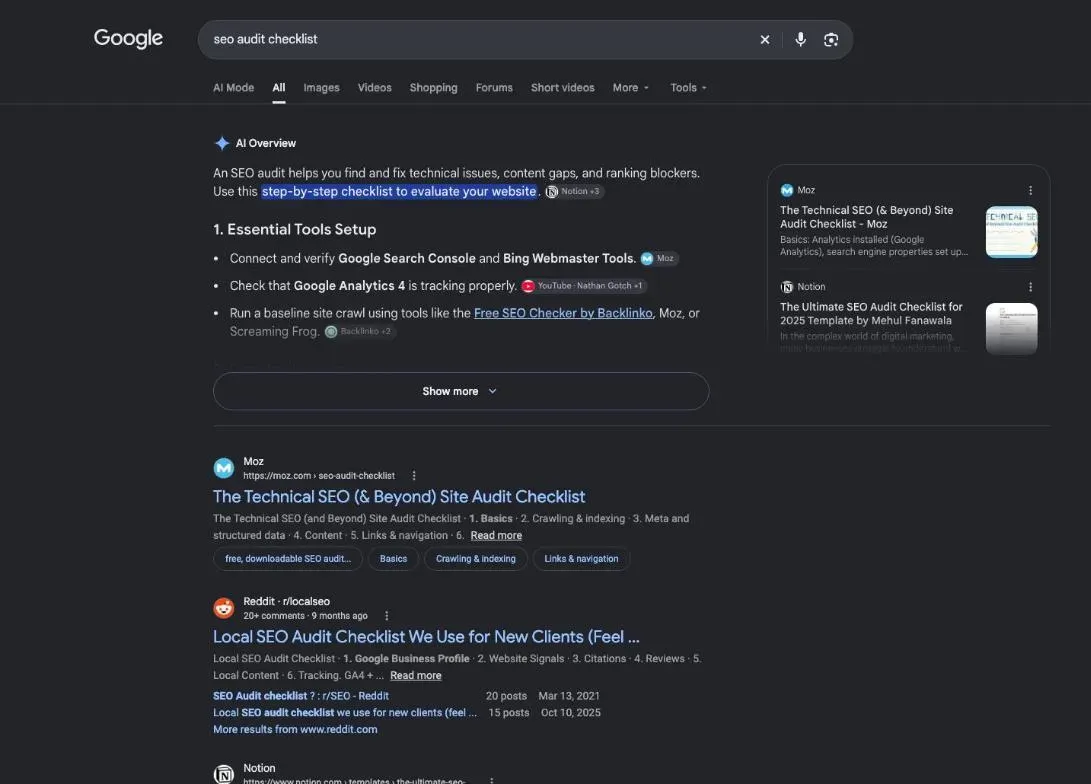
An SEO audit is a health check of your site as Google sees it. You look at three things. Can Google read your pages? Does each page answer a real search? Do other sites point to you? Then you add two things that matter a lot for a small site: your real data from Google, and the competitors who show up before you.
The output isn’t a fat report. It’s a short list of fixes, in order. If you finish an audit with two hundred red lines and no idea where to start, the audit isn’t done yet.
How to use this SEO audit checklist: go through the seven steps in order. The order matters. Polishing a title is wasted effort if Google can’t see the page, and chasing links to a page that answers no search won’t do much either. Each step ends with a checklist. Skip what doesn’t apply to you: if you have no shop or office, the local part of step 5 is a quick pass.
By hand or with a tool
By hand, you open your pages one by one, type searches into Google and read your Search Console reports. It’s free, and nothing teaches you more about your own site. It also gets slow as soon as the site grows past a handful of pages.
With a tool, a crawler goes through your site for you and lists what looks wrong. The catch: you often get hundreds of warnings and no sense of which ones matter. The tool finds. You still have to sort.
There’s a third way: ask an AI assistant to run the tools for you and hand back the priorities. That’s what SemChat does, and it’s the tool I tested for this page. I tell the full story, mistakes included, in my SemChat review. Whatever you pick, you’ll check its findings yourself. I’ll show you why at almost every step below.
Keep a record of what you find
Open a spreadsheet before you start. One row per problem, with these columns:
- the page (its address);
- the problem, in plain words;
- the proof: a Search Console line, a screenshot, the search you typed;
- the fix you plan;
- the effort (small, medium, large) and the gain you expect (high or low);
- the status and the date you fixed it.
Don’t skip the proof column. When a tool or an assistant tells you something, the proof is how you know it’s true. You’ll find a ready-made version of this sheet near the end of the page.
Step 1: set your goal and gather your data
Start with one sentence: what do you want to improve? More readers on your blog. More calls for your shop. One page that used to bring visitors and doesn’t anymore. That sentence decides what you look at first.
Next, write down where you stand today. Without a starting point, you can’t tell in three months whether your fixes worked. Keep four numbers: visits from Google, indexed pages, the searches you appear for, and clicks.
Then name two or three competitors: the sites that show up before you on your main searches. Not the biggest names in your industry, the ones you actually meet in Google’s results. You’ll come back to them in steps 3 and 4. If you want to learn how to analyse a website, yours or theirs, before you commit to a full audit, we have a page for that.
Search Console and Analytics, your first sources
Google Search Console is free. It shows what Google really sees: the searches that display your pages, the clicks, the pages it indexed and the ones it left out. Google Analytics, also free, measures what visitors do once they land on your site. Search Console covers what happens before the click; Analytics covers what happens after.
Without these two sources, an audit runs on estimates. It happened in my own test. Search Console wasn’t connected yet, and SemChat said so at the top of its report, calling it a critical blind spot (translated from the French report). It then worked from estimated rankings instead. It was right to flag it: estimated numbers are a guess about your site, and Search Console is Google’s own count.
Once Search Console was connected, in a lesson of our SemChat course, the assistant read the site’s real numbers: 8 clicks and 533 impressions, the same figures we pulled straight from Search Console (29 October 2026).
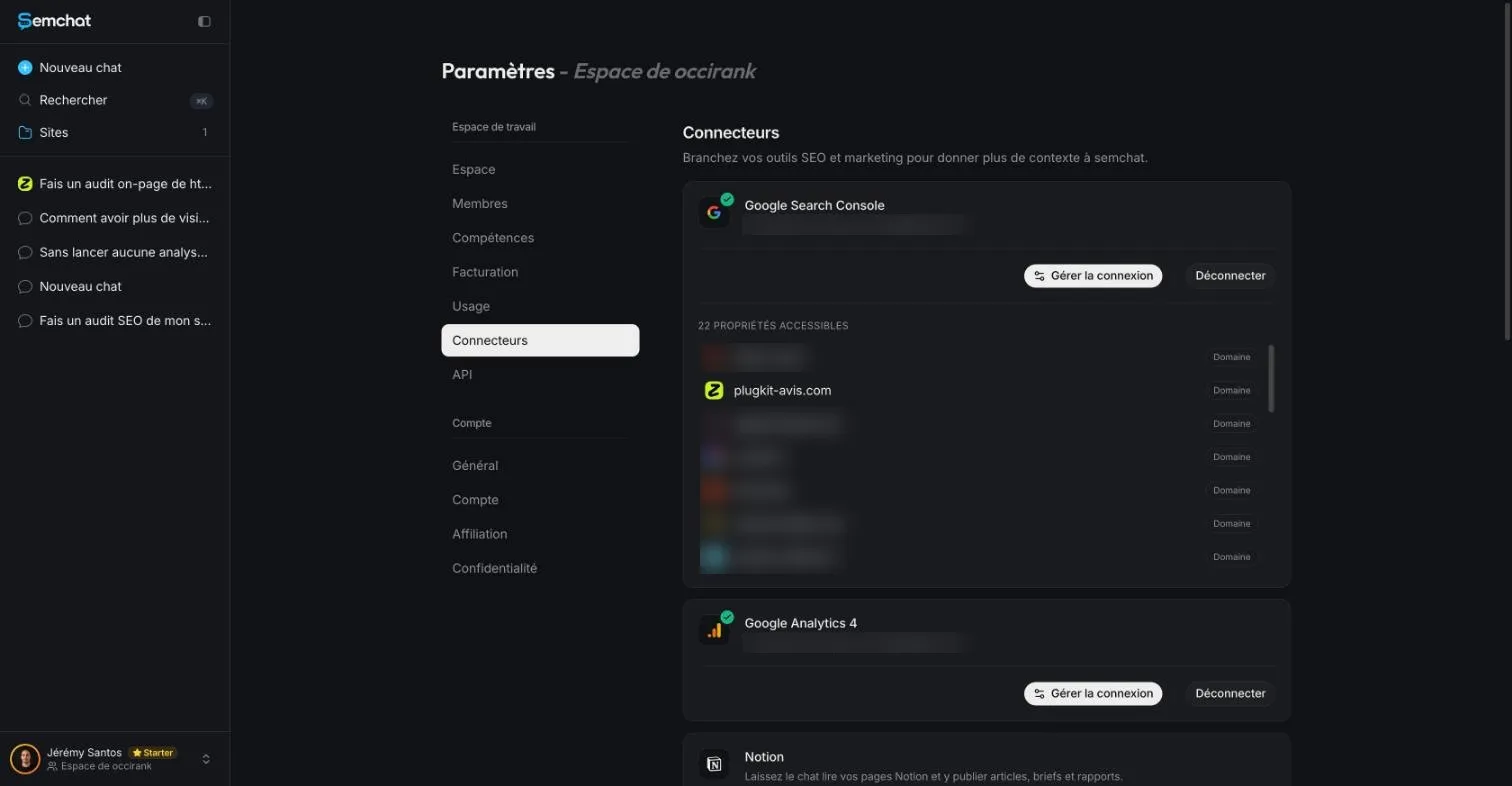 Search Console and Analytics connected in SemChat, the audit’s sources (other properties blurred). Screenshot of the SemChat app, 29 October 2026 (French interface).
Checklist for step 1:
- One sentence that says what you want to improve.
- Search Console set up and verified for your site.
- Analytics installed, with a few weeks of data if you can wait.
- Your four starting numbers written down, with the date.
- Two or three real competitors named.
10% off your subscription, for life with my link, if you subscribe within 2 weeks of signing up. No code. All about the SemChat promo code
Try SemChat for free Free plan, no credit card. Affiliate link: it costs you nothing extra.
Step 2: check that Google can read your site
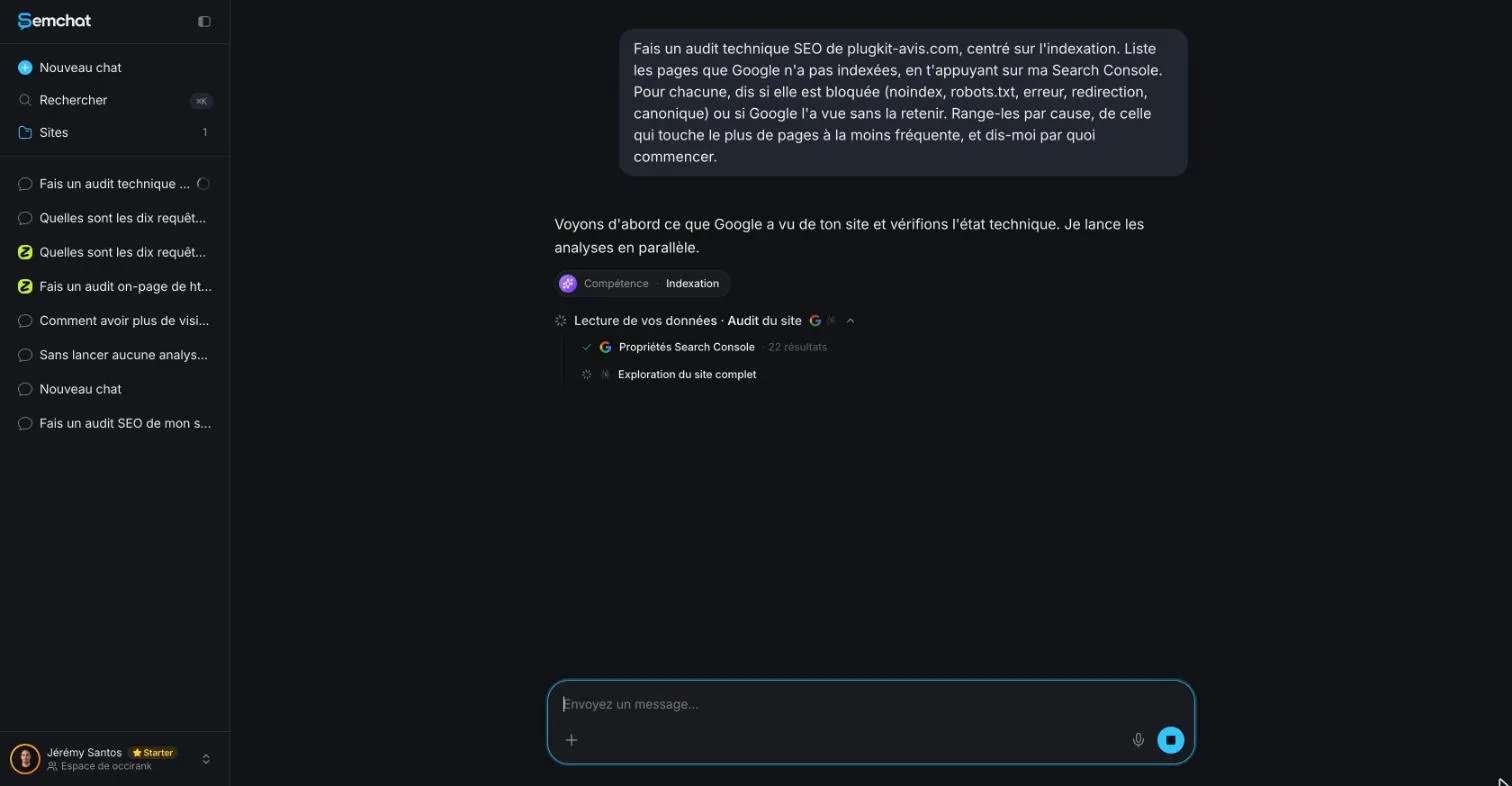 SemChat switches on its own to its Indexing skill for the audit. Screenshot of the SemChat app, 29 October 2026 (French interface).
A page Google can’t read doesn’t exist for Google. Start with the simplest test there is: type site:yoursite.com into Google. Google’s SEO Starter Guide puts it plainly: “If you see results pointing to your site, you’re in the index” (read 30 October 2026). If nothing comes up, stop here and find out why before you touch anything else.
If your site is brand new, give it time. Google says it “can take a few weeks” to notice a new site, or changes to an existing one (Get on Google page, read 30 October 2026).
Here’s a real reason to check findings yourself. In one lesson of our course, we asked SemChat for a technical audit focused on indexing, based on Search Console. It switched by itself to its Indexing skill, which is the screenshot above. Its first diagnosis was wrong: it claimed about 70 English pages had zero impressions and floated adding a noindex, when one of them had about 27 to 30 impressions in Search Console. Pushed back with specific points, it answered, in French, that it had been wrong on three points.
The corrected answer still left three actions, and all three were wrong when we checked them on 29 October 2026. One page it wanted added to the sitemap was already there. Two pages it wanted added returned a 404 with a noindex. And the sitemap it told us to create already existed, with 51 URLs. The rule: check in Search Console, or by opening the page, before you fix anything.
Indexing, errors and speed: the essentials
Three checks cover the first pass.
Indexing. In Search Console, the Pages report splits your pages into indexed and not indexed, with a reason for each one left out. A page with a noindex tag, or blocked by your robots.txt file, won’t show up. Sometimes that’s on purpose (a thank-you page, a login page). Make sure it’s never by accident on a page that should rank.
Errors. A page that returns a 404 (not found) or a server error wastes the visit and every link pointing to it. A redirect chain, where one address sends to another that sends to a third, slows everything down. Fix the link at the source when you can.
Speed. Google’s page experience guide asks a plain question: “Do your pages have good Core Web Vitals?” (read 30 October 2026). Search Console has a report for that. If you don’t want to read it yet, open your main pages on your phone, on mobile data. If you’re waiting, your visitors are too.
On my site, SemChat’s audit gave a technical score of 99 out of 100: 189 pages crawled, zero 4xx or 5xx errors, every page indexable, nothing deeper than 3 clicks, a robots.txt with no global block and a declared sitemap. It also spotted the contact page returning a 404. I checked: correct.
Security and structured data
Security first. Google’s page experience guide asks: “Are your pages served in a secure fashion?” In practice, your address starts with https and the browser shows no warning. Check a few pages, not just the home page, and check the forms.
Structured data is code you add to a page to describe it to search engines: this is an article, this is a product, this is a list of questions and answers. Google defines it as “a standardised format for providing information about a page and classifying the page content” (read 30 October 2026). Google says it can make your results “more engaging”. It doesn’t promise they will be.
On my site, the audit listed Article, HowTo, SoftwareApplication, VideoObject, BreadcrumbList and FAQPage markup. Fine. What you check is simple: is the markup there, does it match what the page shows, and does Search Console report errors on it?
The technical side goes much deeper than this: redirects, canonical tags, hreflang for sites in several languages, sitemaps. All of it is in our technical SEO checklist.
Checklist for step 2:
- The
site:search returns your pages. - Search Console’s Pages report read; every excluded page has a reason you understand.
- No important page carries a noindex or a robots.txt block.
- No 404 or server error on pages that receive links.
- Main pages tested on a phone, on mobile data.
- Every page on https, no browser warning.
- Structured data present where it fits, with no errors reported.
Step 3: review each page’s content and tags
This is the longest step. Don’t try to review every page on day one. Start with the pages that matter: the ones that sell, and the ones that already get visits. The rest can wait.
Page titles and meta descriptions
The title tag is the clickable line in Google’s results. Google’s SEO Starter Guide says a good one “is unique to the page, clear and concise, and accurately describes the contents of the page” (read 30 October 2026). Check three things on each title: it contains the search you’re targeting, no other page on your site uses it, and it gives a reason to click.
The meta description is the short text often shown under the title. Google wants it “short, unique to one particular page” and covering the page’s most relevant points. Think of it as your pitch to the person scanning ten results. Why yours?
Headings and duplicate content
Headings (H1, H2, H3) cut the page into parts. Keep a single H1 that states the topic, then H2s that answer the questions your reader has. Here’s a quick test: read the headings alone, without the text. If you understand the plan, they’re doing their job.
Duplicate content means the same text, or the same title, on several addresses. Google says it’s “not a violation of our spam policies, but it can be a bad user experience” (SEO Starter Guide). On my site, the audit counted 100 duplicate titles (53% of pages), 102 duplicate H1s (54%) and 78 duplicate descriptions (41%).
The finding was real, with a nuance. Most duplicates came from American and British English versions of the same page, declared to each other as language variants (hreflang). Calling them “mirror pages” for Google, as the report did, went too far. Still, two pages with exactly the same title is a fair thing to flag, and the fix SemChat proposed was cheap: make each title say which version it is.
Images and their descriptions
Each image gets a text alternative, the alt attribute. Google’s SEO Starter Guide describes alt text as “a short, but descriptive piece of text that explains the relationship between the image and your content.” Write it for someone who can’t see the image. Name the file plainly too: a name that says what’s in the picture beats a camera number.
Two more checks: weight and readability. Heavy images slow the page; my audit noted that 100% of the site’s images were already in WebP, a lighter format. And text must stay readable against its background. The same audit gave the site an accessibility score of 70 out of 100 and counted 8,390 text contrast issues (WCAG level AA), across all 189 pages. That’s a design fix, done once, that every page benefits from.
The words each page should cover
A page that ranks answers a search with the words people type and the ones they expect to find around them. Type your main search into Google and read the first three results. What questions do they answer that your page skips? What do they show (a table, a price, steps) that you don’t?
This is where your step 1 competitors pay off. The audit of my site listed searches my competitors were getting and I wasn’t, such as “bot message instagram” at 1,300 searches a month according to SemChat. A volume from any tool gets cross-checked before you trust it: during our course, several of SemChat’s volumes landed far from DataForSEO’s, in both directions (29 October 2026). For a deeper pass on the words and topics each page covers, use our content audit guide.
Thin pages count here too. My audit flagged a comparison hub page at 495 words that only listed links to other pages, and suggested a summary table with selection criteria. That’s the kind of fix you can do in an afternoon.
Checklist for step 3:
- Each important page has a unique title with its target search in it.
- Each has its own meta description that makes a case for the click.
- One H1 per page; the H2s alone tell the plan.
- Duplicate titles and descriptions listed, and explained (language versions, filters, print pages).
- Every image has alt text and a plain file name.
- Text contrast checked.
- Each page compared with the first three results for its search.
Step 4: review your links
Links between your own pages
Every important page should get links from other pages on your site, with link text that says what it’s about. Google’s SEO Starter Guide defines link text as “the text part of a link that you can see.” Use the words of the target page’s search, not “click here.”
Look for orphan pages, which no link reaches, and pages buried far from the home page. On my site, the audit found no orphan page, everything within 3 clicks of the home page, and 27.5 internal links per page on average. Good structure. It still found one weak spot: that thin hub page.
Watch the assistant here too. In two lessons of our course, SemChat got existing internal links wrong. In one, it said a page was already linked from three strong pages; only one of the three actually linked to it (we checked the HTML of all 51 French URLs). In another, it proposed six link texts pointing to a pillar page, all different sentences, none of them the pillar’s own search. Internal links are cheap to fix, and just as cheap to get wrong.
Links from other sites, to you and to your competitors
A link from another site to yours works like a recommendation. Count how many different sites link to you, and look at which ones. Are they in your field, or directories with nothing to do with you? Search Console lists the sites that link to you. Ahrefs Free also shows backlinks, but only for sites you prove you own (Ahrefs Free page, read 29 October 2026).
My site had one referring domain, normal for a site under two months old. The quality check is where it got interesting. SemChat called the profile clean. That single link came from a page on a link agency’s site with 2,341 outgoing links and a spam score of 20 (DataForSEO Backlinks, 29 October 2026). Not toxic enough to panic about, but not “clean” either.
Then look at your competitors. Which sites link to them and not to you? A local association, a supplier, a trade directory: those are the realistic targets for a small site. SemChat’s audit listed my competitors by keyword overlap, and in a later lesson it drafted a three-month plan of 12 free links to earn, with a schedule and rules for which sites to skip.
Don’t buy links. Google says so in plain words: “please don’t pay them to link to you; that could be considered a violation of Google’s spam policies” (Get on Google page, read 30 October 2026).
Broken links to fix
A broken link sends a visitor, and Google, to a page that no longer exists. Look for three cases. Internal links pointing to a 404 on your own site. Links from other sites pointing to an old address you changed. Links from your pages to other sites that have since disappeared.
The fix depends on the case. Update the link at the source when it’s yours. When an old address still receives links from elsewhere, redirect it permanently (a 301) to the closest live page. My audit’s first action was exactly this kind of gap: the contact page answered 404, and an inspection during our course showed Google didn’t even know the address (29 October 2026).
Checklist for step 4:
- No orphan page; important pages a few clicks from the home page.
- Internal link text uses the target page’s search, never “click here.”
- Referring sites listed, with a look at who they are.
- A short list of realistic link targets taken from your competitors.
- No paid links, now or planned.
- Broken internal links fixed; old addresses with links redirected.
10% off your subscription, for life with my link, if you subscribe within 2 weeks of signing up. No code. All about the SemChat promo code
Try SemChat for free Free plan, no credit card. Affiliate link: it costs you nothing extra.
Step 5: check mobile and local search
Google’s page experience guide asks: “Does your content display well on mobile devices?” Answer it with your own phone, not a desktop browser squeezed narrow. Open your five most visited pages. Can you read the text without zooming? Can you tap a button without hitting its neighbour? Does a pop-up cover the content when the page opens? Google asks about that last one too: “Do your pages avoid using intrusive interstitials?”
Your Google Business Profile in the audit
If customers come to you, or you go to them in a set area, your Google Business Profile belongs in the audit. Google explains how local ranking works in its own help center: “Local results are mainly based on relevance, distance, and popularity” (read 30 October 2026).
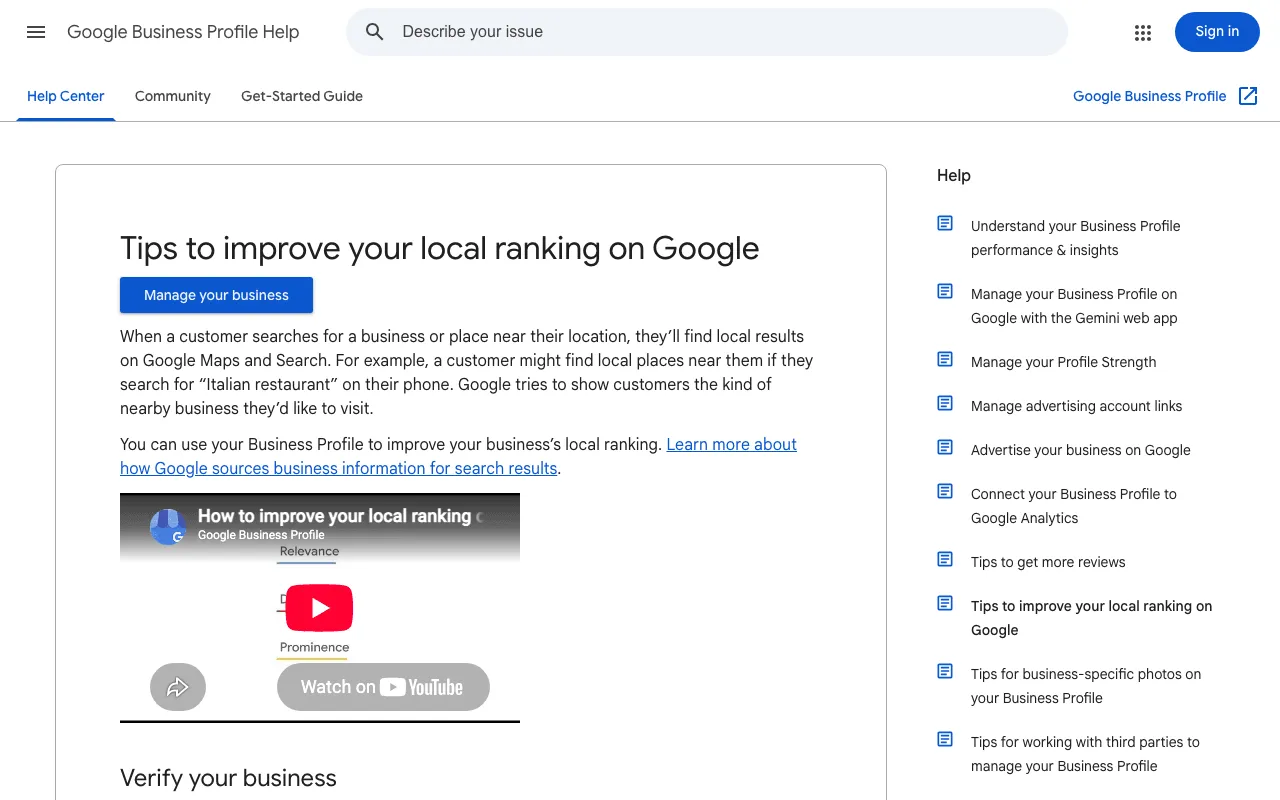 Google’s help page on improving your local ranking. Screenshot of support.google.com, 30 October 2026.
The first tips on that page are plain: verify your business, keep your business information up to date, respond to reviews. Your audit checks each of them. Then one more thing: are your name, address and phone number written the same way on your site, on your profile and in your structured data?
A real example shows why you check this yourself. In one lesson, we asked SemChat about local search for occirank.fr, the site of my SEO consulting business in Toulouse, France. It caught real problems: legal pages naming another domain, a share image pointing elsewhere. It also said the business “probably” had no Business Profile, without checking. And it said the structured data had no postal address, when the home page’s markup did have one. SemChat has no Google Business Profile connector among its eight connectors (app settings, 29 October 2026), so it can’t read your profile; you have to.
Checklist for step 5:
- Top five pages read on a phone: text, buttons, no covering pop-up.
- Business Profile verified, if you serve customers locally.
- Hours, address, phone and categories up to date.
- Recent reviews answered.
- Name, address and phone identical on the site, the profile and the markup.
Step 6: check that AI search can read you
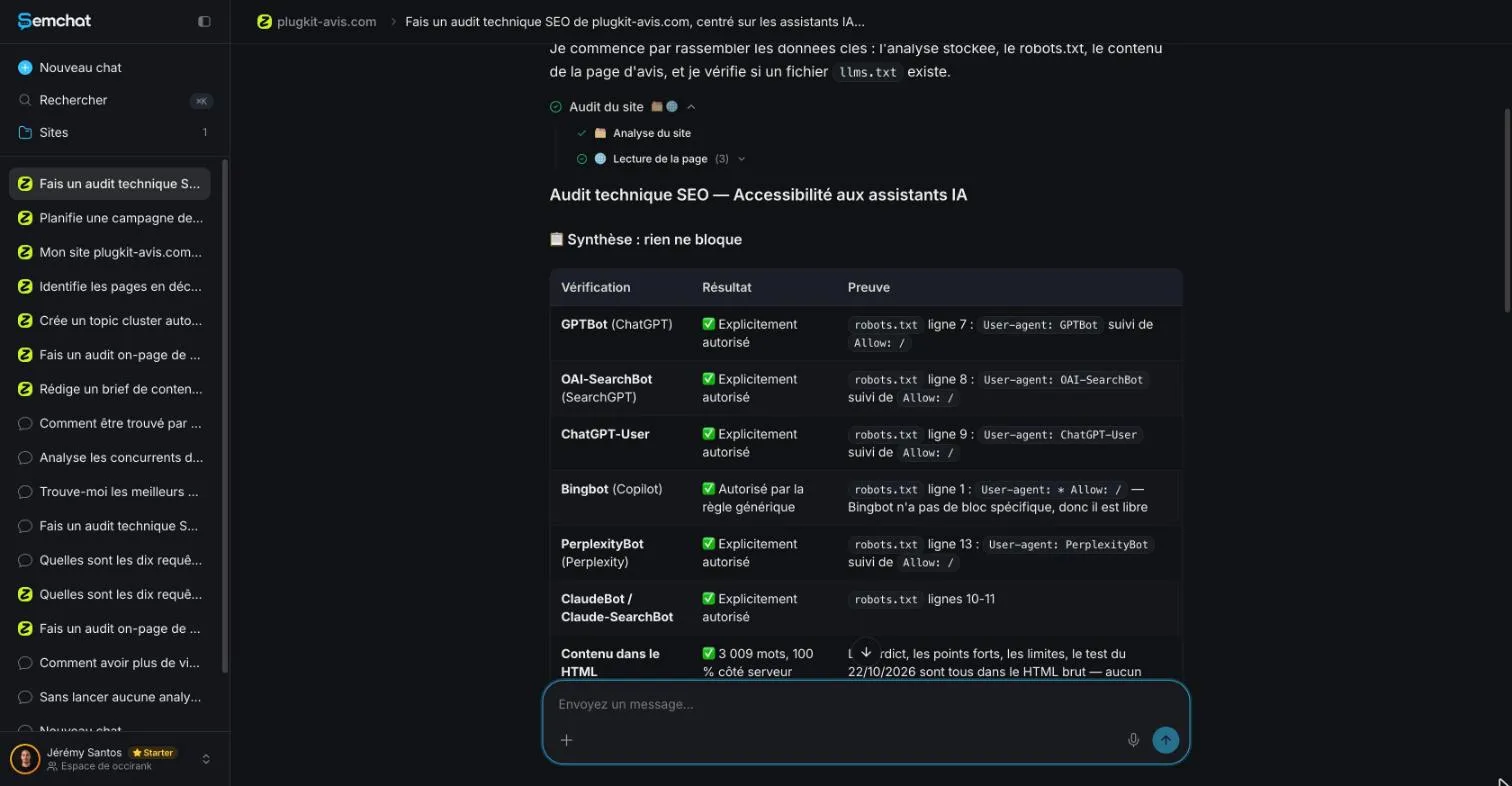 SemChat’s technical audit for AI assistants: tools run, then a summary with proof. Screenshot of the SemChat app, 29 October 2026 (French interface).
People now get answers from AI Overviews in Google and from assistants like ChatGPT. Good news for your checklist: for Google, there’s no separate test. Its own guide says: “There are no additional requirements to appear in AI Overviews or AI Mode, nor other special optimisations necessary.” A page must be indexed and “eligible to be shown in Google Search with a snippet” (read 30 October 2026). In other words, steps 2 and 3 already cover it.
For other assistants, check two more things. First, your robots.txt: does it block the crawlers of the assistants you care about? Second, is your main text in the page’s HTML, or does it only appear after JavaScript runs?
We ran this check with SemChat in our course, on my main review page. It read the robots.txt correctly for the crawlers we named, and it was right that a llms.txt file existed, with 6,802 words. It also made mistakes. It put one crawler on line 13 of the robots.txt when it was on line 12. And the “one thing to fix first” it chose, naming Bing’s crawler in the AI section, changed nothing: the general rule already allowed it, as SemChat had written itself (checked by hand on 29 October 2026).
Bing is worth connecting anyway. SemChat’s own connector page says Bing feeds the answers of ChatGPT and Copilot; that’s SemChat’s claim, which I haven’t verified. Nobody can promise you’ll be cited by an assistant, and this checklist doesn’t either. What you can control is whether they’re able to read you.
Checklist for step 6:
- Your important pages pass steps 2 and 3 (indexed, readable, with a clear title).
- robots.txt read line by line for the AI crawlers you care about.
- Main text present in the HTML without JavaScript.
- Bing Webmaster Tools set up, if you want Bing’s data.
Step 7: turn the audit into an action plan by priority
You now have a list of problems. What’s left is the order.
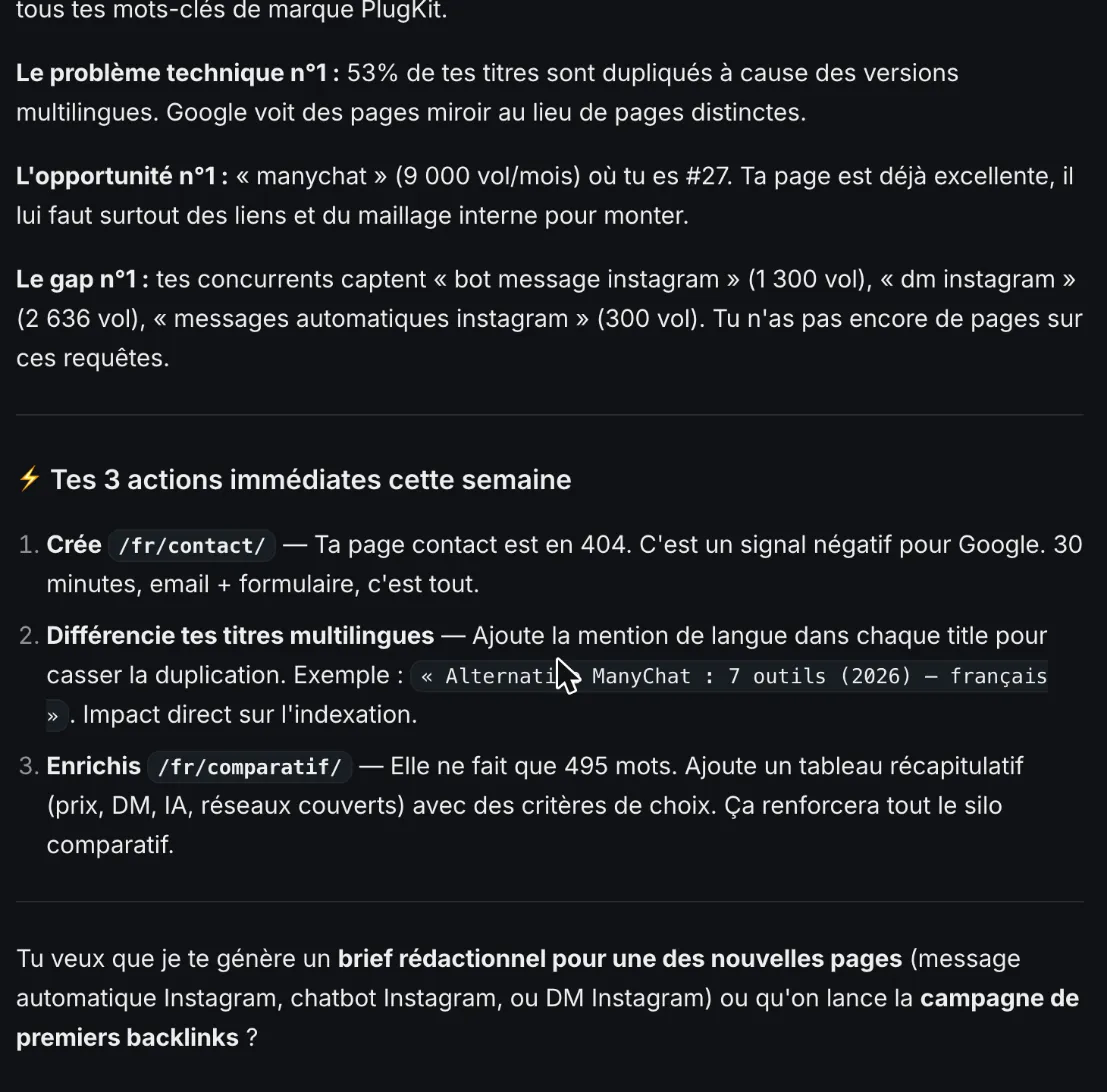 The action plan by priority returned by SemChat at the end of the audit. Screenshot of the SemChat app, 29 October 2026 (French interface).
The audit of my site ended on three actions for the week: create the contact page, make the titles of each language version distinct, and expand the 495-word comparison page with a summary table. The full document went further: 15 actions in three batches (weeks 1 and 2, weeks 3 to 6, weeks 7 to 12), each with a priority from P0 to P3 and an effort rated S, M or L.
Sort each fix by effort and gain
For each fix, ask two questions. How long will it take me? What can it change for my visitors and for Google? Then drop it into one of four boxes.
| High gain | Low gain | |
|---|---|---|
| Low effort | do it this week | slot it in between tasks |
| High effort | plan it | leave it for now |
Start with the “low effort, high gain” box. In my case, that was the contact page: SemChat estimated it at 30 minutes, and a missing contact page is something both visitors and Google notice. The grid sorts; it doesn’t promise. No tool can tell you how many visits a fix will bring before you make it. Google even warns that “some changes might take effect in a few hours, others could take several months” (SEO Starter Guide, read 30 October 2026).
Two more rules keep the plan honest. Write down the date of each fix in your record sheet, so you can compare before and after. And change one thing at a time on a given page, or you won’t know what worked. For fixing by priority and measuring the results, see how to improve SEO.
Read the report without drowning in it
An audit report can run long: SemChat’s report on my site had 10 sections. Read the summary and the action plan first. The rest is evidence, useful when you doubt a finding. Each step in SemChat’s work also has a “View details” button that opens the raw data, with a CSV export, so you can see where a number comes from. To read every part of a report and reuse it, follow our SEO report template.
Checklist for step 7:
- Every problem in the sheet has an effort and a gain.
- Three actions picked for this week, from the “low effort, high gain” box.
- Larger fixes given a date.
- Each finding checked before you act on it.
A real example: one site audited in one sentence
On 29 October 2026, I opened SemChat on the Free plan and typed one sentence, in French. In English, it reads: “Run an SEO audit of my site plugkit-avis.com and give me a clear action plan, by priority.” It was a French audit of a French site, and SemChat’s data tools were set to France and French for the whole run.
SemChat picked its full SEO audit skill on its own, then ran its tools in batches you can watch on screen: reading pages, crawling the site, domain rankings (89 results), top pages, the link profile, competitors (10), the gap against 5 competitors and the ranking history.
About 3 minutes later, I had 8 key numbers, a 5-point diagnosis, 3 actions for the week and a 10-section “full SEO audit” document I could copy or download. Every step of this checklist was in there, action plan included.
Then I checked. The contact page did return a 404: correct. The duplicate titles were real, with the hreflang nuance you read in step 3. The volume of 9,000 monthly searches it gave for its main keyword opportunity, I didn’t cross-check, so I won’t lean on it.
Now the catch. That single audit used up 100% of the Free plan’s monthly quota: documents 39.2%, site analysis 32%, SEO tools 28.9%, with the counter resetting on 28 November. On the Free plan, count on one full audit a month. Starter costs €20 a month, excluding tax; every plan is laid out on our SemChat pricing page. If you want to compare SemChat with other ways to audit without paying, read our free SEO audit guide.
Two things I can’t tell you yet, as an American reader would need them: the language of SemChat’s answers when you write in English, and how good its data is outside France. SemChat says its keyword data outside France comes from a mix of providers it doesn’t name (email from Haloscan, which belongs to the same company as SemChat, 29 October 2026). Missing data on both points (planned source: our own test in English).
How often to audit your site
No single number fits every site. Run your audit again when your site changes, or when your numbers move:
- after a redesign or a change of address;
- when visits from Google drop and you don’t know why;
- when you add a new section, a new language or a new product line;
- a few weeks after your fixes, to see whether they worked.
For that last case, SemChat’s audit proposed its own schedule: re-measure the first fixes two weeks later, and the expanded content six weeks later. Between two full audits, keep an eye on your key searches. A keyword rank checker tells you where you stand on each one, without running the whole list again.
An SEO audit checklist template to copy
Copy this into a spreadsheet: one row per problem, the first row filled with a real finding from my audit.
| Page | Problem | Proof | Fix | Effort | Gain | Status | Date |
|---|---|---|---|---|---|---|---|
| /fr/contact/ | Contact page missing | Answers 404 (checked 29 October 2026) | Create the page with an email and a form | Small | High | Done or to do | Date fixed |
And the whole checklist on one screen, to keep next to the sheet:
- Step 1: goal in one sentence, Search Console and Analytics on, starting numbers, competitors.
- Step 2:
site:search, Pages report, noindex and robots.txt, errors, speed, https, structured data. - Step 3: titles, descriptions, headings, duplicates, images, the words each page covers.
- Step 4: internal links, referring sites, competitors’ links, broken links, no paid links.
- Step 5: phones, Business Profile, name, address and phone consistent.
- Step 6: AI crawlers in robots.txt, text in the HTML, Bing.
- Step 7: effort and gain for each fix, three actions this week, every finding checked.
That’s the full SEO audit checklist: a goal, Google’s access, your pages, your links, local and AI search, then an action plan sorted by effort and gain. Start with Search Console. Keep three actions for this week, not fifteen. And check every finding, from a tool or from an assistant, before you change a thing on your site.
Frequently asked questions
Which SEO audit tool should you use?
Start with Google Search Console: it's free, and it's Google's own data on your site. Add a crawler such as the free version of Screaming Frog, which covers 500 URLs per crawl (pricing page, 30 October 2026). If you'd rather get a sorted action plan than learn a tool, SemChat runs the whole audit from one sentence; on its €0 Free plan, one full audit used up the month's quota in my test (29 October 2026).
What is an SEO checklist?
A list of checks you run on your site, in order, so nothing gets skipped: can Google read the pages, does each page answer a real search, do the right pages link to each other, and what do other sites say about you. An SEO audit checklist adds the last step most lists forget: turning what you found into an action plan by priority.
What is technical SEO?
Everything that lets Google find, read and index your pages: crawling, indexing, robots.txt and noindex rules, sitemaps, redirects, errors, HTTPS, speed and how pages display on phones. It's step 2 of this checklist; our technical SEO checklist goes deeper.
Can you run an SEO audit for free?
Yes. Google Search Console is free, and so is your own time reading your pages. Free tiers help too: Screaming Frog crawls 500 URLs per crawl (30 October 2026), Ahrefs Free covers the sites you prove you own (29 October 2026), and SemChat's Free plan ran one full audit of my site before its monthly quota ran out (29 October 2026).
Let your AI do the chores of getting found online.
10% off your subscription, for life with my link, if you subscribe within 2 weeks of signing up. No code. All about the SemChat promo code
Affiliate link: it costs you nothing extra.
Verified sources
- SemChat home page (the assistant tested here) (October 29, 2026)
- SemChat pricing (October 29, 2026)
- Google Search Central: SEO Starter Guide (October 30, 2026)
- Google Search Central: Get on Google (October 30, 2026)
- Google Search Central: understanding page experience (October 30, 2026)
- Google Search Central: introduction to structured data (October 30, 2026)
- Google Search Central: AI features and your website (October 30, 2026)
- Google Business Profile Help: tips to improve your local ranking (October 30, 2026)
- Screaming Frog SEO Spider: pricing and free version (October 30, 2026)
- Ahrefs Free, the free account (October 29, 2026)