How to create an SEO strategy: start from your real data
How to create an SEO strategy when you're not an SEO? Start from your real numbers, pick a few levers, and measure. On October 29, 2026, I asked SemChat one vague question: it read my Search Console, kept measured data apart from estimates, and gave me three levers. Here's what it got right, and what I had to check.
 By Jérémy Santos Updated on October 30, 2026 Tested on his own SemChat account: first audit on October 29, 2026.
 This page is part of the guide: automated SEO

Start from your real numbers, pick a few levers, measure. Illustration by Zéro Corvée.
You want more visitors. You’ve read a dozen SEO articles, and you still don’t know where to start. That’s normal: they gave you a list of a hundred things, not an order.
This page shows how to create an SEO strategy from one plain question, asked to SemChat, an assistant that does automated SEO. I ran the test on October 29, 2026, on plugkit-avis.com, my own site. You’ll see what it read, what it suggested, and what I had to check behind it. The SemChat buttons on this page are affiliate links.
The short version:
- What it did well: it read my Search Console, said for each number whether it was measured or estimated, and stuck to three levers.
- What it got wrong: a search volume three times too high, a first answer that mixed up my site’s languages, and one lever that was already in place.
- What it cost: 2.2 points of the Starter plan’s monthly quota, for the whole lesson.
One caveat: I ran the test in French, so the quotes below are translated. How SemChat words the same answers in English is missing data (planned source: a test in English).
What an SEO strategy is, for a small business
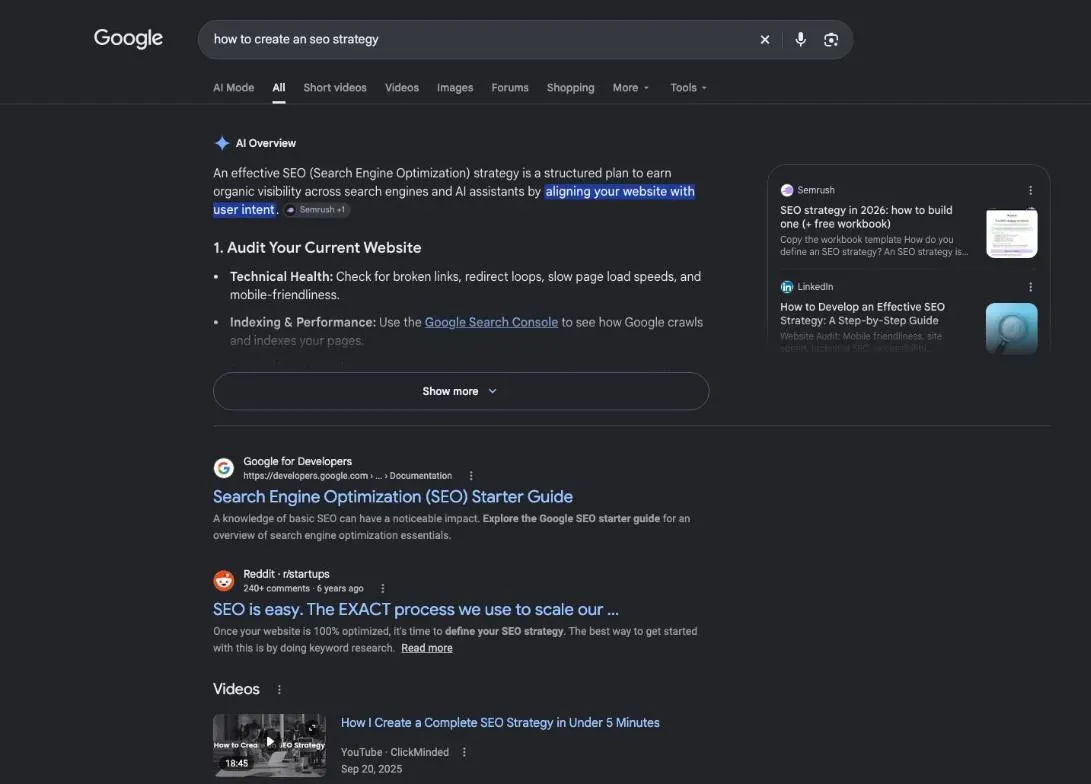
SEO (search engine optimization) means showing up in Google without paying for ads. Google puts it this way: SEO “is about helping search engines understand your content, and helping users find your site and make a decision about whether they should visit your site through a search engine” (SEO Starter Guide, read October 30, 2026).
What most beginners lack is a choice. Which pages you improve first, for which searches, and how you’ll know it worked.
Why your website needs one
Without a plan, you change ten things at once and never learn which one mattered. Google says results take weeks to show, so every change is a bet you can only read later. A strategy keeps those bets few and clear.
It also protects you from shortcuts. Google is blunt: “There are no secrets here that’ll automatically rank your site first in Google.”
Getting your site on Google, step by step
Four facts from Google’s own pages, read October 30, 2026:
- Google finds pages through links. “Google primarily finds pages through links from other pages it already crawled.”
- Nothing can be bought. “Google doesn’t accept payment to crawl a site more frequently, or rank it higher” (How Google Search works).
- Nothing is guaranteed. Google doesn’t guarantee it will crawl, index or serve your page, even if it follows the rules.
- Nothing is instant. You “likely want to wait a few weeks” before judging a change.
If your site is brand new, the question is different: the page on SEO for a new website covers that case. Here, we start from a site that already exists and gets a few visits.
The pillars to cover: keywords, content, technical, authority
Most guides split SEO into four pillars: keywords (what people type), content (does the page answer?), technical setup (can Google read the page?), and authority (do other sites mention you?). That split is a habit of the trade, not a rule written by Google. But each pillar maps to a Google page.
| The question | Where to look | |
|---|---|---|
| Keywords | What do people type? | Search Console, queries |
| Content | Does the page answer it? | Search Console, clicks |
| Technical | Can Google read the page? | Search Console, indexed pages |
| Authority | Do other sites cite you? | links from other sites |
Keywords: one main keyword per page
A keyword is the phrase people type. Give each page one main phrase, and don’t make two of your pages fight for the same one. Your Search Console already lists the phrases that show your pages: that’s the cheapest keyword research there is. To pick the phrase each page should target, see how to choose keywords for SEO: volume, difficulty and intent, explained simply.
Content people actually want to read
This is the pillar Google ranks above the others: “Creating content that people find compelling and useful will likely influence your website’s presence in search results more than any of the other suggestions in this guide.”
In practice: one page, one topic, one main search. Write for the person, then check the page answers the question in its first lines.
Authority: links and trust
Authority is what other sites say about you. Google notes that, in many cases, the pages it finds come from “other websites that are linking to your pages.”
For a small site, this pillar moves slowly. That’s why a beginner’s strategy often starts with the other three. The technical one starts with a simple check: are your important pages in Google at all? A URL indexer helps you spot the ones that are missing.
How to do SEO for your website: the basics on each page
Before any strategy, each page needs the basics right. The full checklist is on the page what is on-page SEO; here are the two that matter most.
Title tag and meta description built around one keyword
The title tag is the blue link in Google’s results. Google’s advice: “Write descriptive and concise text for your <title> elements” (title links guide, read October 30, 2026). It adds that the title is “often the primary piece of information people use to decide which result to click.”
Put the page’s main keyword in it, near the start, in words a person would use. The meta description sits under the title: one or two sentences that say what the page gives.
Headings and copy that use the keyword naturally
The main heading (H1) repeats the promise of the title. The subheadings answer the questions people ask next. Use the keyword where it fits, not in every sentence.
Step 1: how to create an SEO strategy from one plain question
I opened a new chat and typed, word for word, “Comment avoir plus de visiteurs ?” (How do I get more visitors?). No skill picked, no site address, nothing else.
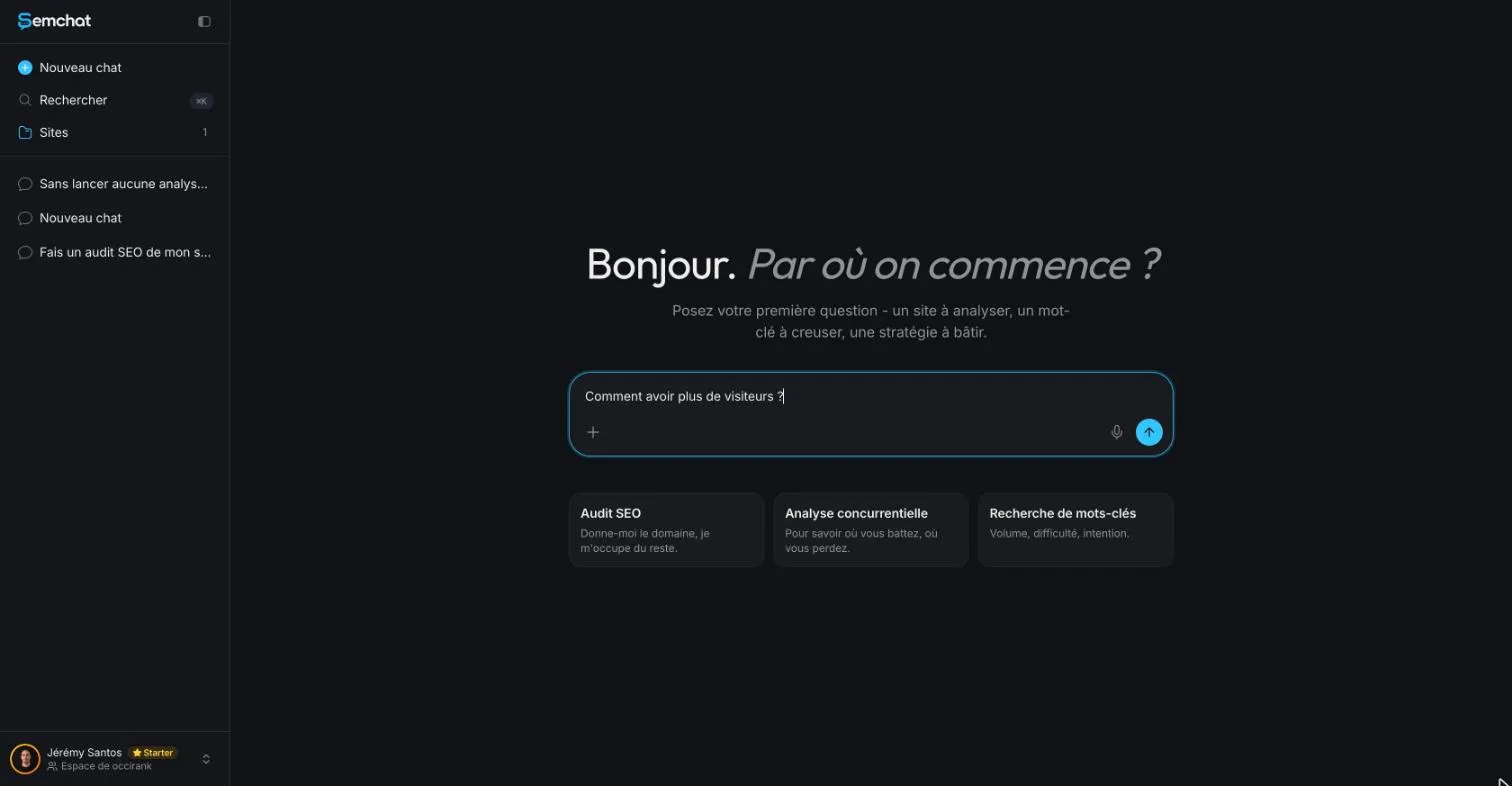
It’s the question everyone asks. I wanted to see whether it knew what to do with it.
SemChat picks the SEO strategy skill on its own
A purple label appeared above its answer: “Compétence · Stratégie SEO” (Skill · SEO strategy). It chose the skill by itself. You can also pick it yourself, from the “+” button in the message bar, then Skills.
It first said what it would look at: the site’s visibility, its keywords, and whether my Search Console was connected “pour avoir les vrais chiffres” (to get the real numbers). Then it showed each reading, one after the other:
- the Search Console properties on the account;
- an overview of the domain;
- the domain’s rankings (89 results);
- a comparison of two periods;
- the queries that bring my pages impressions (135) and my pages (94);
- a read of two pages, the ones closest to the first page of results.
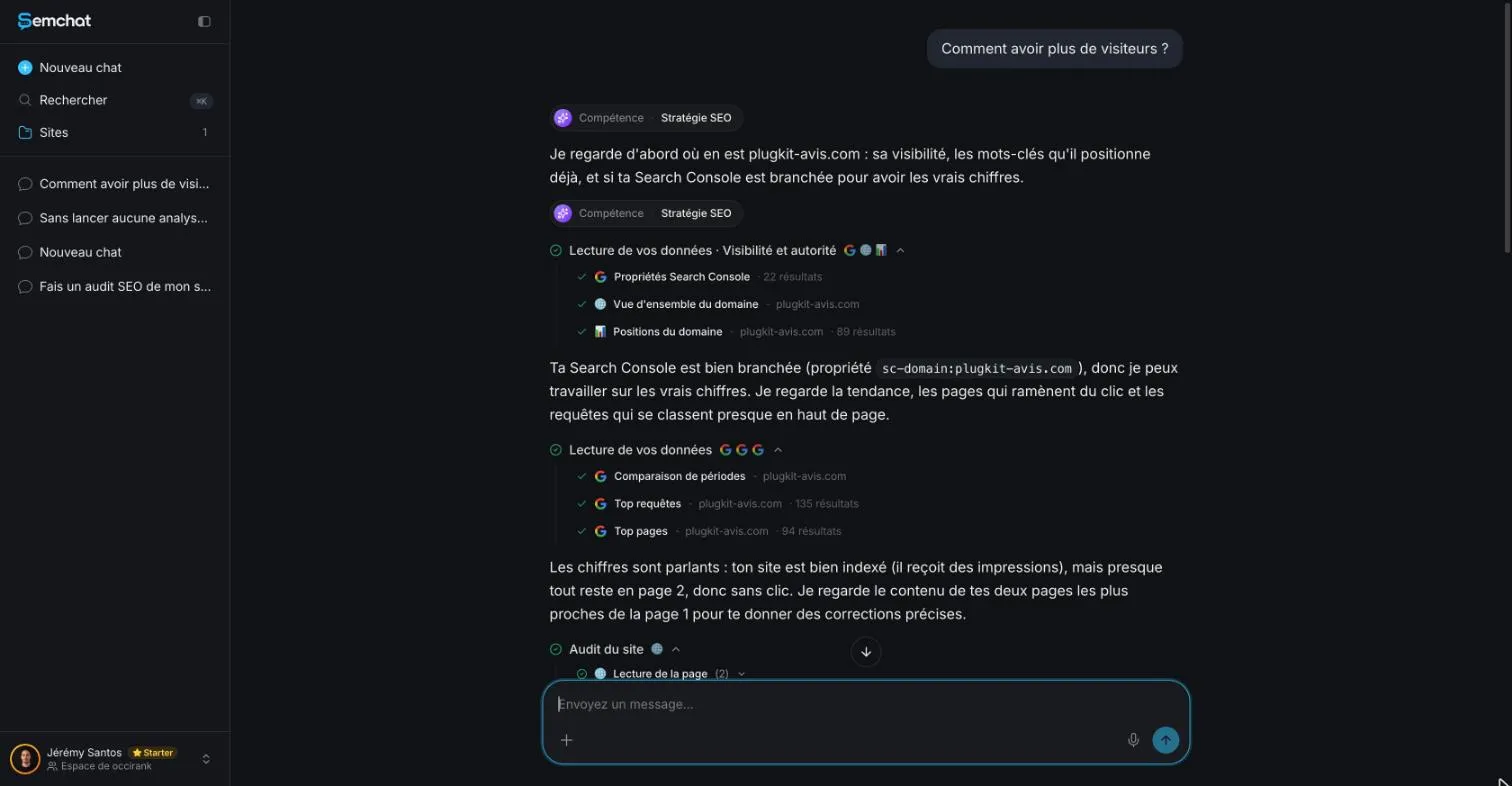
Each step has a “see details” button that opens the raw table. You always know where a number comes from.
Connect Search Console before you ask
Without Search Console, SemChat works from estimates. Connect it before your first question: Settings, then Connectors, then Google Search Console. The same screen offers Google Analytics 4 and Bing Webmaster Tools.
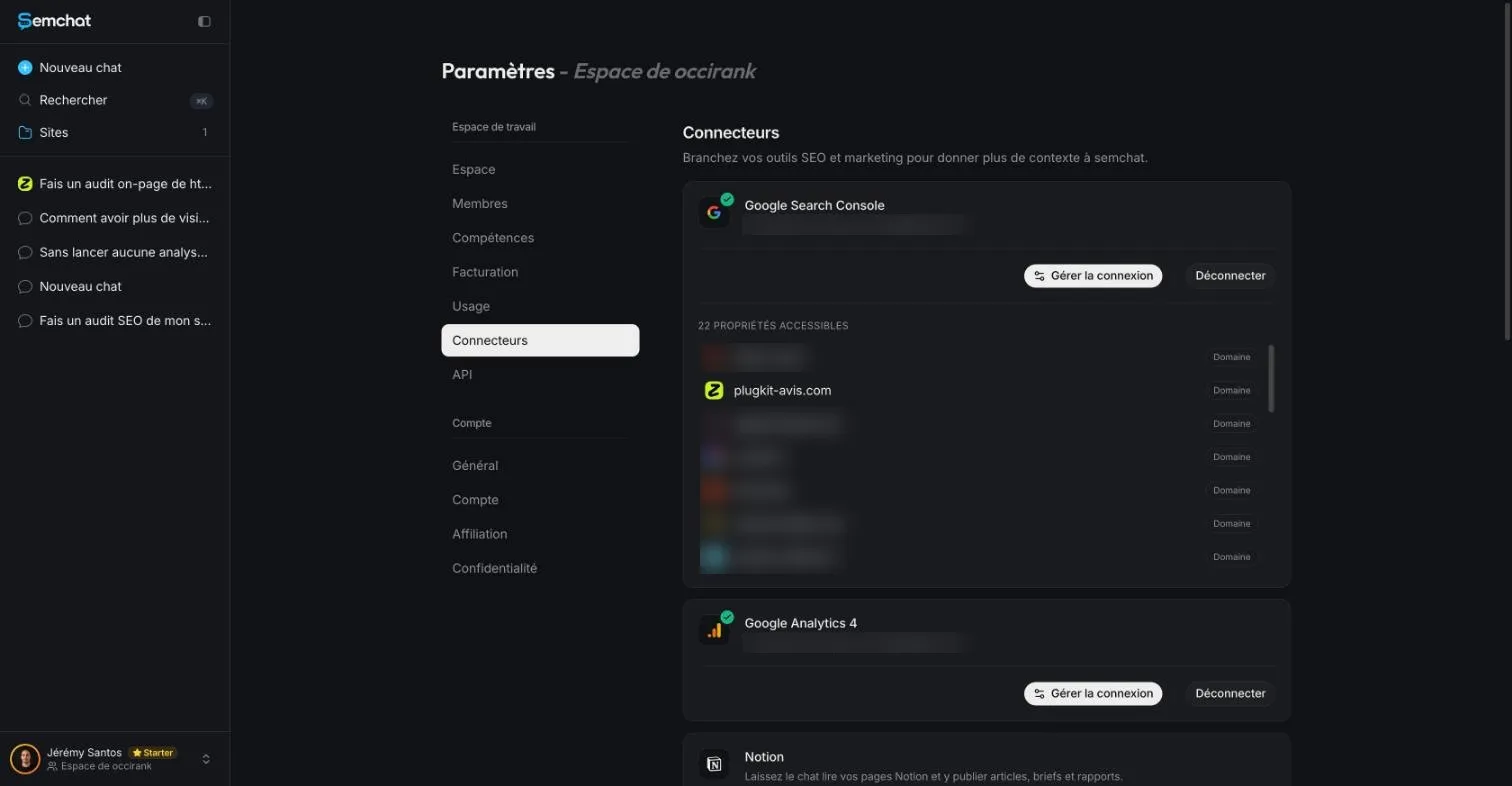
One trap I hit the same day: a chat tied to the site’s page told me “Je n’ai pas accès à ta Search Console” (I don’t have access to your Search Console), although it was connected to the workspace. A new chat read it fine. So ask your strategy question in a new chat.
10% off your subscription, for life with my link, if you subscribe within 2 weeks of signing up. No code. All about the SemChat promo code
Try SemChat for free Free plan, no credit card. Affiliate link: it costs you nothing extra.
Step 2: see where you stand: real numbers vs estimates
There are two kinds of numbers in any SEO plan, and you should never mix them up.
- Measured: what Search Console records on your site. Clicks, impressions (how often your page was shown), average position.
- Estimated: what a tool calculates without access to your site. A keyword’s search volume, a competitor’s traffic.
Rankings have three faces too. Your own Google search gives a snapshot on your screen. Search Console gives an average over a period. A third-party tool gives a robot’s reading on a given date. Three different numbers, and that’s normal.
Clicks and impressions read from Search Console
SemChat opened its answer with a card, “plugkit-avis.com, where you stand.” Over the last 28 days: 8 clicks, 533 impressions, a click-through rate of 1.5% and an average position of 13.7.
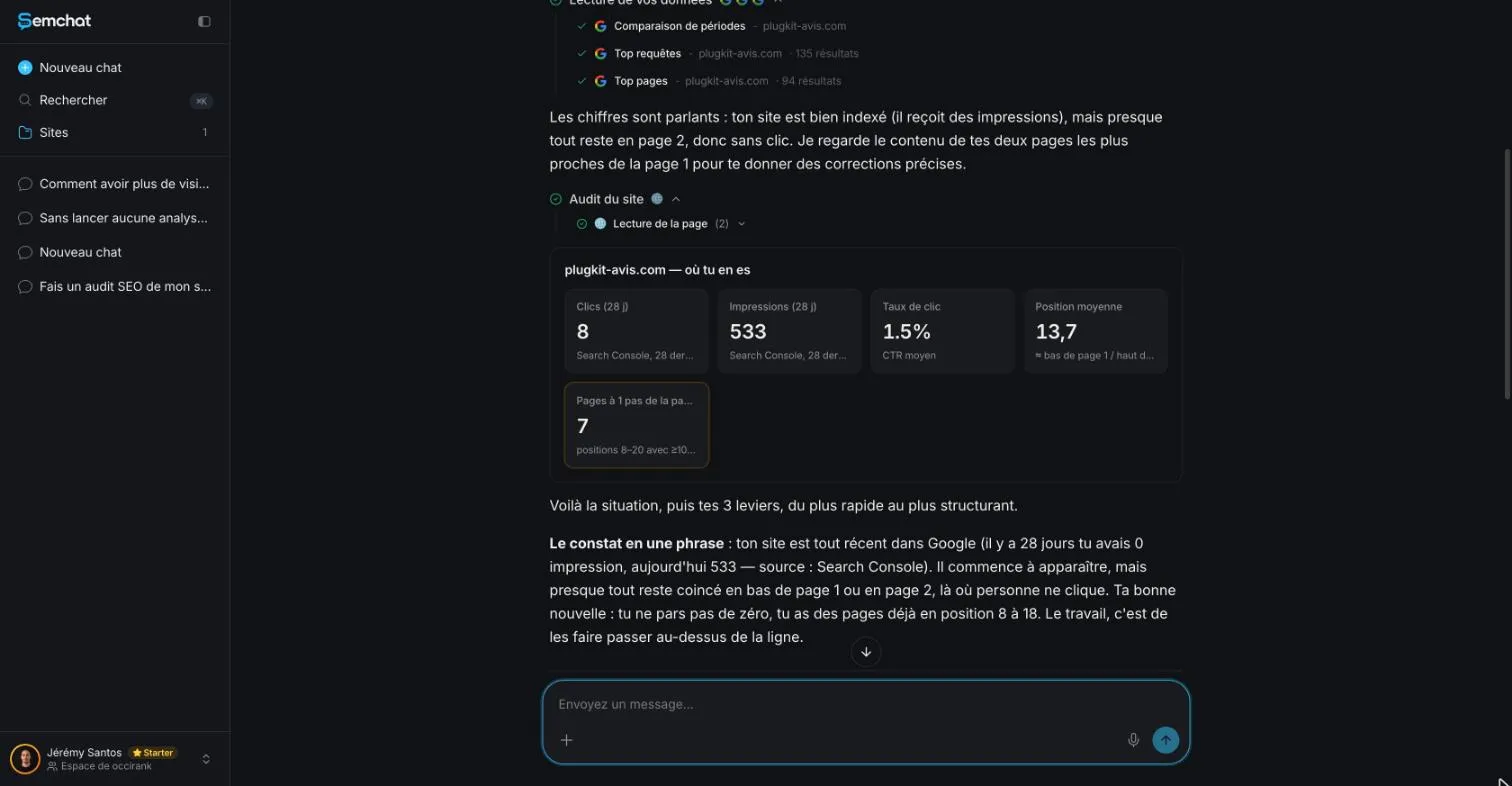
I checked these numbers the same day by querying my Search Console directly, over July 29 to October 26, 2026: 8 clicks and 533 impressions, identical. The site’s data only starts on October 24, 2026, which is why the 28-day and three-month totals match. True.
What I liked: every number carries its nature. Clicks and impressions are labeled as Search Console data. The average position of 13.7 is a Search Console average, not what you’d see searching yourself. Its other number, 7 pages one step away from the first page, is its own count: I didn’t recount it.
Estimated search volume: cross-check it first
Its second lever targeted the French phrase “statistiques instagram” (Instagram statistics), which it put at 655 searches a month. It did label that number as an estimated volume. Honest. But the number was far off.
DataForSEO (Google Ads data, France), read October 29, 2026, gives 210 searches a month. SemChat’s estimate was three times higher. In France, SemChat relies on Haloscan, a tool focused on French data (email from Adrian Delmarre, of Haloscan, October 29, 2026); two tools, two estimates.
Also watch its rounding. “~180 impressions a month” is an order of magnitude, not a measurement.
The rule: cross-check any SemChat volume before you build a page on it. A Search Console number you can read as is.
Step 3: choose your levers and build an SEO action plan
Your SEO action plan: a few levers, in order of priority
Why only a few? Because each change takes weeks to show. In my SemChat workspace, I had set one instruction for every chat: three actions at most, and the source of every number. It followed it. I’d copy that setting.
It gave three levers, from fastest to most structural. Here they are, with my check.
- Push pages already close to page one. My “when to post on Instagram” pages sat between positions 8 and 18, with no clicks. Its move: link to them from pages already on page one. Free, no new article. Sound logic. But those day-by-day pages are in English: its first answer mixed up my site’s languages, and it fixed that on the follow-up.
- Win “statistiques instagram”. My page sat at position 18 with 35 impressions in three months (source: Search Console). Its move: put the exact phrase at the start of the title. Good move; the 655 volume, as we saw, was not.
- Group the language versions with hreflang tags (which tell Google which page is for which language) and canonical tags. Needs nuance: an audit the same day had already found the checked pages declared to each other in hreflang.
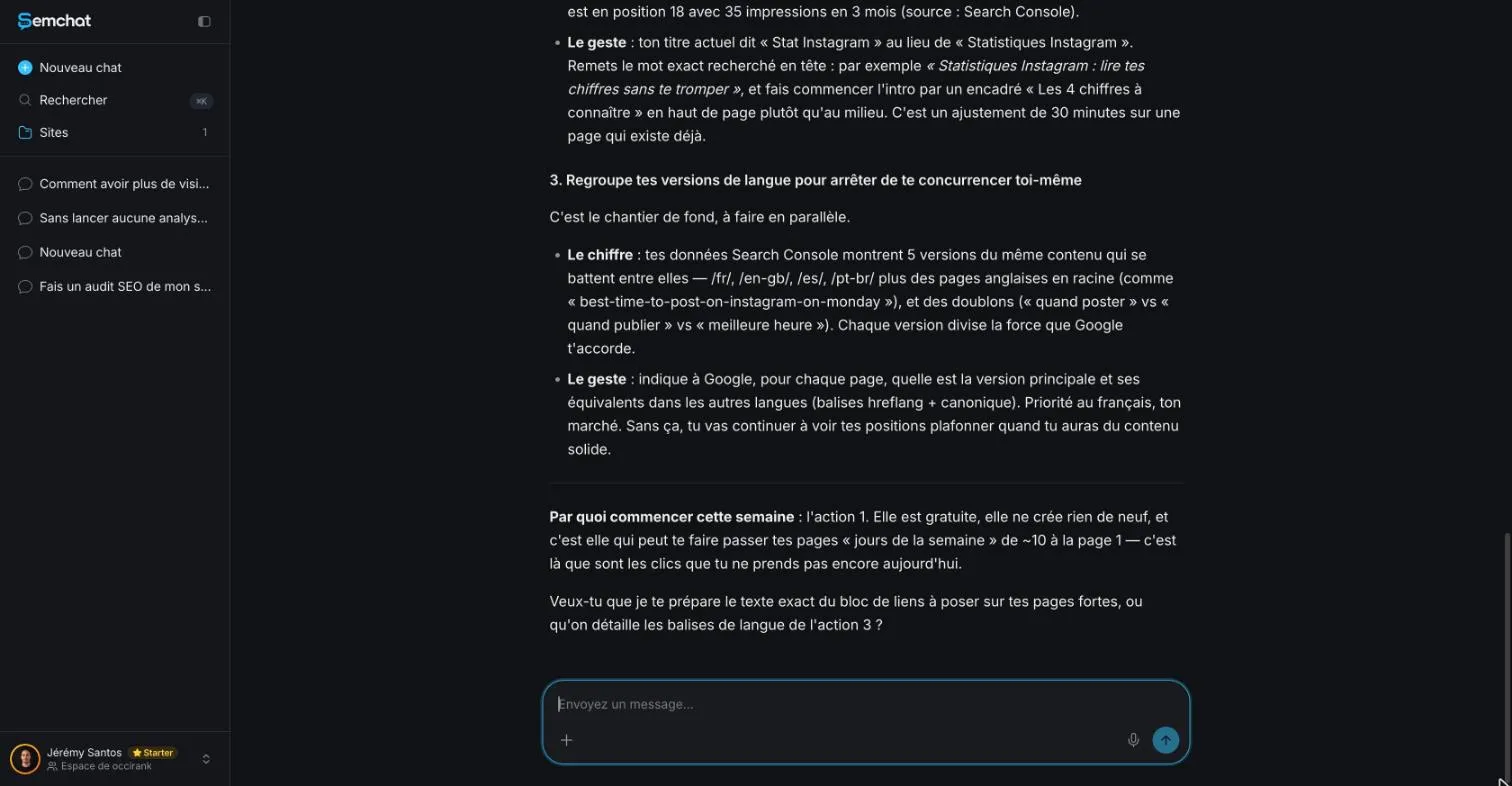
It ended with where to start this week: action 1, because it’s free and doesn’t create anything new. Then a question: should it prepare the block of links, or detail the language tags?
For a beginner, that’s the right shape for an SEO action plan: one priority, the reason for it, then the next question. If your competitors already hold the spot, look at what they do first: that’s the job of competitor analysis SEO tools.
Follow up to sharpen one action
I replied, in French: “Yes, write me the exact text of the link block, ready to paste on my home page.”
Before writing, it re-read my home page and my top pages. And it corrected itself: my French home page lives at /fr/, not at the root, and the “when to post on a given day” pages are in English. Their French equivalent is a single guide. So it changed targets.
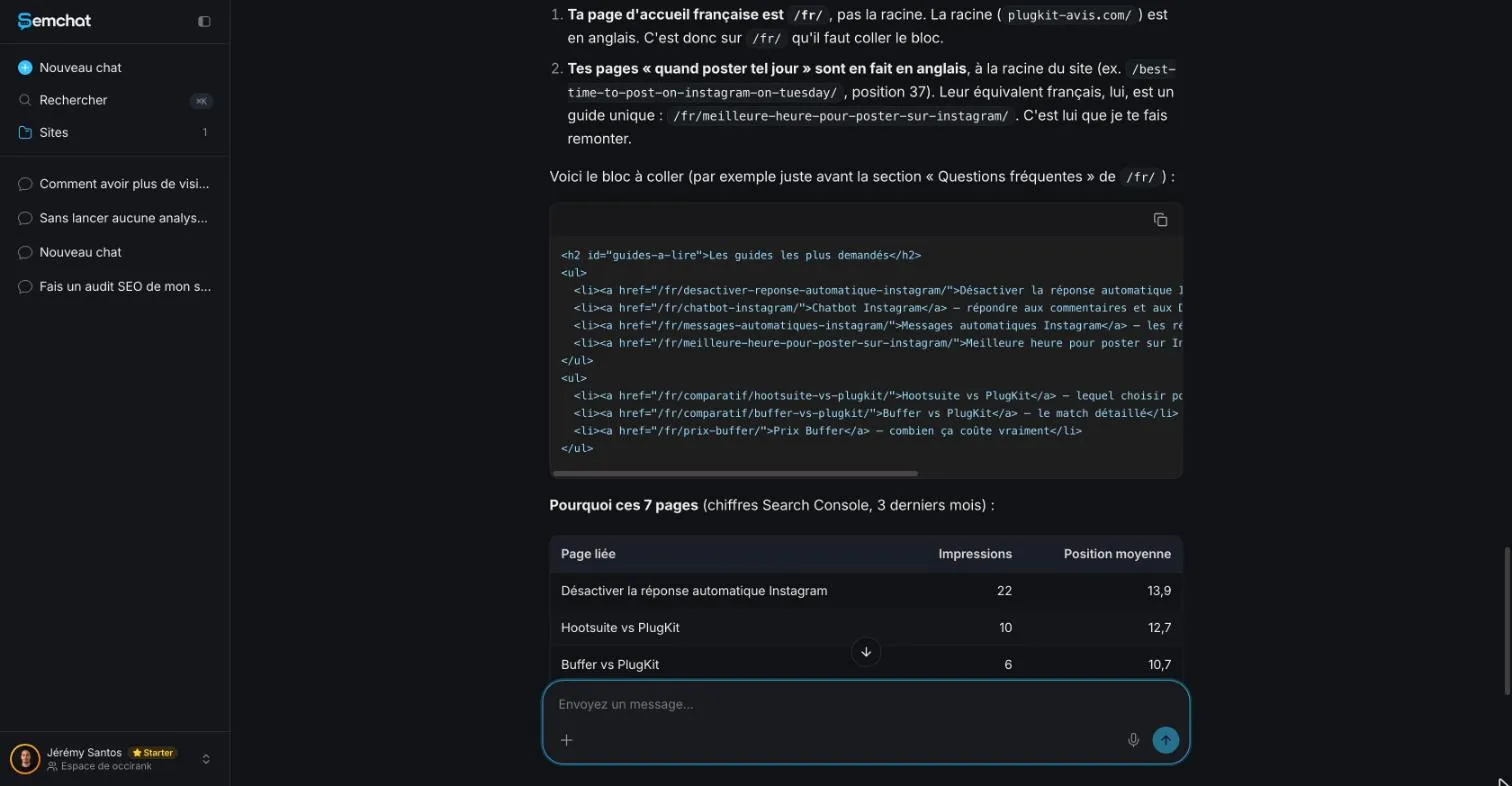
The block held seven links, each with its page’s impressions and average position over three months. Ready to paste.
My takeaway: the follow-up is worth more than the first answer. Always ask for the exact move, not an idea. And check every address in the block against your sitemap before you publish.
Step 4: measure, then adjust your strategy
Your SEO strategy is judged in Search Console, not in the assistant. Google’s own pitch: “Search Console tools and reports help you measure your site’s Search traffic and performance, fix issues, and make your site shine in Google Search results” (About page, read October 30, 2026).
My routine after each action:
- Write down the date of the change.
- Wait a few weeks, as Google advises.
- Compare the page’s clicks and impressions before and after, over periods of the same length.
- Then ask SemChat again with those numbers: it picks up from there.
If you run a shop or serve a local area, the method changes: your Google business profile matters too. That’s the topic of the local SEO tool page, tested with another skill.
What an SEO strategy costs in quota
The whole lesson used 2.2 points of the Starter plan’s monthly quota: the Usage screen went from 3.2% to 5.4%. That lesson also included an on-page audit request, so the strategy’s own share is missing data (planned source: a strategy-only test).
The Starter plan costs “€20 /mo”, excluding tax, and the Free plan €0, with “Every feature, in every plan” (pricing page, read October 30, 2026). Careful with Free: in another test, a single full site audit used up the whole month’s quota. Plan details are on the SemChat pricing page.
From strategy to content: an SEO content plan
A strategy tells you which pages to work on. A content plan turns that into a list: for each page, its main keyword, the question it answers, and the date you’ll update it. Start with the pages already close to page one, then the ones with impressions but no clicks, and only then new pages.
One more nuance. The app’s skills list describes the SEO strategy skill as a 12-month plan (app reading, October 29, 2026). My vague question produced no 12-month roadmap: three levers and the week’s action. For a calendar, ask for one in so many words.
Doing it yourself for free
Everything in this method has a free version: Search Console for the numbers, your own site for the changes, and your calendar for the waiting. An assistant saves you the hardest part for a beginner, choosing where to start. It doesn’t replace the checking.
My verdict on this skill: it does that hardest part well, from your real numbers. It gets volumes wrong and can suggest work that’s already done. Read the full verdict in my SemChat review.
So, how to create an SEO strategy in practice: connect Search Console, ask your question, keep three levers at most, cross-check every volume, start one action, and measure a few weeks later. Then do it again.
Frequently asked questions
How do you create an SEO strategy from scratch?
Set up Google Search Console (free) so you see which searches already show your pages. Pick a few pages close to the first page of results, give each one a clear topic, and link to them from your stronger pages. Change one thing at a time, note the date, and check the numbers a few weeks later: Google itself says “you likely want to wait a few weeks to assess whether your work had beneficial effects” (SEO Starter Guide, read October 30, 2026).
Is SEO dead, or just changing?
Search keeps changing, but Google's own advice still puts content first: “Creating content that people find compelling and useful will likely influence your website's presence in search results more than any of the other suggestions in this guide” (SEO Starter Guide, read October 30, 2026). What has not changed: no one can pay Google to rank higher.
Do you need an SEO team, or can you do it alone?
A small business can start alone with free Google tools and a short list of actions. If you hire help, Google gives one clear warning: “No one can guarantee a #1 ranking on Google. Beware of SEOs that claim to guarantee rankings” (Do You Need an SEO?, read October 30, 2026). Agency prices vary by provider; this site doesn't quote any.
Does SemChat build a 12-month SEO roadmap?
Its skills list describes the SEO strategy skill as a 12-month plan (app reading, October 29, 2026). In my test the same day, a vague question produced no 12-month roadmap: it gave three levers and one action to start that week. If you want a calendar, ask for it in so many words and check every date.
Let your AI do the chores of getting found online.
10% off your subscription, for life with my link, if you subscribe within 2 weeks of signing up. No code. All about the SemChat promo code
Affiliate link: it costs you nothing extra.
Verified sources
- Google Search Central: SEO Starter Guide (30/10/2026)
- Google Search Central: In-depth guide to how Google Search works (30/10/2026)
- Google Search Central: Do You Need an SEO? (30/10/2026)
- Google Search Central: Influencing your title links in search results (30/10/2026)
- Google Search Console: About page (30/10/2026)
- SemChat pricing (Free plan, every feature in every plan, Starter at €20 a month) (30/10/2026)