ChatGPT for SEO: ChatGPT or SemChat, which one for your site
ChatGPT for SEO, the short answer: ChatGPT is a fast writing partner for ideas, outlines, titles and proofreading, even on its free version. To know what to fix on your site, you need measured numbers: SemChat reads your Search Console and runs SEO tools before it answers, starting with a Free plan at €0. The two work well together; here is when to use each.

 By Jérémy Santos Updated on October 30, 2026 Tested on his own SemChat account: first audit on October 29, 2026.
 This page is part of the guide: GEO vs SEO
You asked ChatGPT “how do I improve my website’s SEO?” The answer came back in seconds, neatly organized and full of common sense. Then a second question hit you: where do I start, and based on which numbers? This guide to ChatGPT for SEO starts right there.
It belongs to our page on GEO vs SEO, which explains how AI engines are changing search. This page is more hands-on: how to use ChatGPT for your own site, where it stops, and what a tool built on measured data, like SemChat, adds. ChatGPT facts come from OpenAI’s pages, read on October 30, 2026. SemChat facts come from my own test on my own site, on October 29, 2026. Links to SemChat are affiliate links; they change neither the price nor what I say about it.
How ChatGPT works when you ask it about SEO
ChatGPT is a general assistant. OpenAI’s pricing page (read October 30, 2026) describes it through everyday uses: written conversations, web search with citations, file uploads, images, voice. It shows no plan built for SEO. For your SEO, think of it as a fast, patient writer who has read a lot.
When it answers an SEO question, two sources can be at work. First, the model itself. Google describes generative models in general this way: they “don’t retrieve facts, but predict a likely sequence of words based on their training data” (Google Search Central, read October 30, 2026). Second, web search: ChatGPT can look up pages and cite them. OpenAI’s help center adds that “ChatGPT search sometimes partners with other search providers” and warns that “Search results and citations can be incomplete, outdated, or incorrect” (read October 30, 2026).
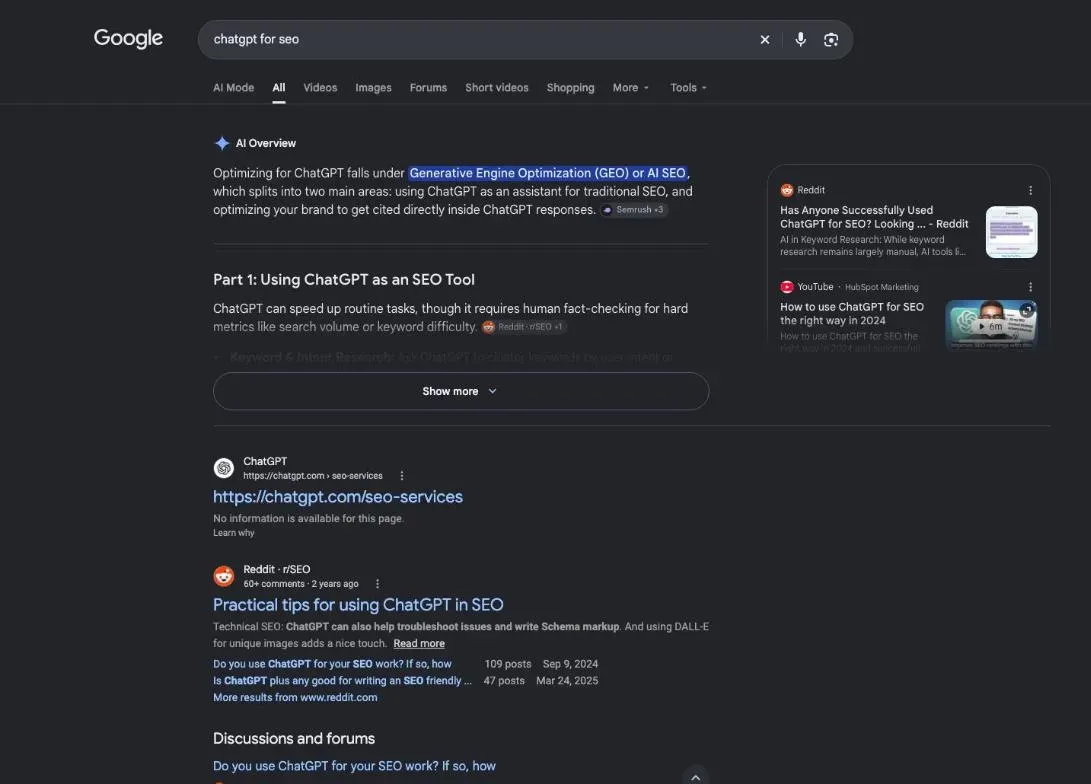
On the query “chatgpt for seo”, Google showed an AI Overview at the top, then guides, forum threads and videos (DataForSEO, United States, October 29, 2026). If that AI box puzzles you, our page on AI Overviews SEO explains how it picks its sources.
How to use ChatGPT for SEO: what it does well
Google is fine with it, within limits. Its guidance on AI content says generative AI “can be particularly useful when researching a topic, and to add structure to original content” (read October 30, 2026). Here are the jobs where ChatGPT saves you real time. Each time, give it context: your business, your city, your reader.
Keyword ideas and keyword groups
Start with your customers, not with a tool. Try: “I sell pottery classes in Austin. What questions do people ask before they book a class?” You get a list of ideas to sort, not a list of proven keywords.
Then ask it to group those ideas by intent: learning, comparing, buying. Each group can become a page. This step suits ChatGPT well: grouping is about meaning, not about numbers.
Outlines, briefs and title ideas
Give it a topic, your reader and what you want them to do next. Ask for an outline with section titles phrased as questions. Keep the sections that answer a real question; delete the filler.
You can also ask for five title ideas with your main keyword at the start. Pick one, then shorten it by hand. A short brief for a freelance writer works the same way: topic, reader, outline, tone, what to avoid.
Meta descriptions and FAQs
Ask for three short meta descriptions, each with your keyword and a reason to click. For an FAQ, paste the questions your customers really ask and let ChatGPT draft short answers. Then replace every generic line with your real prices, hours and delays.
Google’s guidance is explicit here: the fact-check “also applies to metadata like title elements, meta description elements, structured data, and alternate texts for images, which can appear in Search results” (read October 30, 2026).
Proofreading and small bits of code
Paste a paragraph and ask ChatGPT to cut jargon and long sentences. It is good at this, and it is a quick win for readers who are not experts.
It can also draft small pieces of code, such as FAQ structured data for a page. Google asks you to validate structured data markup to be eligible for its search features, so test the code before it goes live.
Prompts worth asking, and how to write them
Specific questions get usable answers. Here are four prompts that work for a small business site:
- “Here is my homepage text. List the five questions a first-time visitor still has after reading it.”
- “Here are 20 search ideas. Group them by intent and suggest one page per group.”
- “Write an outline for a page targeting [keyword], for [reader], with an FAQ of four questions.”
- “Rewrite this paragraph for a reader who has never heard of SEO. Keep every fact.”
ChatGPT SEO prompts: your brief matters more than the wording
People share long “magic” prompts online. The wording matters less than the facts you give. Tell ChatGPT who you are, who your reader is, what the page must make them do, and what you know for sure (prices, address, opening hours). Ask it to flag anything it is not sure about.
If you use ChatGPT Plus, you can save those instructions in a custom GPT, so you don’t repeat them every time: OpenAI’s pricing page lists custom GPTs among the Plus features (read October 30, 2026). A custom GPT remembers your rules. It does not add a keyword database.
Where ChatGPT falls short for SEO
SEO rests on two things: what people search for, and what Google sees of your site. On both, ChatGPT has limits worth knowing before you follow its advice.
Numbers without a source to double-check
Ask ChatGPT for the monthly search volume of a keyword, and it will often give you a number. Where does it come from? I could not find out. None of the OpenAI pages I read on October 30, 2026 names a keyword database or a source for search volumes. Missing data, then: the source of the volumes ChatGPT may quote.
The number may well be right. You just can’t check it. Treat it as a lead, not a measurement, and verify it in a tool that tells you where its data comes from before you build a page on it.
Can it see your Search Console data?
Your real numbers (the searches that show your site, your clicks, your positions) live in Google Search Console, which Google calls “a free service”. ChatGPT connects to work tools: Google Drive, Gmail, SharePoint, GitHub, Slack, Notion and more (OpenAI help on connected apps, read October 30, 2026).
Search Console and Google Analytics are not mentioned on the pages I read. The full app catalog sits behind a login, so they are neither confirmed nor ruled out. A more technical route exists: a custom MCP server, a bridge to another tool. OpenAI’s help reserves full support for it to Business, Enterprise and Edu plans, on the web.
Without a connection, you are left copying and pasting your numbers. One thing to know then: on Free, Go, Plus and Pro, “data sharing is enabled by default” to improve the models, and you can turn it off in your settings (OpenAI help on data controls, read October 30, 2026).
Content that reads generic
A model predicts likely words, so its first draft tends to sound like everything else on the topic. Google’s guidance points to its raters’ guidelines on “main content created with little to no effort, little to no originality, and little to no added value”. The fix is yours to bring: a real example, a photo you took, a price you charge, a mistake a customer made. That is what no model can guess.
Is ChatGPT content good for SEO?
It can be, once you have added value and checked it. Google does not ban AI content. Its line is about scale and value: “using generative AI tools or other similar tools to generate many pages without adding value for users may violate Google’s spam policy on scaled content abuse” (read October 30, 2026). One page, edited and fact-checked, is a different story from a hundred pages published unread.
What SemChat adds: measured data and your own site connected
SemChat is an SEO assistant you talk to. You ask a question in plain words; it runs the analysis tools itself and gives you an action plan. What sets it apart from ChatGPT is the numbers it fetches before it answers. That is what people mean by an SEO agent: it chains the steps without you dictating each one.
Search Console and Google Analytics connectors, and what was tested
SemChat connects to 8 tools: Google Search Console, Google Analytics 4, Bing Webmaster Tools, Yandex Metrica, WordPress, Webflow, Slack and Notion (app settings, October 29, 2026). You connect Search Console once, and your numbers come into the conversation.
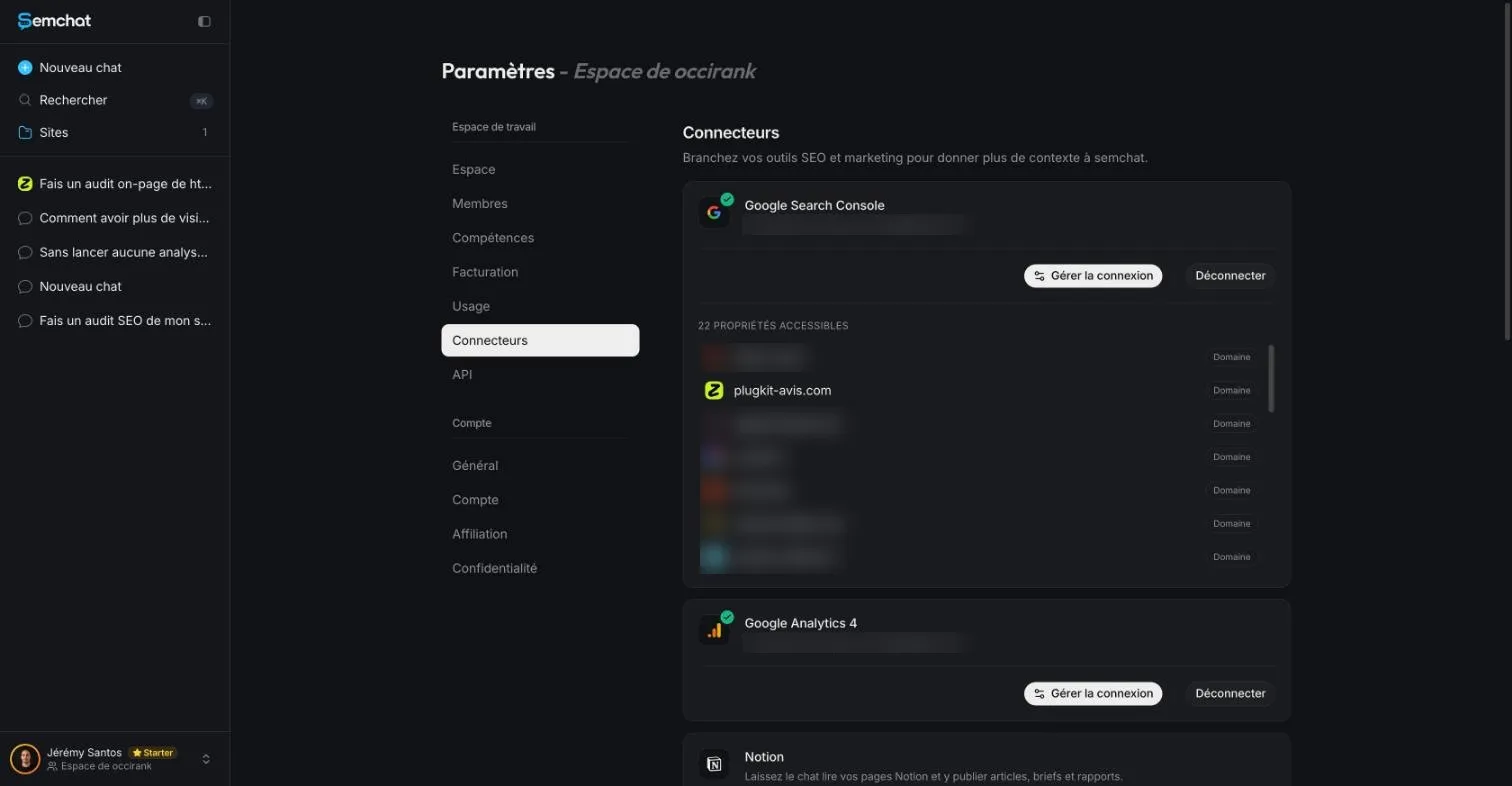
What I checked: a new chat in the workspace read my Search Console and, after one follow-up, gave the exact total (8 clicks, 533 impressions), confirmed through the Search Console API. What went wrong: the conversation linked to my site answered “Je n’ai pas accès à ta Search Console” (I don’t have access to your Search Console). So ask your data questions in a new chat. Google Analytics was connected, but I did not test it.
Keyword data outside France: a mix of providers
In France, SemChat uses data from Haloscan, a French SEO data tool published by the same company as SemChat (ARCHI301, in Nice). Outside France, its keyword data comes from a mix of providers that SemChat does not name (email from Adrian Delmarre, of Haloscan, October 29, 2026). I ran my tests in French, on a French site, so I have not checked data quality for the United States.
One thing I did check: when asked, SemChat gave the source of its volumes (“Base de données semchat”, a 12-month rolling average for the French market). Its numbers sometimes differed from DataForSEO’s Google Ads data (France, October 29, 2026), in both directions: 500 searches a month against 590 for one keyword, 655 against 140 for another. A number with a known source can be checked; that is the point.
Ready-made SEO skills, tested on a real site
SemChat has 17 built-in skills: full SEO audit, technical audit, content brief, topic cluster, local SEO, trust audit and more. For the free SemChat course, 13 of them ran in real conversations on real sites, and each result was checked (records of October 29, 2026).
In short: accurate findings on the essentials, some suggested pages that already existed, volumes to cross-check. One strength stood out: SemChat admits what it cannot see and corrects itself when you point out a mistake. In one test it answered, in French, “you’re right on all three points”.
A full audit started from one sentence
My test on October 29, 2026 took one sentence, typed in French: “Run an SEO audit of my site plugkit-avis.com and give me a clear action plan, by priority.” SemChat picked its audit skill on its own and ran its tools in visible rounds: first visibility and authority (rankings, top pages, backlinks, competitors), then competitor gap analysis. The action plan arrived in about 3 minutes.
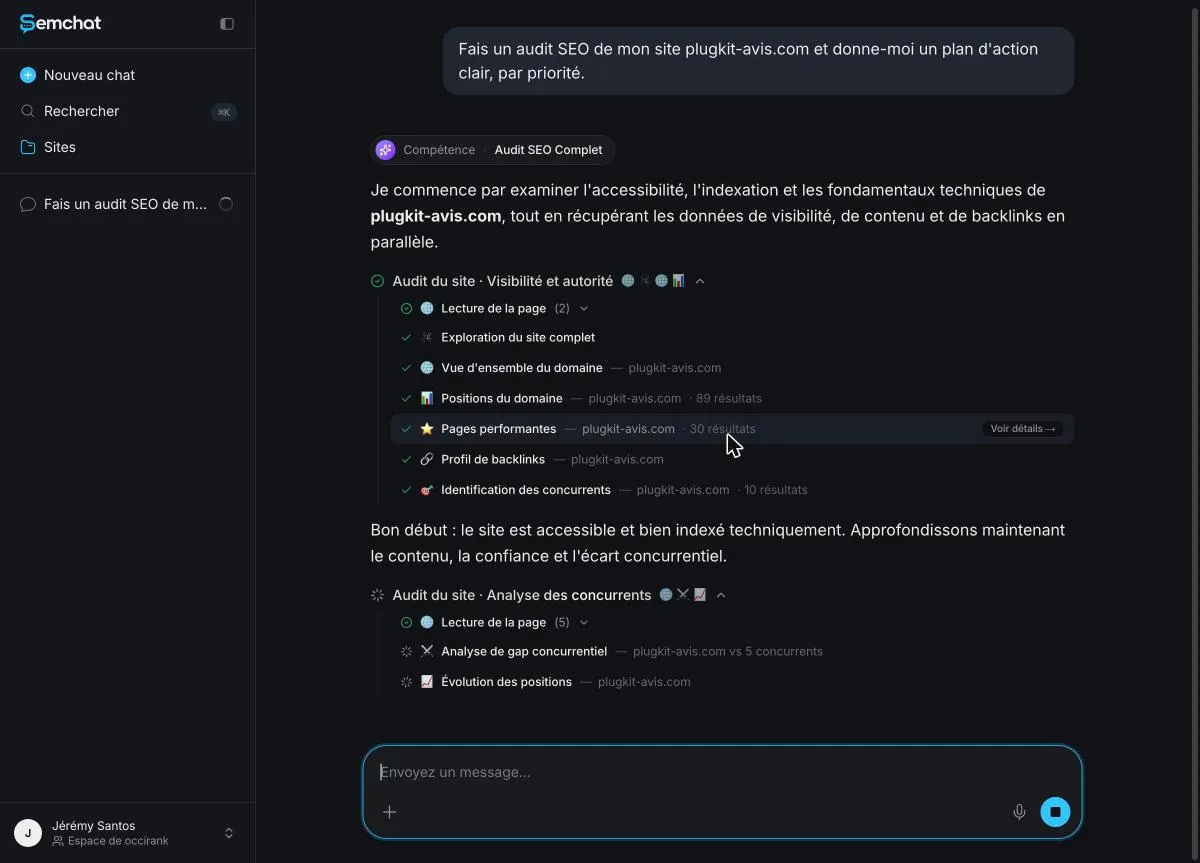
I checked two of its findings by hand. My French contact page did return a 404 error, as SemChat said. Duplicate titles between the US and UK English pages were real too, though calling them “mirror pages” went too far, since they are declared language variants.
Free on both sides? What each option costs
ChatGPT Free costs $0 and has no end date, with unlimited written chats under usage guardrails (pricing page, October 30, 2026). OpenAI’s help center lists ChatGPT Plus at “$20/month”. SemChat follows the same model: a free plan, then paid plans.
SemChat’s Free plan at €0, Starter at €20 a month
SemChat’s Free plan costs €0, with no credit card. It includes every feature, like the paid plans; only the monthly usage changes. Starter costs €20 a month before tax, or €16 a month billed yearly (€192 a year). Prices are in euros, even on the English page (pricing page read October 29, 2026). The plan-by-plan breakdown is on our SemChat pricing page.
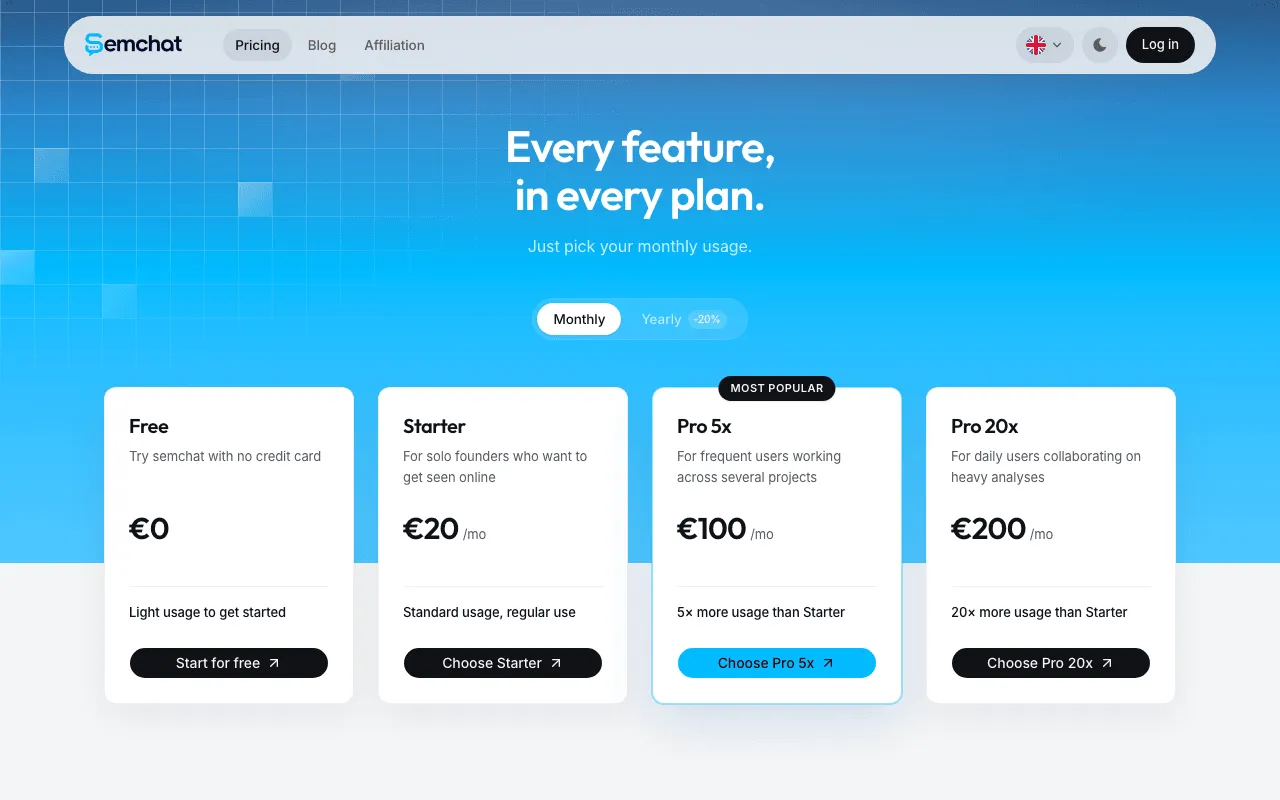
SemChat’s public pricing page in English, with the Free plan at €0. Screenshot of semchat.io/en/pricing, taken October 30, 2026.
What one full audit used up: 100% of the Free quota
Here is the limit to know. My full audit on October 29, 2026 used 100% of the Free plan’s monthly quota in one go. The Usage screen said the quota was used up, with a reset on November 28.
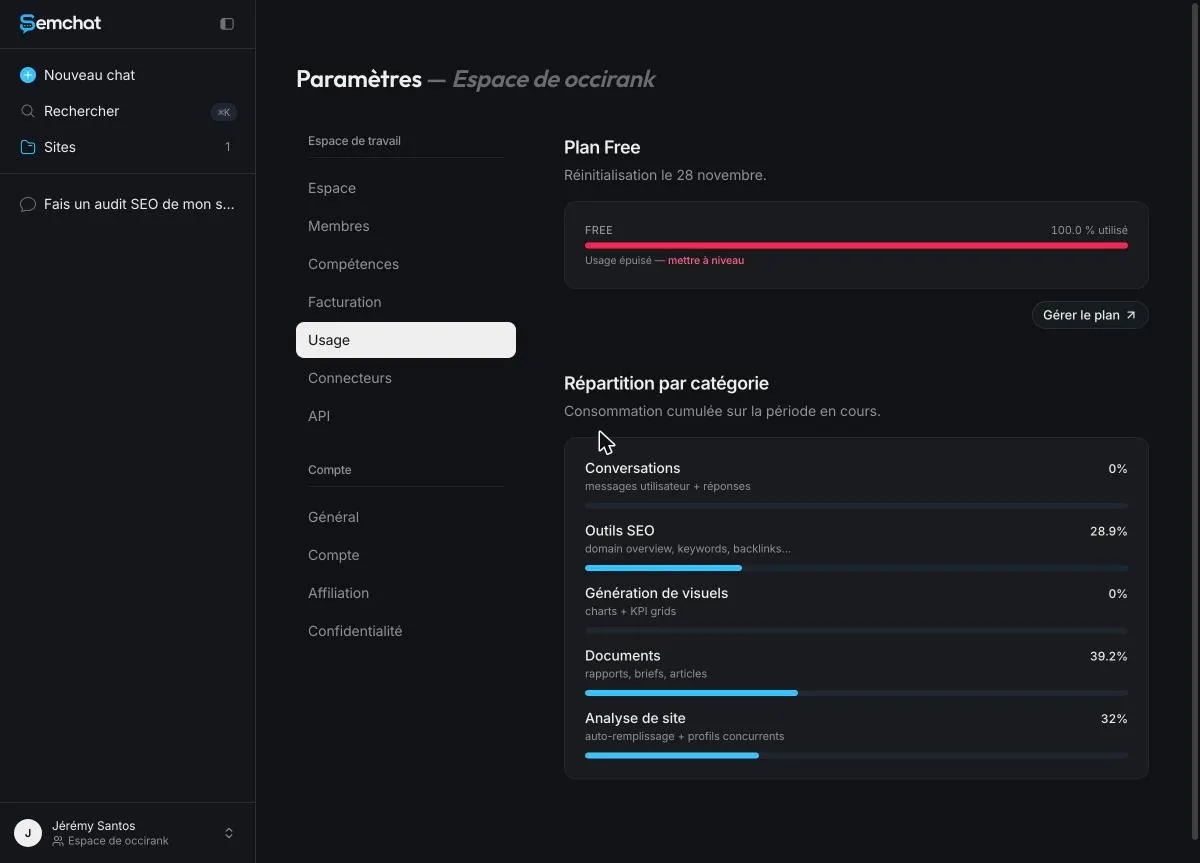
So the Free plan is for judging SemChat on your own site, once a month. To work on your SEO every week, you need Starter.
Can ChatGPT replace an SEO expert?
Not on its own. An SEO expert starts from your data: what your site ranks for, what Google indexed, what your competitors do better. By default, ChatGPT does not see that data, and OpenAI publishes no SEO data of its own. What it can replace is a lot of the writing work around SEO.
Where it saves you time
It saves you the blank page: first drafts of outlines, titles, meta descriptions and FAQs. It saves you rewrites: simpler sentences, shorter paragraphs. And it explains SEO terms in plain English when you hit one you don’t know. For the decisions (which page first, which keyword, what to fix), use measured data, from Search Console or from a tool that shows its sources.
ChatGPT or SemChat: which one for you
Ask yourself one thing instead: do you need help writing, or help deciding what to fix?
| ChatGPT | SemChat | |
|---|---|---|
| Best at | writing, rewriting, finding ideas | auditing your site, ranking the fixes |
| Search volumes | source not published on pages read | Haloscan in France, mixed providers elsewhere |
| Your Search Console | not mentioned on pages read | connector, read during the test |
| Free version | Free, no end date | Free, no credit card |
When ChatGPT is enough
You already know what to write and want to go faster. You need topic ideas, an outline, a meta description, a proofread. You also want an assistant for everything else: an email, a spreadsheet, an image. The free version does that job, as long as you check every fact before you publish.
When SemChat gives you more
You don’t know where to start and want a priority order. You want to see which searches your site already shows up for, with your own Search Console numbers. You’d rather not learn a dashboard: you ask your question, it runs the tools. If you want my full verdict before trying it, read my SemChat review.
Nothing stops you from using both: SemChat to decide what to do, ChatGPT to help you write it.
Getting cited by ChatGPT is a different goal
This page is about using ChatGPT for your SEO. Showing up in its answers is another topic: see how to rank in ChatGPT. For the bigger picture, read our guide to AI search optimization and our definition of generative engine optimization.
On that front, SemChat does not track your visibility in AI engines: its GEO features are announced as planned, with no date (email from Adrian Delmarre, October 29, 2026). Its technical audit skill does check “AI extractability”: in my test, it read my site’s robots.txt correctly for GPTBot and OAI-SearchBot, with one wrong line number for PerplexityBot. So when it comes to ChatGPT for SEO day to day, keep this split: ChatGPT to write, SemChat to measure.
Frequently asked questions
Is ChatGPT good for SEO?
For writing, yes: ideas, outlines, titles, meta descriptions, proofreading. Google itself says generative AI "can be particularly useful when researching a topic, and to add structure to original content" (Google Search Central, read October 30, 2026). For data, be careful: none of the OpenAI pages I read on October 30, 2026 names a source for the search volumes ChatGPT may quote.
How do you use ChatGPT for SEO keyword research?
Use it to brainstorm: describe your business, your city and your customer, and ask for the questions people ask before they buy. Then group the ideas by intent. Check every volume in a tool that tells you where its data comes from, and check your real queries in Google Search Console, which is free.
Which AI tool is best for SEO?
It depends on what you need. To write faster, a general assistant like ChatGPT does the job, even for free. To know what to fix on your own site, pick an assistant that pulls measured data first: SemChat connects to your Search Console and runs SEO tools before it answers, with a Free plan at €0, then €20 a month before tax (pricing page read October 29, 2026).
Does Google penalize AI-written content?
Google does not ban it. Its guidance says that using generative AI tools "to generate many pages without adding value for users may violate Google's spam policy on scaled content abuse", and asks you to fact-check all AI-generated content before publishing, titles and meta descriptions included (Google Search Central, read October 30, 2026).
Let your AI do the chores of getting found online.
10% off your subscription, for life with my link, if you subscribe within 2 weeks of signing up. No code. All about the SemChat promo code
Affiliate link: it costs you nothing extra.
Verified sources
- Google Search's guidance on using generative AI content (October 30, 2026)
- Google: in-depth guide to how Google Search works (no payment for ranking) (October 30, 2026)
- Google: about Search Console (a free service) (October 30, 2026)
- ChatGPT pricing page (French version) (October 30, 2026)
- OpenAI Help: ChatGPT Plus (October 30, 2026)
- OpenAI Help: ChatGPT search (October 30, 2026)
- OpenAI Help: connected apps in ChatGPT (October 30, 2026)
- OpenAI Help: connecting custom MCP servers in ChatGPT (October 30, 2026)
- OpenAI Help: data controls (October 30, 2026)
- SemChat pricing in English (October 29, 2026)
- SemChat home page (Free plan with no credit card, connectors) (October 29, 2026)