On page audit tool: what SemChat checks on a single URL
An on page audit tool compares one page with Google's top results for its keyword, then suggests a few fixes. I ran SemChat's on-page audit on a real page on 29 October 2026: it found the main flaw and the right priority, and it also missed some context. Here's the step-by-step, and what to check before you touch your page.
 By Jérémy Santos Updated on 30 October 2026 Tested on his own SemChat account: first audit on 29 October 2026.
 This page is part of the guide: automated SEO audit

One page reviewed against Google’s top results. Illustration by Zéro Corvée.
Your page is live, but Google shows other pages first. An on page audit tool answers one plain question: what do the top results have that your page doesn’t? It reads your page, looks at the competition, and suggests a few fixes.
This page is part of our guide to the automated SEO audit skills in SemChat. I’ll walk you through its On-Page Audit skill, tested on 29 October 2026 on a page of plugkit-avis.com, my other site. The test was run in French, on a French page, with the interface in French. The SemChat buttons on this page are affiliate links: I earn a commission if you subscribe through them.
On page audit tool: what it checks on a single page
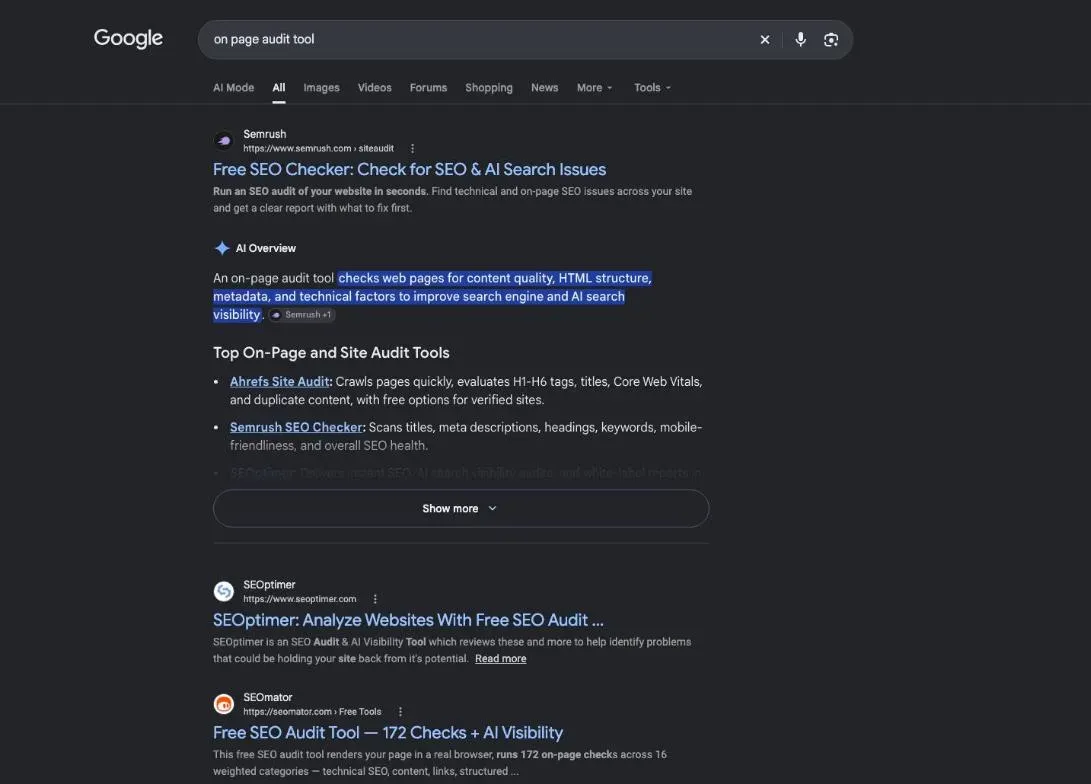
An on page audit tool works on one page and one keyword. It compares what Google shows at the top with what your page offers: the title, the subheadings, the content, and the links that lead to the page.
- 1 Your request The page, its keyword, what you want back.
- 2 What it reads Your page, Google's results, your site.
- 3 Its answer A diagnosis and a few fixes, with the exact text to change.
- 4 Your check Each fix verified on your page before you apply it.
On-page, technical, off-page: the difference in one line
On-page is what you set on the page itself. Technical is what lets Google reach and read it. Off-page happens on other sites, mostly the links they point at you. If you need the basics first, read our guide on what is on-page SEO.
An audit or an optimisation: what sets them apart
The audit is the diagnosis: what works, what’s missing, what to fix first. The optimisation is the work that follows: rewriting a title, adding a link, moving an answer up. The tool does the first part. You decide on the second. To turn a diagnosis into tasks you can track, our SEO report template walks through a real report and gives you a model to copy.
Why use a tool for an on-page check
You can check a page by hand. A tool saves you the slow part: opening the top ten results and comparing them line by line with your page.
Free checks: Search Console, speed tests, readability tests
Start with what’s free. In Search Console, Google’s free service for site owners, “The URL Inspection tool provides information about Google’s indexed version of a specific page, and also allows you to test whether a URL might be indexable” (Search Console Help, read 30 October 2026). PageSpeed Insights, Google’s speed test at pagespeed.web.dev, measures how fast the page loads. Readability checkers exist too; none was tested for this page.
None of these compares your page with the pages that outrank it. That’s the gap an on-page audit fills.
Step 1: pick the page and the keyword to audit
Pick a page that matters: a product page, a post that should bring visitors. Then write down the phrase your customers type to find it.
For my test, I picked the page on the best times to post on Instagram on plugkit-avis.com, published on 24 October 2026. Its keyword: “meilleure heure pour poster sur instagram” (best time to post on Instagram).
Tip: choose a page that already has a few impressions in Search Console. You’ll be able to give those numbers to the audit, and to measure the effect of your fixes.
Step 2: type SemChat’s template sentence, then your precise request
In SemChat, open a new chat, click the “+” in the message bar, then Skills, then On-Page Audit. The app writes the opening sentence for you.
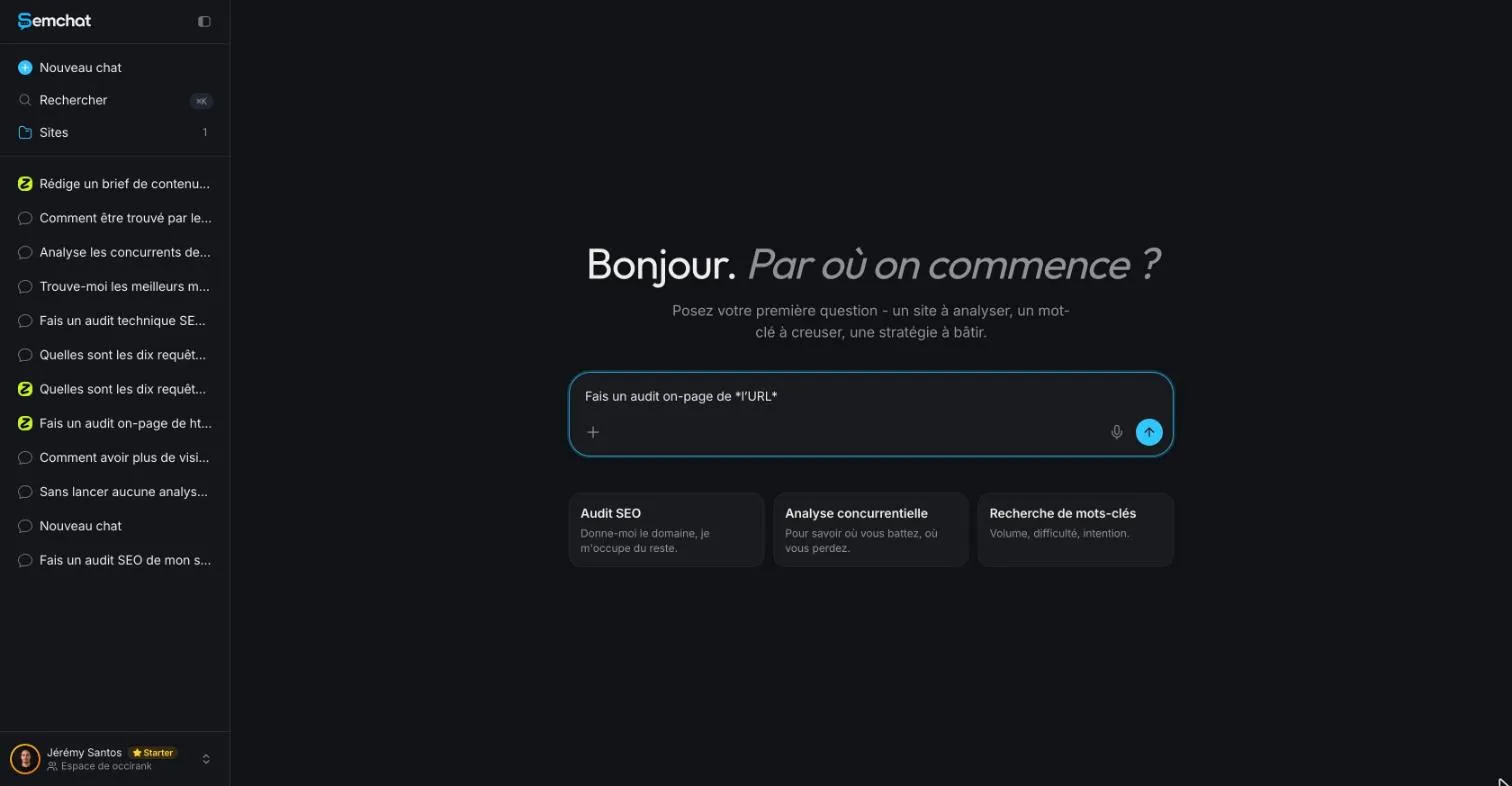
The template sentence is “Fais un audit on-page de l’URL” (run an on-page audit of the URL). You replace the URL placeholder with your page address. Then add detail: the tighter the request, the more useful the answer.
Here’s what I typed, in French, in a chat linked to my site (translated here, address shortened):
Run an on-page audit of plugkit-avis.com/fr/meilleure-heure-pour-poster-sur-instagram/ for the keyword “meilleure heure pour poster sur instagram”. The attached file contains this page’s Search Console queries over 28 days. Compare the page with Google’s top ten results: title, subheadings, content. Give me three fixes at most, in order of importance, each with the exact text to change and the source of the idea.
Three things make the difference: the exact keyword, a limit (three fixes at most), and the source of each idea. Without a limit, you get twenty points you’ll never apply.
Tested in French: the English wording is still to check
My test ran in French, on a French site, with the interface in French. How the skill handles an English request on an English page: missing data (planned source: test T36, in English).
Your Search Console rows: paste them as text
I had attached the Search Console export (13 queries, 29 September to 27 October 2026) with the “upload a file” option. SemChat ran four tools: page reading, search results (20 results), page analysis, site analysis. Then it warned that it hadn’t received the content of the attached file.
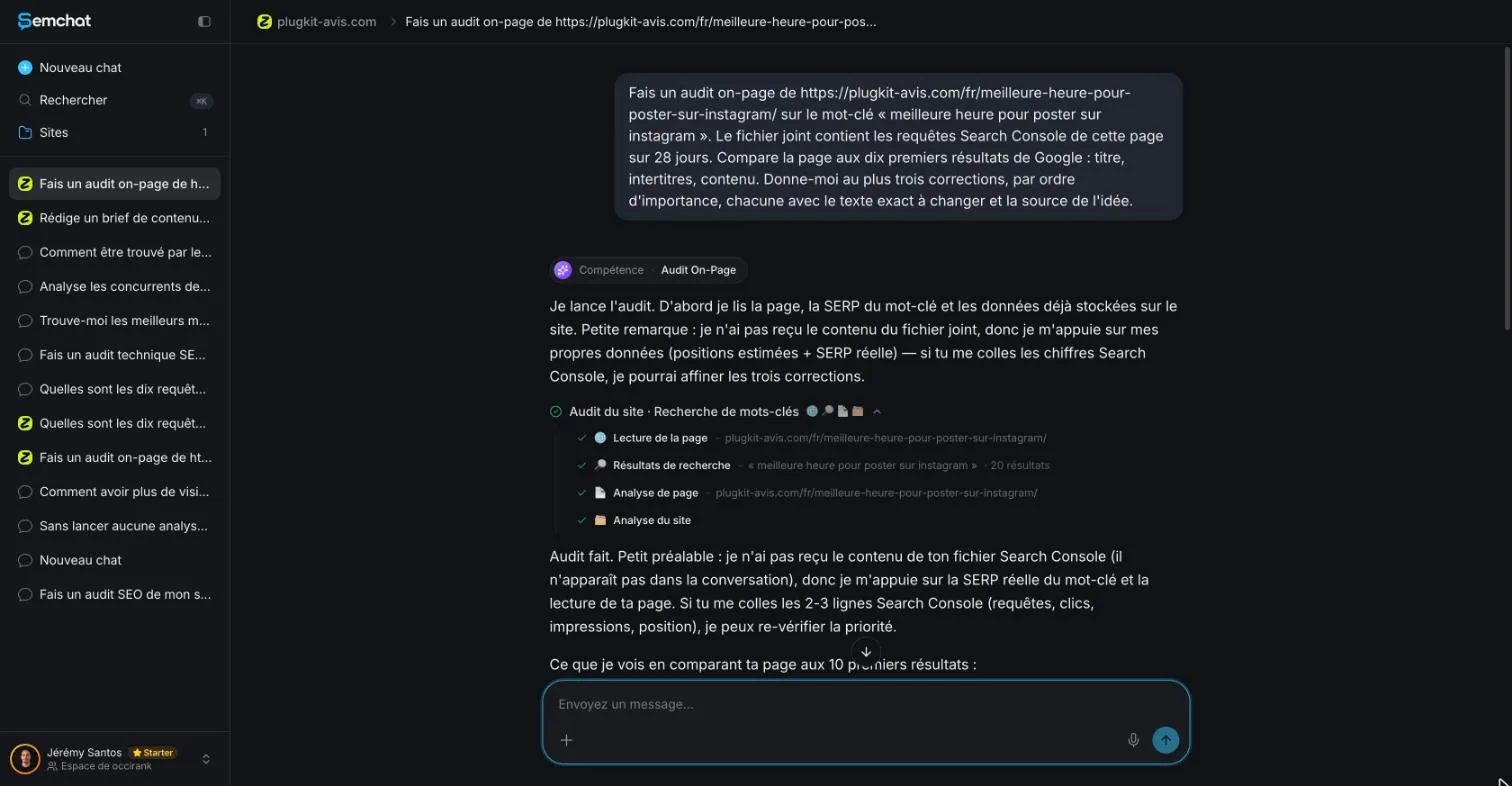
To its credit, it said so instead of making up numbers. The habit to keep: if your file isn’t read, paste its rows straight into the chat (query, clicks, impressions, position). That’s what I did in step 4.
Step 3: read the comparison with Google’s top results
Title, subheadings and content against the competition
The first answer came as three findings, then three fixes.
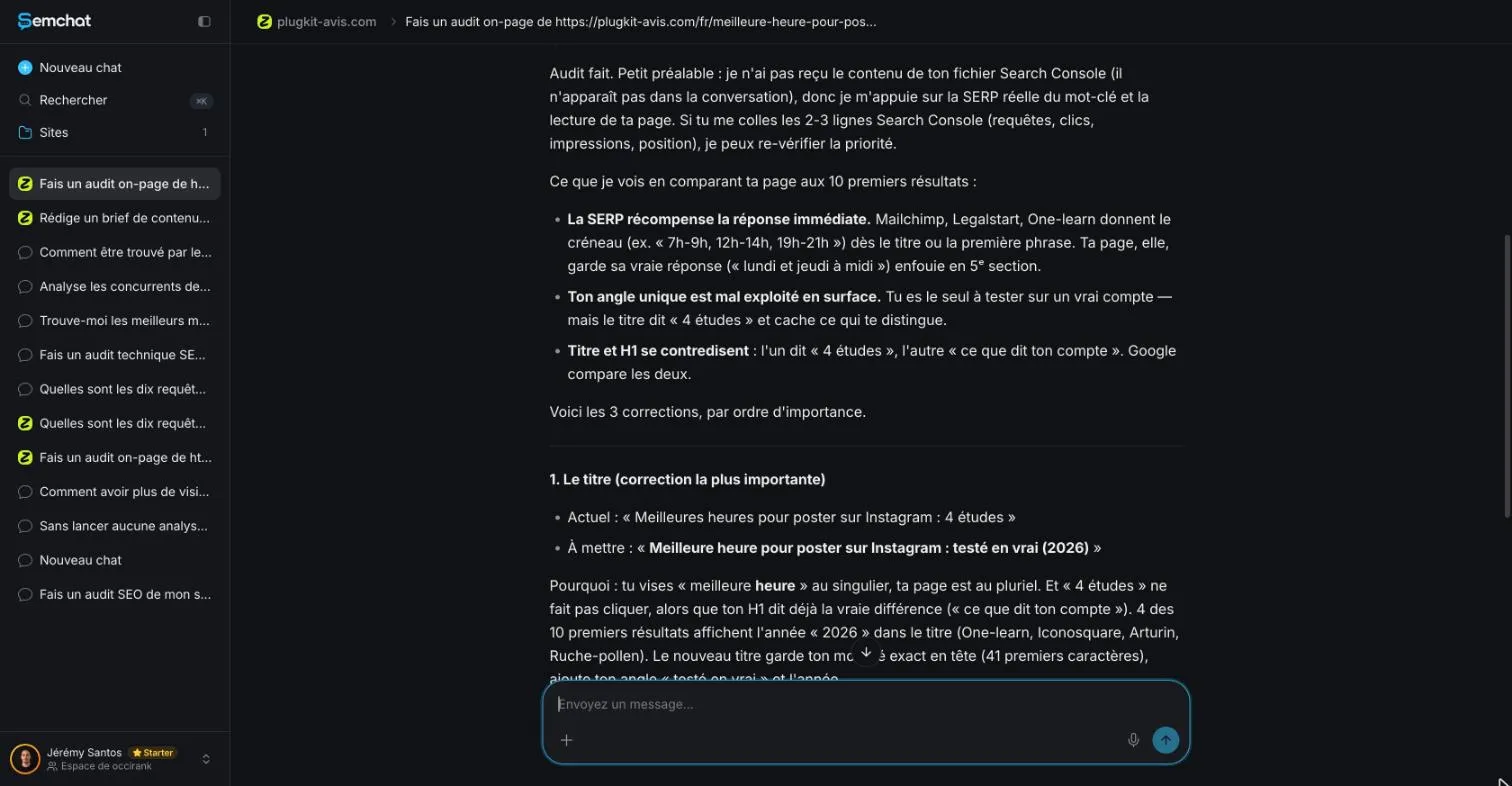
Its three findings, in short:
- The top results give the time slot right away, in the title or the first sentence. My page keeps its own answer further down.
- The page’s angle is buried: it’s based on a real account I tested, but its title talks about “4 studies.”
- The title tag and the main heading (H1) contradict each other.
Its three fixes, in order: a new title tag, an answer sentence right under the H1, and a new H1 matching the title. Then: measure again in two to three weeks.
The first finding held up. A DataForSEO snapshot of Google’s results from the same day also showed the time slot in the page descriptions. Some of its examples didn’t: two of the sites it named weren’t in that snapshot’s organic results. Results change with the moment and the tool that records them.
Step 4: check each fix it suggests
A fix isn’t right because a tool wrote it. Open your page next to the answer, and check every point.
A title tag that contradicts the main heading: well spotted
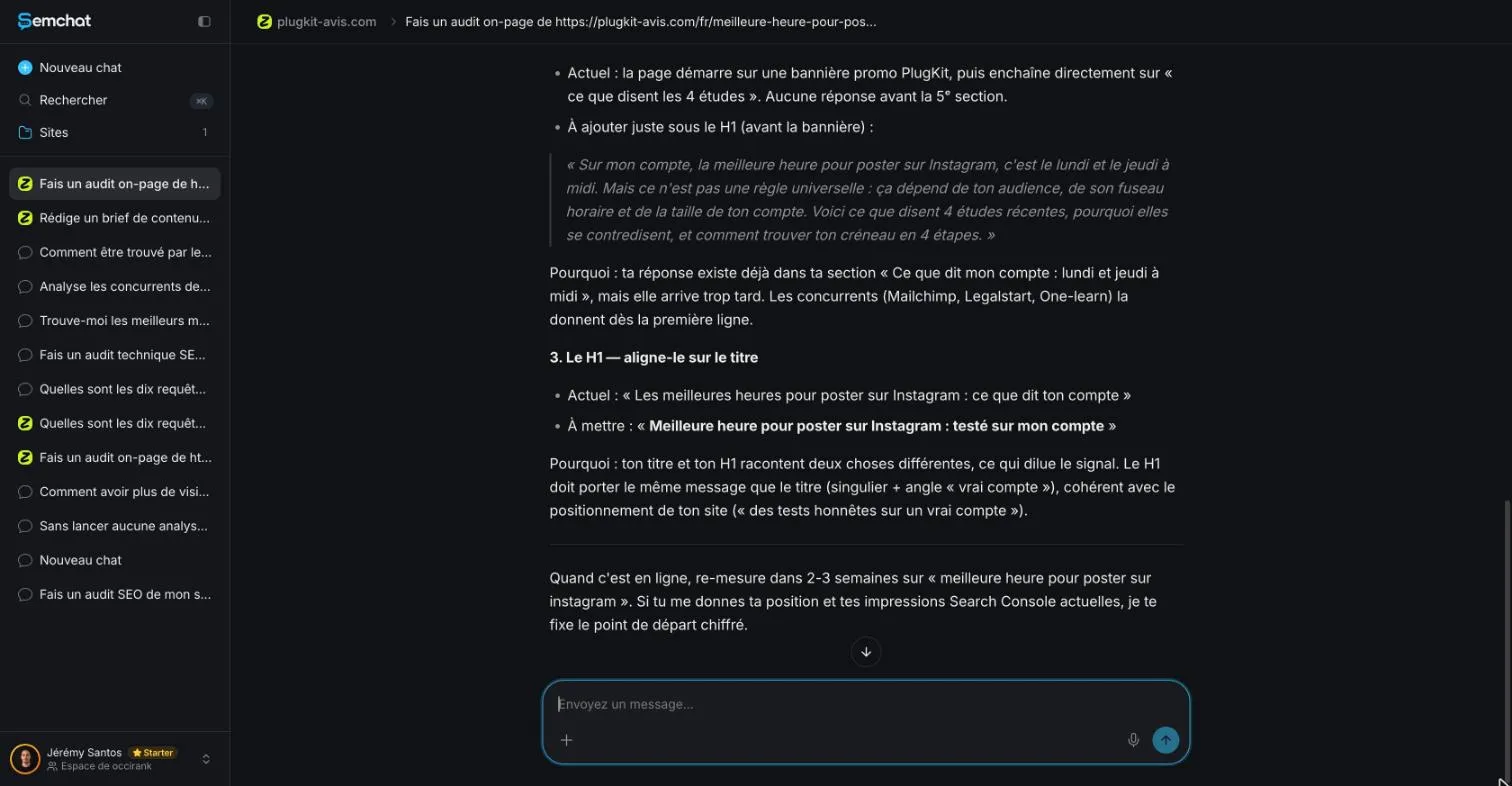
I checked the same day. Title tag: “Meilleures heures pour poster sur Instagram : 4 études” (Best times to post on Instagram: 4 studies). H1: “Les meilleures heures pour poster sur Instagram : ce que dit ton compte” (The best times to post on Instagram: what your account says). Two promises for one page: the finding is true.
Google gives the same advice, tool or no tool: “Write descriptive and concise text for your <title> elements,” and “Make it clear which text is the main title for the page” (title links documentation, read 30 October 2026).
Internal links from pages that already rank: the right priority
Next, I pasted the Search Console rows as text, with the publication date, and asked whether these figures changed the order of the three fixes.
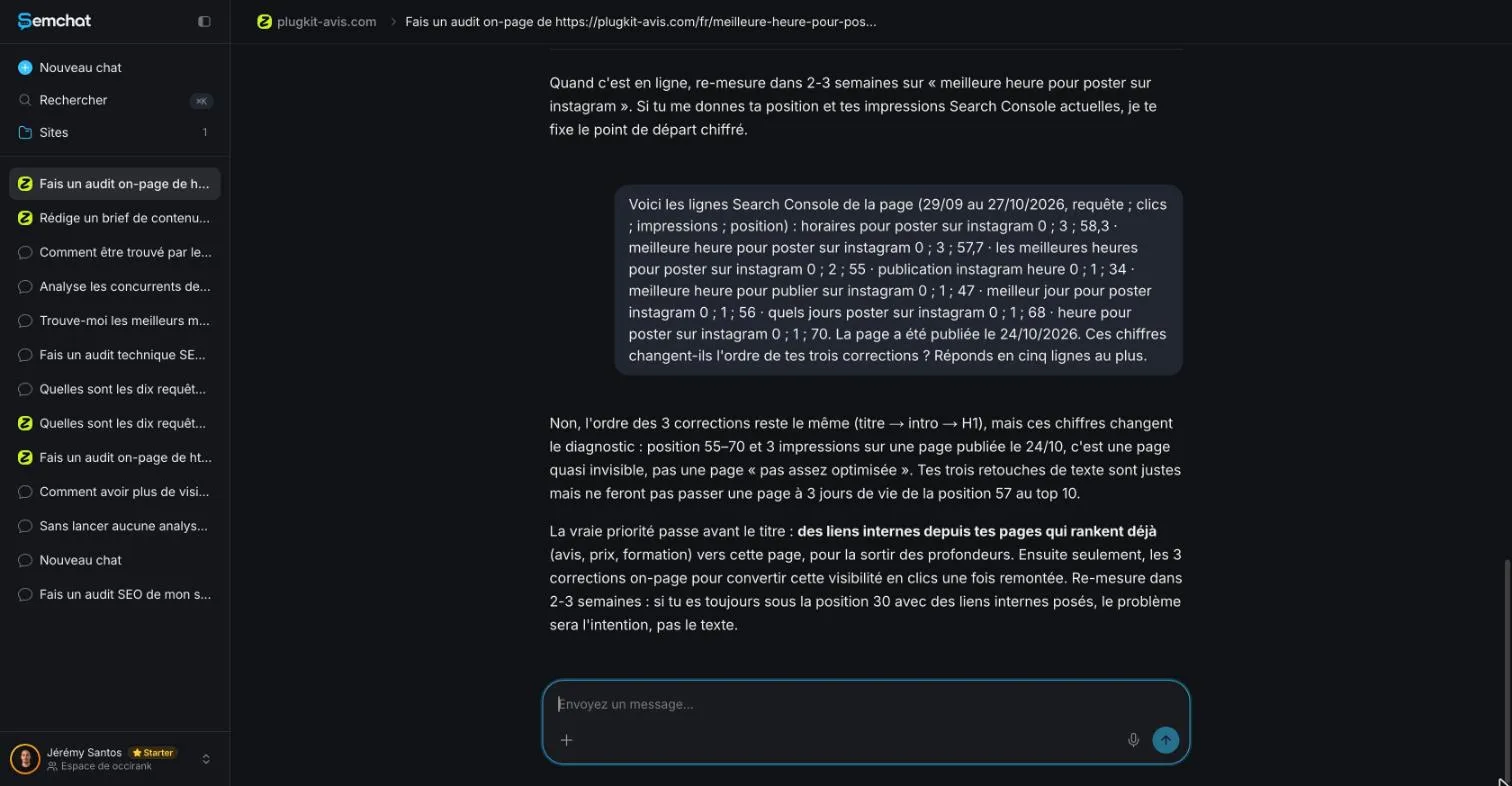
Its second answer changed the diagnosis. A page published five days earlier, with almost no impressions, is “nearly invisible” (my translation). Before rewriting any text, it needs internal links, links from your own pages that already rank. Only then the three fixes. And if the page stays below position 30 after that, the problem is the search intent, not the text.
Checked in Search Console (29 September to 27 October 2026): my review page had an average position of 5.0, my course page 3.0. Of the 51 French pages in the sitemap, 13 linked to the audited page; neither of those two did. The priority was right. One caveat: it also named my pricing page, which wasn’t among the site’s top 25 pages in Search Console.
That was the most useful answer of the test, and it only came with the real numbers. Always give them.
Step 5: spot what it misread
The audit also missed context. You only catch these errors by rereading your own page.
A suggested sentence that erases a limit written on the page
Its proposed answer sentence said that on my account, the best time is Monday and Thursday at noon. But the page states its own limit.
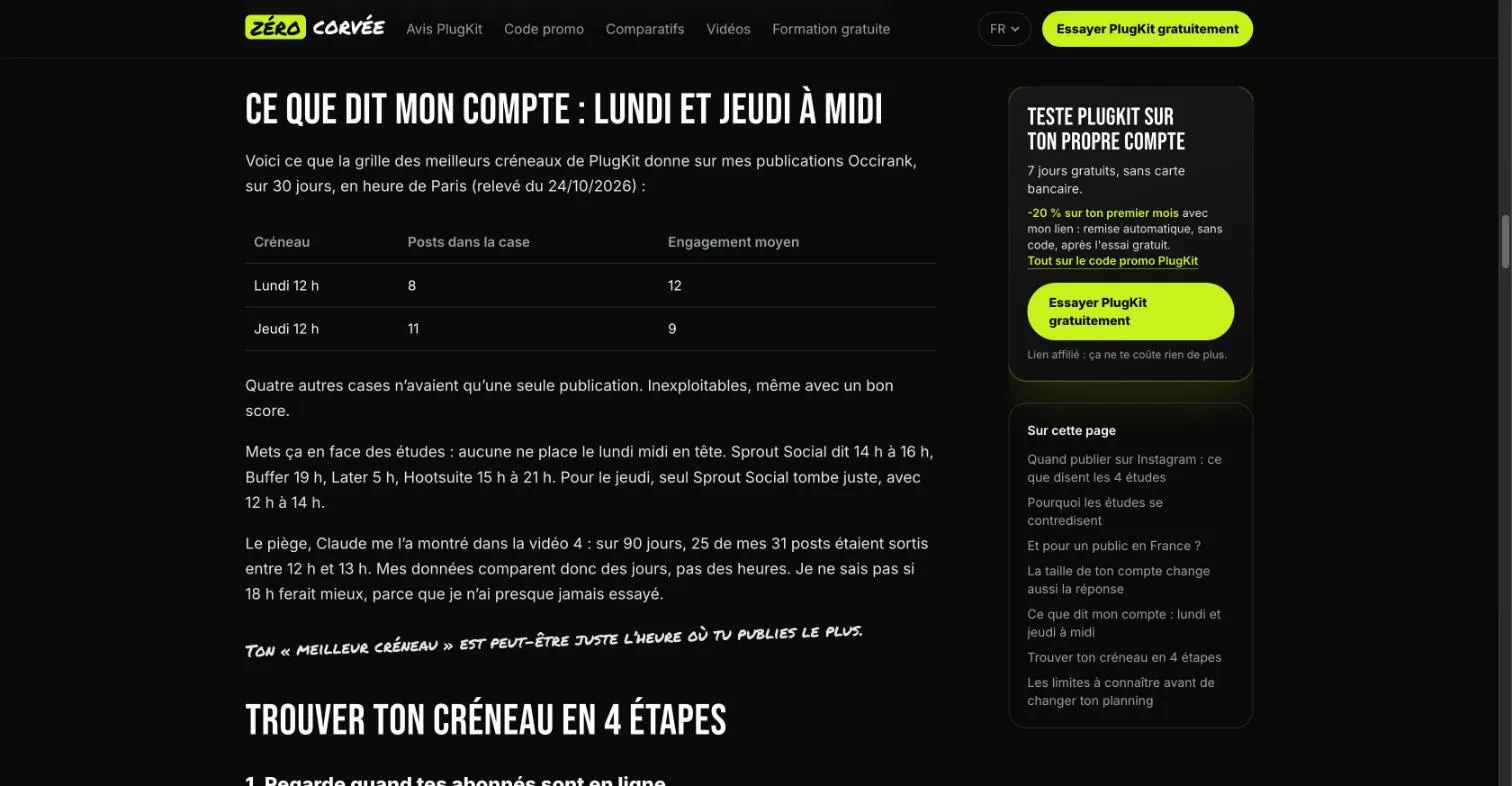
Over 90 days, 25 of my 31 posts went out between noon and 1 p.m. The page concludes: “Mes données comparent donc des jours, pas des heures.” (So my data compares days, not hours.) SemChat’s sentence turned an honest limit into a promise. Don’t copy it as is.
Same care for another finding: “no answer before the 5th section.” Half true. The introduction already gave the time slots from the four studies; only my own result came in the fifth part.
Subheadings in neighbour cards it didn’t see
At the bottom of the page, 11 cards link to neighbour pages. Each card carries an H2 subheading. The result: 20 H2s on the page, only 7 of them for its actual content.
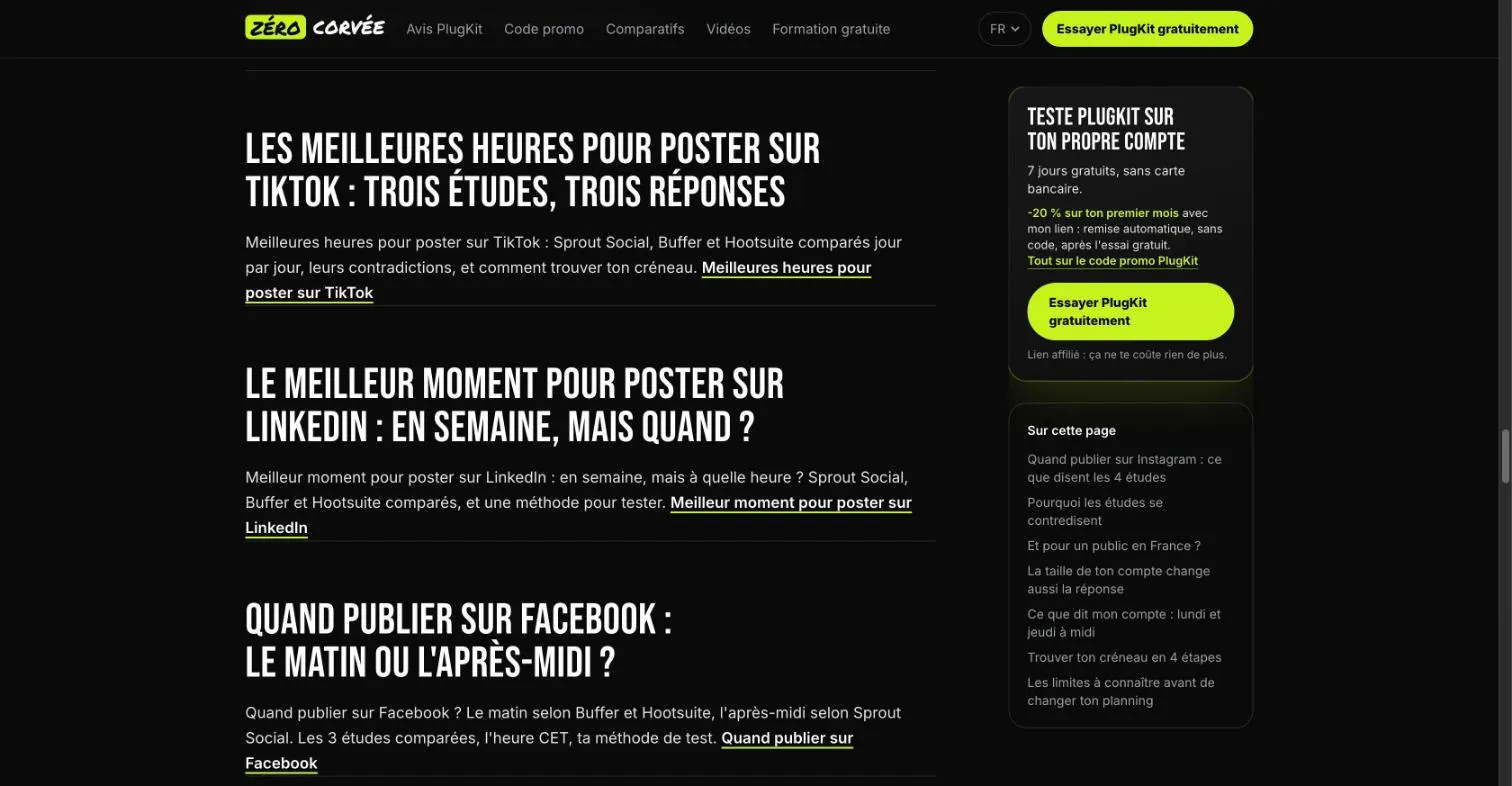
The audit said nothing, though it was comparing subheadings. A real structure issue, missed.
A sitewide banner blamed on one page
SemChat blamed the page for opening on a promotional banner. Checked: that banner sits at the top of the whole site, above the menu. Fixing it on one page would change nothing.
One last gap: it said 4 of the top 10 titles included the year 2026. The DataForSEO snapshot from the same day found 2 out of 8.
Step 6: fix the page, then follow it in Search Console
Apply what you verified, in this order:
- internal links from your pages that already rank, using the page’s keyword as the link text;
- a title tag and an H1 that say the same thing;
- your answer near the top, limits included.
Then ask Google to come back with the URL Inspection tool, which also lets you request indexing of a URL. To measure, don’t mix three positions: your own Google search (a snapshot on your screen), Search Console’s average position (an average over a period), and a third-party tool’s dated snapshot. Compare the same measure before and after, a few weeks apart.
What one on-page audit costs on the Starter plan
The first answer used 1.3 points of the Starter plan’s monthly usage (from 41% to 42.3%, Usage screen). The second answer falls inside a 7.1-point gap that also covers two other lessons: its own share is missing data (planned source: the Usage screen read before and after a single answer).
Starter costs €20 a month (“€20 /mo”, pricing page read 30 October 2026). The Free plan is €0, and the page says it plainly: “Every feature, in every plan.” Plans are compared on our SemChat pricing page.
The whole site at once: the full SEO audit
An on-page audit looks at one page. For the whole site in one request, SemChat has another skill, covered in our page on website SEO audit tools. For the mechanics (crawling, speed, tags), see our technical SEO tool page.
Trust signals have their own check, described in our EEAT checker tool page. SemChat’s accessibility audit, tested on 30 October 2026, returned a score of 70 and one issue, text contrast, in under a minute, but its advice was written for WordPress on a site that doesn’t use it: see our page on accessibility testing software.
My verdict on SemChat’s on-page audit
For one page and one keyword, it saves real time. One request was enough to find the main flaw (a title tag and H1 that disagree). With the real numbers, it moved internal links to the top, and that was the right move. It even admitted it hadn’t read my file, which plenty of tools would gloss over.
Context is where it slips: an erased limit, a banner blamed on the wrong page, 11 subheadings unseen. Take its ideas, not its ready-made sentences. The full test of the tool is in our SemChat review.
Bottom line: an on page audit tool saves you the comparison work. It doesn’t replace your own reread. One page, one keyword, three fixes at most: check them on your page, apply them, then look at Search Console a few weeks later.
Frequently asked questions
Can AI run an on-page SEO audit for your website?
Yes, for one page at a time. SemChat's on-page audit read my page and Google's results, then gave three ranked fixes (test of 29 October 2026). It caught a real conflict between the title tag and the main heading, but it also missed context written on the page. Treat its answer as a draft and check every fix on your page.
Is AI-generated content good for on-page SEO?
Only if it adds value for people. Google writes that “using generative AI tools or other similar tools to generate many pages without adding value for users may violate Google's spam policy on scaled content abuse” (Google Search Central, read 30 October 2026). Use AI to spot problems, then write and check the fix yourself.
How do you use AI to optimise one page for SEO?
Give it the page URL, the exact keyword, a limit (three fixes at most) and ask for the source of each idea. Paste your Search Console rows as text: in my test, the most useful advice (internal links before any rewrite) only came once the real figures were in the chat. Then check each fix on the page before applying it.
Does SemChat read a Search Console file attached to the message?
Not in my test of 29 October 2026. I attached the export with the upload option, and SemChat replied that it hadn't received the content of the attached file. I pasted the rows as text in the chat, and it read them.
Let your AI do the chores of getting found online.
10% off your subscription, for life with my link, if you subscribe within 2 weeks of signing up. No code. All about the SemChat promo code
Affiliate link: it costs you nothing extra.
Verified sources
- Google Search Central: Influencing your title links in search results (30/10/2026)
- Search Console Help: URL Inspection tool (30/10/2026)
- Google Search Central: Google Search's guidance on using generative AI content on your website (30/10/2026)
- PageSpeed Insights (30/10/2026)
- SemChat pricing (Free plan, every feature in every plan) (30/10/2026)