Topic cluster: how to build one, with a real site as the example
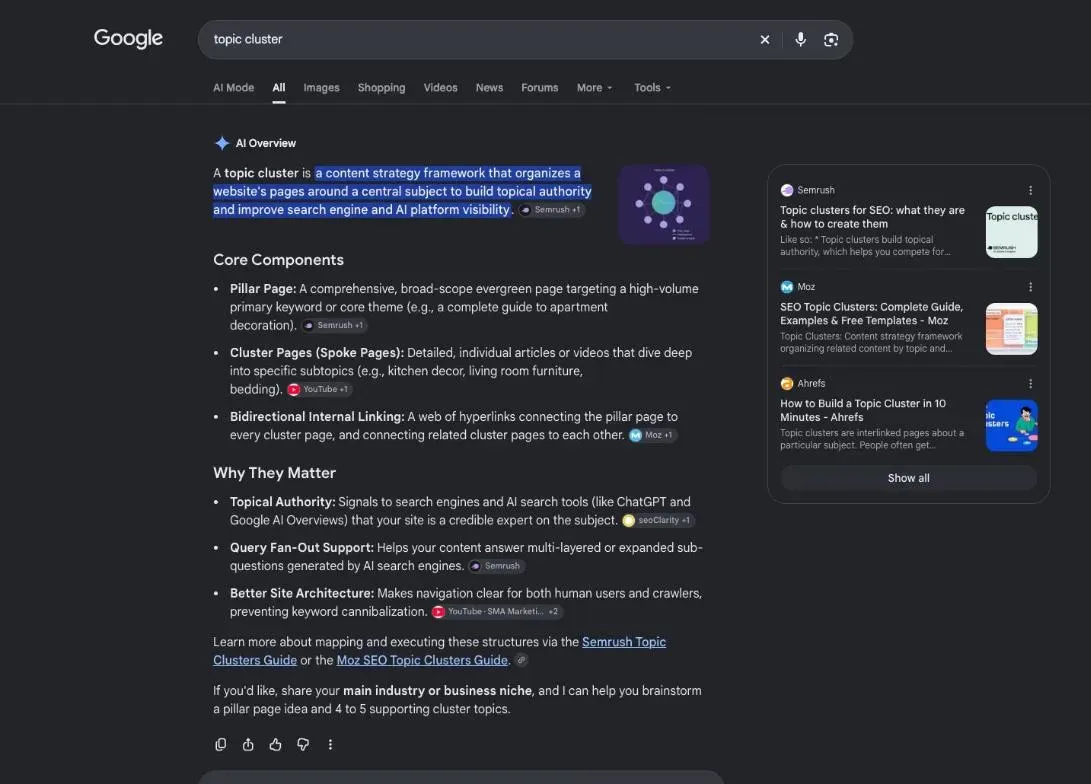
A topic cluster is a group of pages on one subject: a pillar page that covers the subject broadly, cluster pages that each answer one narrower question, and links both ways between the pillar and every cluster page. HubSpot's help center describes the same model: the pillar links to each subtopic page, and each subtopic page links back to the pillar.
 By Jérémy Santos Updated on October 30, 2026 Tested on his own SemChat account: first audit on October 29, 2026.
 This page is part of the guide: website optimization

One pillar page, its cluster pages, and links both ways. Illustration by Zéro Corvée.
You publish a blog post, then another, then a third. Each one lives alone, with no link to the others, and Google can’t tell that your site knows a subject well. A topic cluster fixes that: you group your pages by subject and link them on purpose. It’s one of the core jobs of website optimization, and this site is built that way, so I’ll show you the real plan. The SemChat buttons on this page are affiliate links.
Topic clusters, in plain English
Picture a tea shop with a website. It has a guide called “green tea,” and separate articles on how to brew green tea, green tea and caffeine, and how to store loose-leaf tea. Put them together, link them both ways, and you have a topic cluster.
What is a topic cluster: one pillar page, several cluster pages
A topic cluster has three parts:
- one pillar page that covers the broad subject (“green tea”);
- cluster pages that each answer one narrower question (“how to brew green tea”);
- internal links from the pillar to each cluster page, and from each cluster page back to the pillar.
- Pillar page the broad subject
- Cluster page
- link to the pillar
- links to related pages
- Cluster page
- Cluster page
- Cluster page
HubSpot spells out the linking rule in its help center (read October 30, 2026). Each topic needs “Links on the pillar page to other pages or blog posts written about specific subtopic keywords,” and “The subtopic keyword content should also include a link back to your pillar page.”
Hub and spoke, content cluster: the same idea under other names
You’ll see the same structure called a hub and spoke model, a content cluster or a content hub. The pillar is the hub; the cluster pages are the spokes. HubSpot’s tool calls the cluster pages “subtopic” content. The names change; the shape doesn’t.
What is a pillar page?
The pillar page is the one that covers the whole subject. HubSpot defines it as “a comprehensive resource page that covers the topic in depth.” It answers the broad question, then sends readers to the cluster pages for the details.
On a small business site, your pillar is often a page you already have: your “wedding photography” service page, your “sourdough baking” guide, your “WordPress SEO” tutorial.
How long a pillar page should be
No Google page we read sets a length for a pillar, so be wary of any magic number. On this site, we set each page’s target length from comparable pages already ranking for its keyword. For this very page, the brief averages three competing guides of 5,264, 1,850 and 1,763 words. That gives a target to aim for, not a rule: a page is long enough when it fully answers its question.
Guide, definition or how-to: three kinds of pillar pages
A pillar can take three common shapes:
- a guide that walks through the whole subject, section by section;
- a definition page (“what is…”) that explains a concept, then branches into details;
- a how-to that lays out the steps, with each step expanded on its own cluster page.
Pick the shape the search results already favor. In this site’s “improve your pages” cluster, the plan marks 5 pages as “what is” and 7 as “how to,” the pillar included (site plan, October 29, 2026).
The semantic cocoon: a stricter version of the topic cluster
If you read French SEO blogs, you’ll meet the “cocon sémantique,” or semantic cocoon. In the United States the term barely registers: DataForSEO Labs returned no search volume for “semantic cocoon” on October 29, 2026, while “topic cluster” showed 260 searches a month.
The method comes from Laurent Bourrelly, a French SEO consultant. On his blog (read October 30, 2026), he says he started working on it in 2004, formalized it in 2007, and released it for free in 2012. His one-line definition: “Qui est en relation avec quoi et pourquoi” (who is related to what, and why).
He also warns against shrinking it to links: “Ce n’est pas juste une technique de maillage interne” (it’s not just an internal linking technique). The goal, in his words, is “réconcilier l’offre avec la demande” (to reconcile supply with demand): start from what people search for, then build the pages that answer it.
Mother page, daughter pages, sister pages
The semantic cocoon uses family words. The pillar is the mother page, the cluster pages are its daughters, and the daughters are sisters. The big difference from a loose topic cluster: sisters link to each other too, and the links stay inside the family.
- Mother page the broad subject
- Daughter page
- link to the mother
- links to its sisters
- Sister page
- Another sister page
- Daughter page
On this site, the method comes down to four written rules:
- mother-daughter and sister-sister links, always both ways;
- 15 daughter pages at most under one mother;
- every page within 3 clicks of the home page;
- a cocoon goes live as one block, never a daughter without its mother.
One search intent per page, links that stay inside the cocoon
Each page in a cocoon targets one search intent: the reason behind a search. “How to brew green tea” and “green tea brewing temperature” may deserve one page or two, depending on whether Google shows the same results for both.
Bourrelly also separates the cocoon from a plain silo. A silo, he writes, “est fait pour ordonner des données, des produits, des services” (is made to sort data, products, services), while the cocoon “est là pour donner à Google ce qu’il veut” (is there to give Google what it wants). A silo is your store’s aisles. A cocoon starts from the questions people type.
Why topic clusters help your SEO
Nobody can promise you a ranking gain from a topic cluster: no source we read measures one. What Google does say is how it uses links.
Topic cluster SEO: Google understands what your site covers
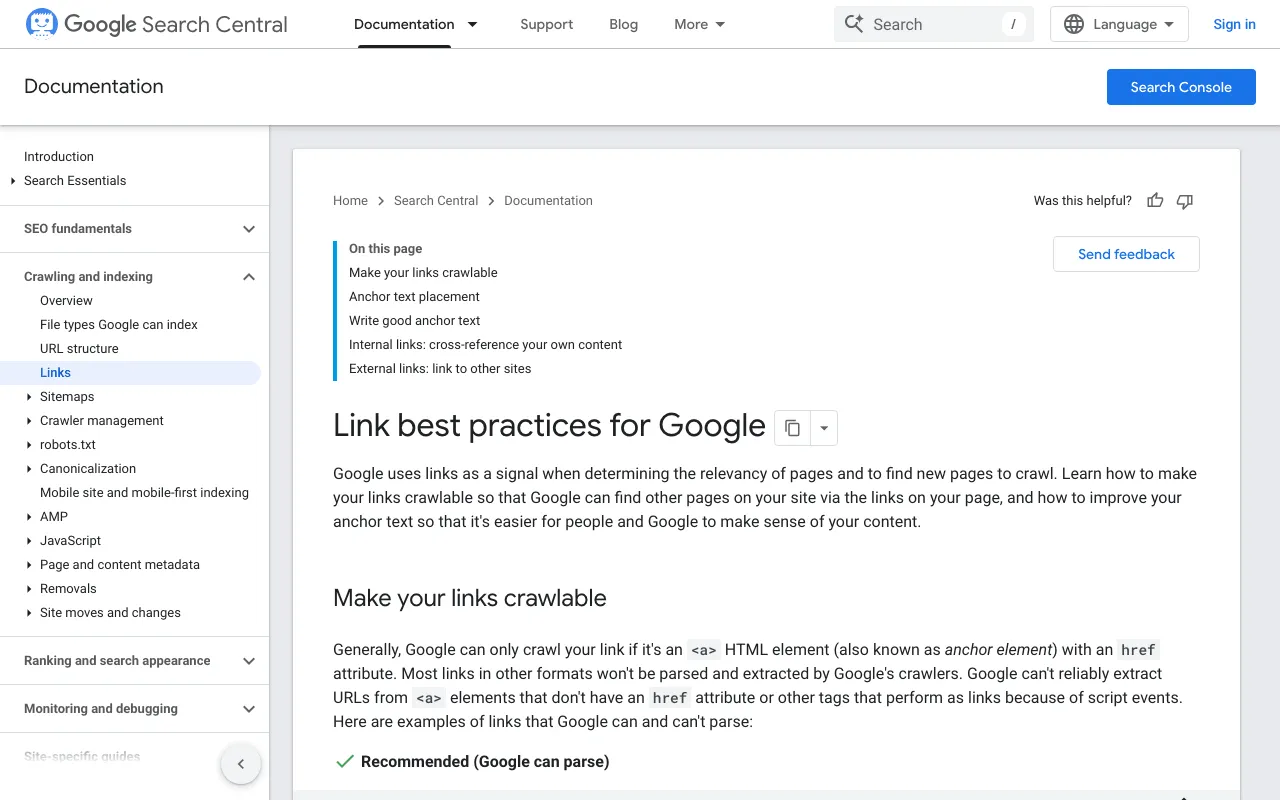
Google’s link best practices (read October 30, 2026) open with this: “Google uses links as a signal when determining the relevancy of pages and to find new pages to crawl.” A topic cluster gives Google a clear map: these pages belong together, and this one is the overview.
The link text matters too. Google says “Good anchor text is descriptive, reasonably concise, and relevant to the page that it’s on and to the page it links to.” In a cluster, each link uses the target page’s keyword, never “click here.” For the full picture of links between pages, see our guide to internal linking SEO.
Readers find the next answer they need
Someone reads your page on brewing green tea, then wonders about caffeine. The link sits right there in the text. They stay on your site instead of heading back to Google.
The same page from Google adds the rule that keeps a cluster honest: “Every page you care about should have a link from at least one other page on your site.” In a cluster, every page gets at least one: the pillar links to it.
How to build a topic cluster, step by step

Pick the topics, draw the tree, write, then link. Illustration by Zéro Corvée.
- 1 Pick the keywords One search intent per page.
- 2 Map the pages The pillar, then its cluster pages.
- 3 Write Cluster pages first, then the pillar.
- 4 Link Pillar and cluster pages, then related pages.
- 5 Publish and track All at once, then watch the results.
Step 1: how to create topic clusters from your keyword list
Start with the questions your customers ask. A yoga teacher might list “yoga for beginners,” “yoga for back pain,” “how often to do yoga” and “what to wear to yoga.” Then check that people actually search for them: Google’s own suggestions are free, and a keyword tool adds search volumes.
Pick the broadest question as your pillar. Here, “yoga for beginners” covers the others.
Step 2: map the cluster pages, one intent each
Type each keyword into Google and compare the first results. If two keywords bring up mostly the same pages, they deserve one page on your site. If the results differ, they get a page each.
That’s how this site’s plan was made. For each pair of keywords, we counted the shared URLs in Google’s top 10 (DataForSEO, United States, October 29, 2026): 6 shared URLs out of 10 or more means one page; 2 or fewer means two pages; in between, each page keeps a clearly different angle. “Topic clusters,” for example, shares 7 URLs with “topic cluster,” so both live on this page.
Step 3: write the cluster pages, then the pillar page
You could start with the pillar. On this site, we do the opposite: the cluster pages first, then the pillar, which sums them up and links to each one. Writing the pillar last means it describes pages that exist, not pages you plan to write someday.
Prepare each page with a content brief, then write it for your reader with the rules of SEO content writing. Every page stays in review until the whole cluster is ready.
Step 4: link each page to the pillar, and related pages to each other
Each cluster page links to its pillar first. Then link related cluster pages where the subject calls for it, not everywhere. Use the target page’s keyword as the link text. And give every page a clear title that names its subject: our page on the SEO title shows how.
Step 5: publish and track the results
Publish the whole cluster at once: a cluster page without its pillar leaves its links pointing nowhere. Then follow your pages in Google Search Console. Keep three things apart: what you see when you search yourself, the average position the Search Console reports, and a dated check from a third-party tool. They rarely match.
Links from other sites are a separate job, covered on our backlinks page.
Topic cluster or keyword cluster: not the same thing
The two terms sound alike and get mixed up. A keyword cluster groups keywords that people use for the same need, so you can answer them on one page. A topic cluster groups pages around a subject, so they support each other.
| Keyword cluster | Topic cluster | |
|---|---|---|
| Groups | keywords with the same intent | pages on the same subject |
| Result | one page that answers them all | a pillar and its cluster pages |
| Question it answers | what goes on this page? | how do my pages fit together? |
SEO tools handle both. According to our fact sheets of October 29, 2026, Ahrefs’ Keywords Explorer offers to “Instantly cluster keywords by Parent Topic or related terms,” and Semrush describes its content toolkit as able to “generate topic clusters, build SEO briefs.” Build the keyword clusters first: they tell you how many pages your topic cluster needs.
Topic cluster examples
Here’s what one could look like for a wedding photographer working alone on a Webflow site:
- pillar page: wedding photography in your city;
- cluster pages: how much a wedding photographer costs, questions to ask before booking, how many photos you get, engagement shoots.
Each cluster page links to the pillar, and the pricing page links to the questions page, since people often read one after the other.
A real example: how this site is built in cocoons
This site follows its own advice. The English side of the plan has 10 cocoons, plus a few pages outside them (review, pricing, tutorial). The home page links 14 pages: the money pages and 9 cocoon roots. The tenth cocoon, on SemChat’s skills, sits under the tutorial.
- Home page 14 pages linked
- Website optimization root of cocoon C9
- What is on-page SEO
- SEO title
- Meta description length
- Internal linking SEO
- Topic cluster
- EEAT meaning
- Backlinks
- Check backlinks
- Link audit
- SEO content writing
- Content brief
- 8 other cocoon roots
- 5 money pages
- Website optimization root of cocoon C9
The cluster you’re reading, “improve your pages,” has one pillar, website optimization, and 11 cluster pages. It’s written bottom-up and goes live as one block. A limit to state plainly: on October 30, 2026, this cluster is still in review, not published. Its effect on rankings isn’t measured yet: missing data (planned source: Search Console, after publication).
Tools that build topic clusters, including SemChat
You don’t need a tool for your first cluster: a sheet of paper or a spreadsheet will do. Tools help once you have dozens of pages. HubSpot has a Topic Clusters tab in its SEO tool, listed with its Professional and Enterprise plans on the help page we read. Ahrefs and Semrush offer clustering, as described above.
SemChat’s topic cluster skill, tested: what it got right and wrong
SemChat is an SEO assistant you talk to in plain language. On October 29, 2026, I ran its Topic cluster skill on plugkit-avis.com, my other site, in French. I asked for a pillar page and six articles on Instagram auto-replies, with keywords, volumes, and the link from each article to the pillar, after checking my sitemap.
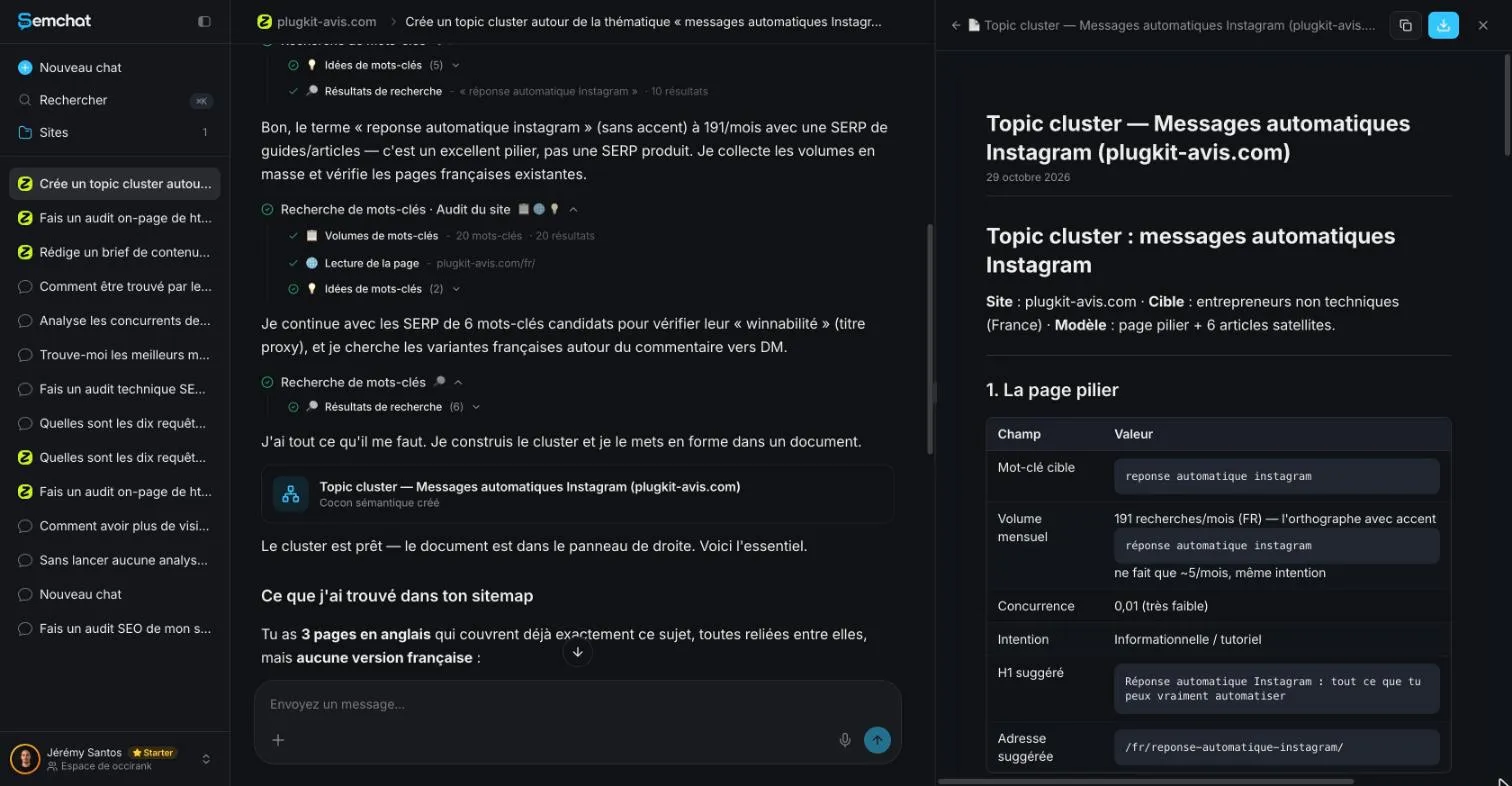
What it got right: the shape of the plan. One pillar, six articles, a link from each article to the pillar, a few links between related articles, and an instruction to leave no page orphaned.
What it got wrong, checked the same day:
- it read three English pages and the French home page, then said there was no French version. That’s false: the French sitemap had 7 pages on the topic;
- 3 of the 6 articles it proposed already existed, and the address it suggested for the pillar returned a 404 error;
- its volume for the pillar keyword, 191 searches a month, didn’t match DataForSEO’s 110 (Google Ads, France);
- all six link texts pointing to the pillar were full sentences; none was the pillar’s keyword.
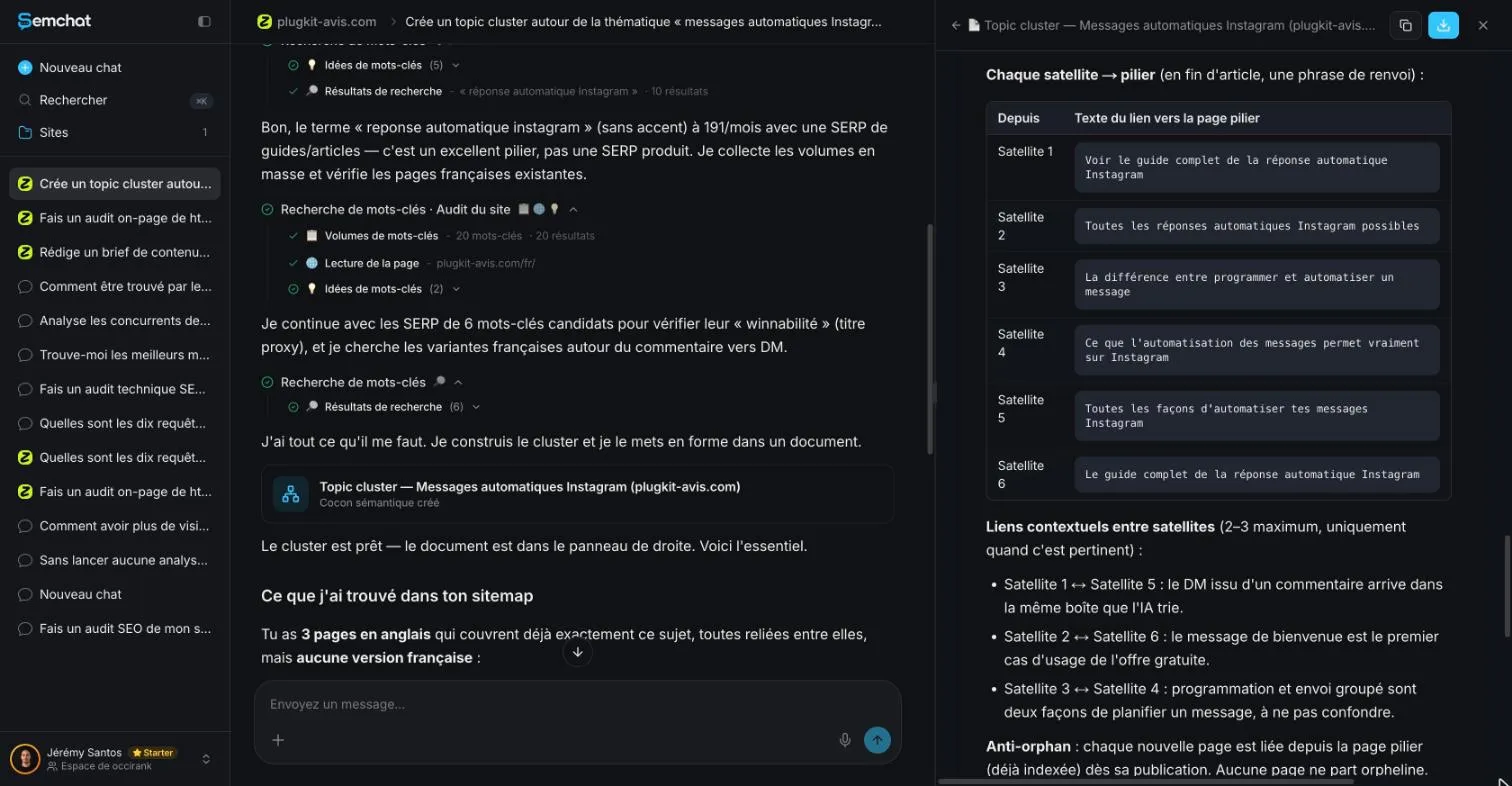
The useful way to work with it: take the shape of the plan, then fix the substance yourself, with your sitemap open in the right language. The full test is in our SemChat review.
SemChat’s semantic cocoon skill: tested on October 30, 2026
SemChat’s skill list, checked in the app on October 29, 2026, includes “Cocon sémantique (« façon Bourrelly »)” (semantic cocoon, Bourrelly style), and we tested it on October 30, 2026, on plugkit-avis.com, on the Starter plan. In about 4 minutes, it mapped the site’s links (5,486 by its own count) and listed each link to add, with its direction and anchor, for 4 points of the monthly quota (Usage screen). Unlike the Topic cluster skill, it works from the whole site’s real links, but it called a link missing that already existed and a page “to create” that was already live. The full test is on our internal linking tools page, and plans and prices are on our SemChat pricing page.
A topic cluster is simple at heart: one pillar page, cluster pages that each answer one question, and links both ways with the target page’s keyword as the link text. Start small, with a pillar and three cluster pages, then grow the family one page at a time.
Frequently asked questions
What are the main parts of a topic cluster?
Three parts: one pillar page that covers the broad subject, several cluster pages that each answer one narrower question, and internal links between them. The pillar links to every cluster page, and every cluster page links back to the pillar. Related cluster pages can also link to each other where the subject calls for it.
What is a topic cluster in HubSpot?
In HubSpot, a topic is set up in the SEO tool, under the Topic Clusters tab. You attach a pillar page, then subtopic keywords and the pages written about them; HubSpot's help center says each topic can have up to 100 subtopic keywords. The page we read lists the feature with Marketing Hub and Content Hub, Professional and Enterprise (help article read October 30, 2026).
Is there a topic cluster template you can reuse?
Yes, the one this site uses, with no file to download: one pillar page per subject; under it, one page per search intent, 15 at most; every page within 3 clicks of the home page; each page linking to its pillar first, then to related pages, with the target page's keyword as the link text.
How many pages should a topic cluster have?
No Google rule we read sets a number. HubSpot's tool accepts up to 100 subtopic keywords per topic. On this site, we cap a pillar at 15 cluster pages so every page stays within 3 clicks of the home page. The cluster this page belongs to has one pillar and 11 cluster pages (site plan, October 30, 2026).
Let your AI do the chores of getting found online.
10% off your subscription, for life with my link, if you subscribe within 2 weeks of signing up. No code. All about the SemChat promo code
Affiliate link: it costs you nothing extra.
Verified sources
- HubSpot Knowledge Base: Create topics for your SEO strategy (last updated November 7, 2025) (30/10/2026)
- Google Search Central: Link best practices for Google (30/10/2026)
- Laurent Bourrelly: the official definition of the semantic cocoon (in French) (30/10/2026)
- Laurent Bourrelly: the semantic cocoon, 2020 version (in French) (30/10/2026)
- Laurent Bourrelly: the semantic cocoon in 2024 (in French) (30/10/2026)
- Laurent Bourrelly: is the semantic cocoon the same as topic siloing? (in French) (30/10/2026)
- Ahrefs: Keywords Explorer and pricing (our fact sheet of October 29, 2026) (29/10/2026)
- Semrush: official description, llms.txt (our fact sheet of October 29, 2026) (29/10/2026)
- SemChat pricing (Free plan, every feature on every plan) (29/10/2026)